

GenUI
Personalization changed the content. It did not change the screen.
It picks the layout, the order, and the next step for each person, from parts your team already approved. We start with one screen in the app you already run.
A 30-minute conversation about your product. If we’re the wrong fit, we’ll say so.
- Event GenUI at Google Cloud Next 2026
- For CTOs The GenUI approval checklist
- Cost How do I know GenUI is worth the cost?
- 0.0% structural hallucinations, 33 models, 495 turns Data
- Guide Generative UI, from first principles
-
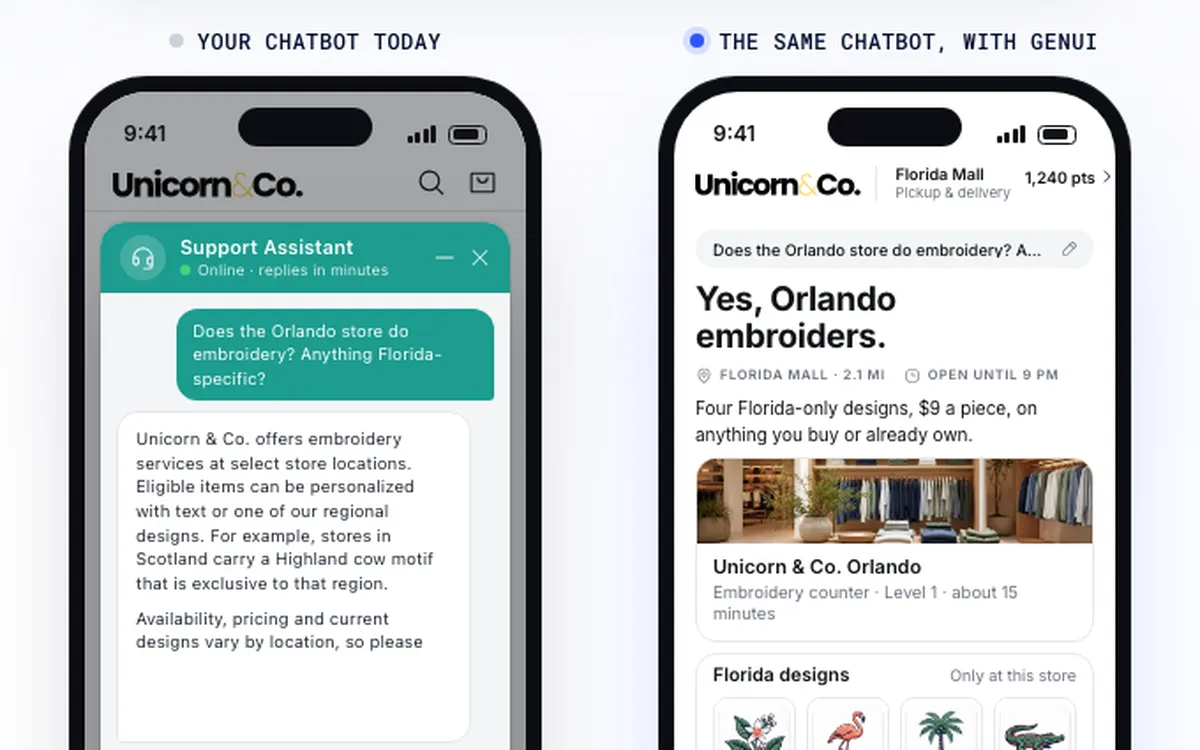 Live demo Your chatbot, with GenUI
 -
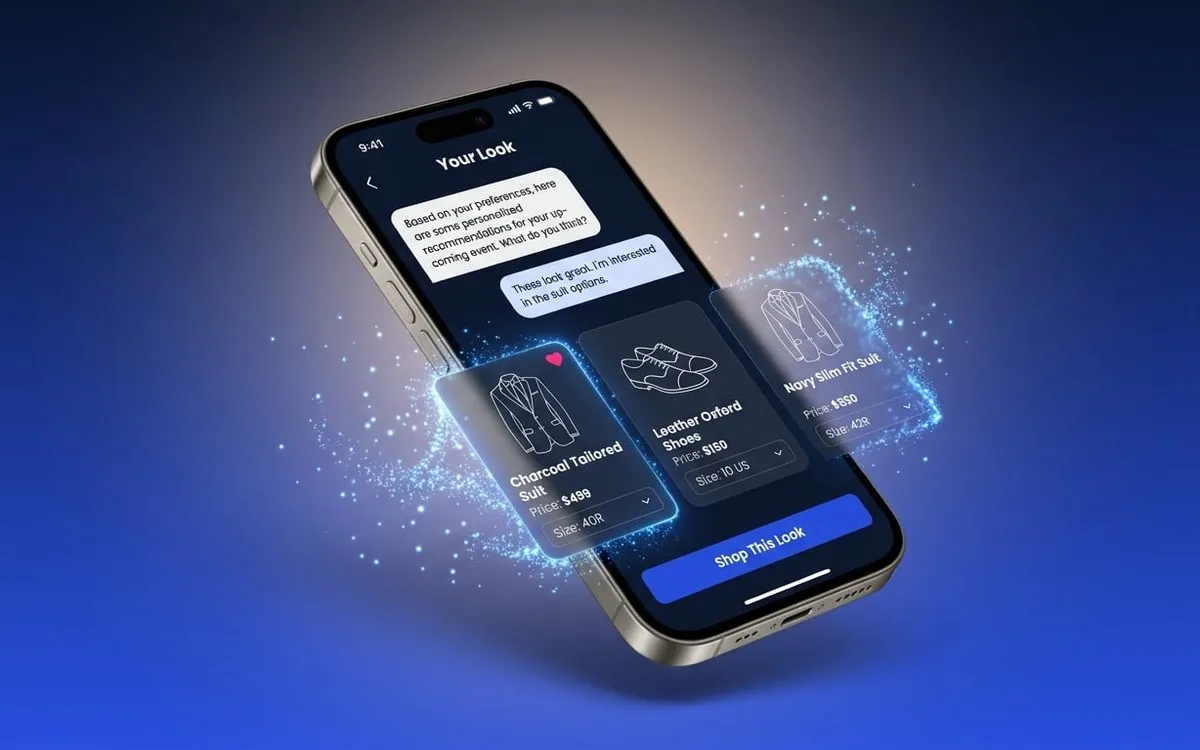 GenUI Kit Drops into the app you already run
 -
 The cruise concept
The screen is put together while the customer uses it.
The AI model decides what to show. Your design system decides how it looks. The model can only use pieces you approved, so it can’t show a screen you wouldn’t ship.
Think of it as a restaurant. Your design system is the kitchen, the catalog is the menu, and the model is the waiter. The waiter never invents a dish.
Pick a customer
What it composes from
-
Customer context
Who the customer is. Their goals, accounts, and history, so the model composes for them.
-
Your catalog
Your design system, locked. A brand-safe set of components, the only pieces the model may use.
-
Live moment
What’s true right now. Time, balances, rates, and activity, so the screen fits this moment.
A family has four hours on board and two kids to keep busy.
A cruise app already knows the guest’s cabin, who they travel with, their dinner time, and where the ship is. Most apps use that to fill a row of offers. The rest of the screen looks the same for everyone.
Tailored offers change what sits in one row. A generative interface changes the whole screen, the layout, the order, and the buttons, based on who the guest is and where they are in the trip.
A generative interface answers with the screen, not a paragraph.
Ask a banking app how to save for a house faster. A static app shows everyone the same rates table. A chatbot writes you a paragraph. A generative interface answers with the screen, ready to act on.
-
GenUI answers with a screen, not a paragraph.
A chatbot hands you a paragraph. GenUI hands you the screen, built from your components.
Try the live chatbot demo -
A generative interface lays out the whole screen.
Tailored offers change what sits in one row. A generative interface lays out the whole screen for the person using it.
What is GenUI -
A demo is the easy 10 percent.
Anyone can build a GenUI demo. The GenUI Kit is our own code for the other 90 percent, the part that keeps a live model on-brand in front of real customers. It is also how we get a real demo running on your app.
See the GenUI Kit
Comic Sans and hot pink never reach the screen.
Your review board approves the catalog once. After that, a four-layer defense checks every screen the model builds before a customer sees it.
How the four layers work- The catalog.
- Your design system, the components your app is built from, becomes a locked set. The model picks from it and fills the pieces with your data. It never draws its own.
- The checks.
- Every request is signed in and screened on the way in. Every screen is checked on the way out: is it built right, is the data real, is it what the customer asked for? A customer who asks for a 50 percent discount gets a polite no, not a made-up coupon.
- Never generated.
- Checkout and payment, legal wording, and the main navigation. Anything that moves money or must be exactly right stays hand-built.
- request · “show my savings goal”
- 01 authenticate ok
- 02 screen the request ok
- render GoalProgress (goal: house) in catalog
- render ActionCard (transfer) in catalog
- render PromoBanner (style: neon) not in catalog, dropped
Sign-in, then the four layers every request passes
- 01 Authenticate On the way in
- 02 Screen the request On the way in
- 03 Validate structure On the way out
- 04 Validate content On the way out
- 05 Enforce intent On the way out
Your app stays as it is, and GenUI takes over one zone at a time.
The Kit drops into the app you already run, whether it’s built in Flutter, native code, or for the web. One part of one screen, a zone, starts to build itself. The rest of the app stays as it is.
Five steps to the first zone
-
The Kit turns your first six to eight components into a catalog. You add more later.
-
In the sandbox, your team builds and tries the experience on its own, outside your app.
-
The backend connects GenUI to your data and handles the plumbing. Run it as it is, or use it as a guide.
-
The experience goes into your Flutter, native, or web app and runs one part of one screen.
-
Every zone ships with an off switch, a fallback screen, and built-in measurement.
You get a business case, not a demo with a bill attached.
Most GenUI projects stall right after the demo, because nobody can say what it costs to run or what it earns. We answer both before you pay for a rollout.
- ~8¢ What it costs to run A sample retail session, three questions and three data lookups, costs about 8 cents on a leading AI model. At three sessions a month, that’s about 25 cents per user. Caching cuts it by about a third, if you turn it on.
- 1 screen What it moves We test one GenUI screen against the same screen left as it is, with the same goal and the same tracking. You get a fixed budget, one clear metric, a fair test, and a point where you stop.
- 54s → 3.8s How fast it feels In one dashboard demo, a small, fast model picked the view first. The typical wait dropped from 54 seconds to 3.8 seconds.
Costs are estimated from public model prices in July 2026, not from a client’s bill. The speed result comes from a demo with sample data.
Here’s what we can put in front of you today.
Published data, a live demo, and open source code. You can check all of it.
-
GenUI model benchmarks
0.0% structural hallucinations, answers the app could not draw, across 33 model setups and 495 turns. Each one is checked against the catalog and the A2UI spec.
-
Google Cloud Next 2026
Live at the booth for three days, on Chromebook, Android, and iOS at the same time. The Life Goal Simulator is built in Flutter, and its source is on GitHub.
-
A2UI
An official A2UI showcase partner, built on Google’s Flutter GenUI SDK.
-
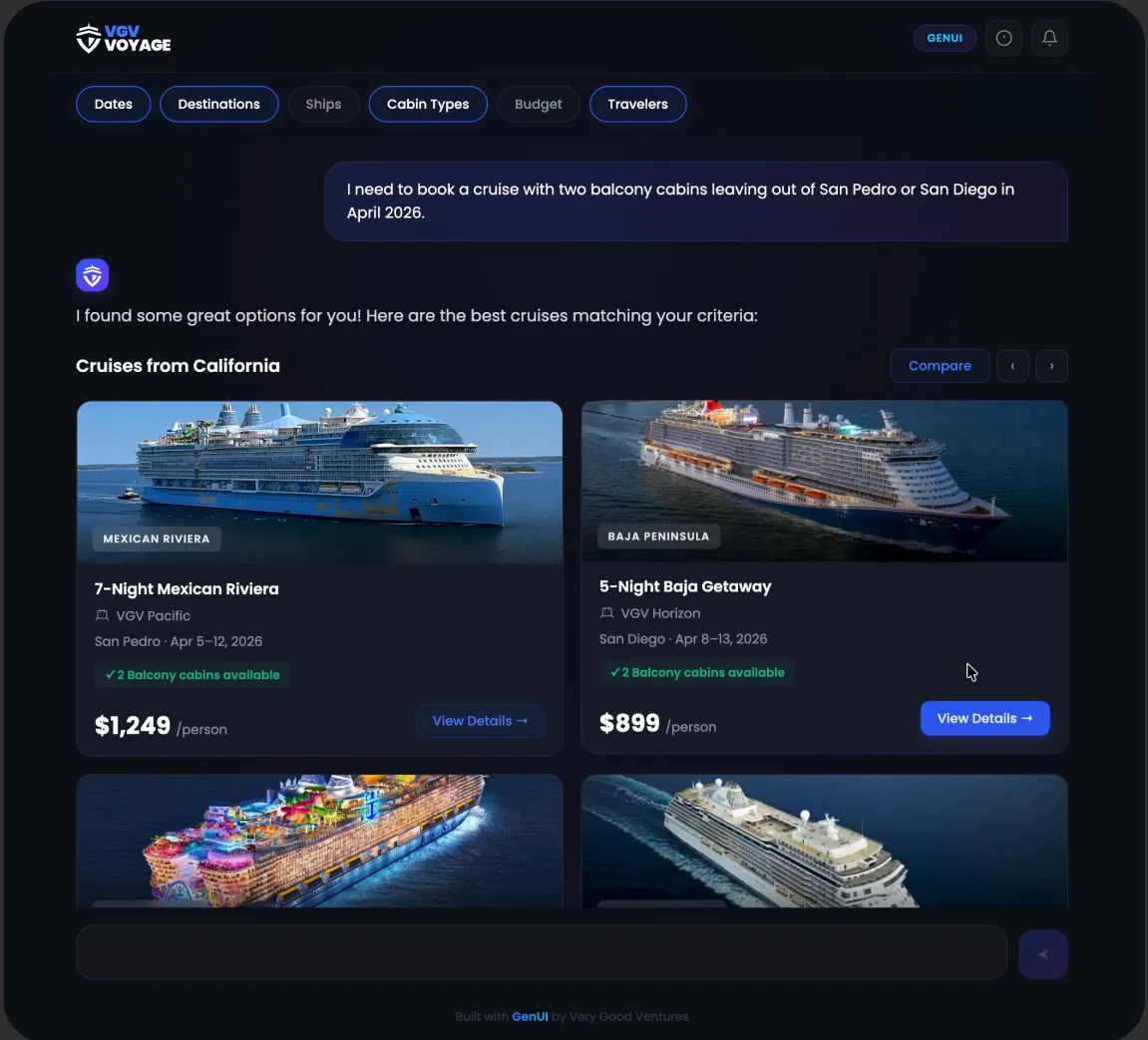
01Global cruise line
Generative UI for a global cruise line
See how VGV helped a global cruise line evolve a text-based AI assistant into a visual, generative concierge that moves guests closer to booking.
- Booking conversion, driven by agentic search
- 1.00% → 1.08%
- Estimated ticketing revenue from that lift
- $536M
- Approved catalog items the model can assemble
- 14
-
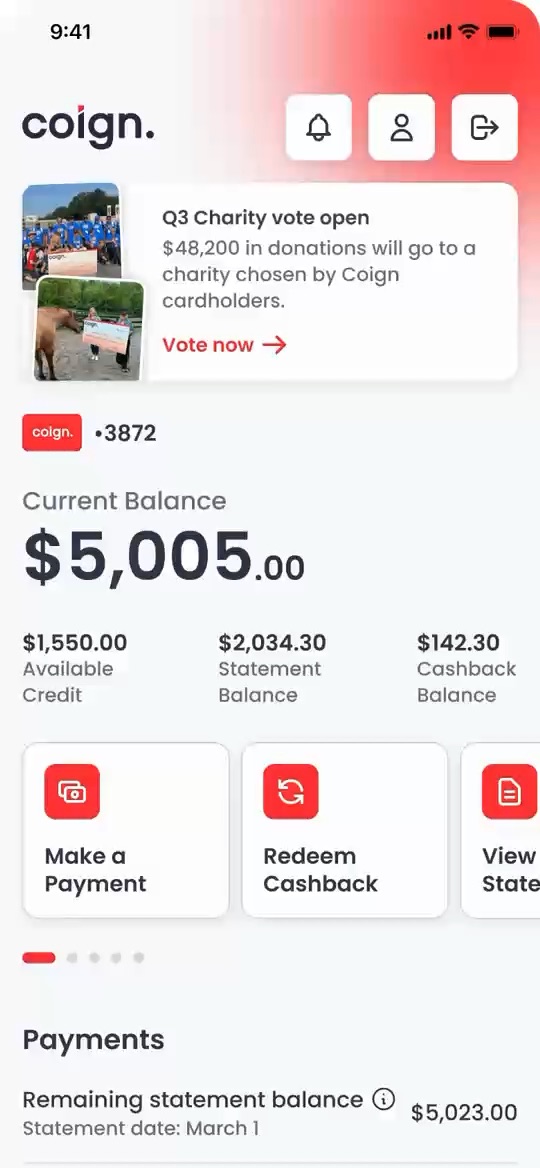
02Coign
Generative UI for Coign
How VGV used GenUI to turn Coign’s quarterly charity vote into a personal way for cardholders to explore causes, vote, and share the impact they made.
Who you’ll work with.
-

Nate Wootten
Chief Strategy Officer
-

Andrew King
Director of Solutions Architecture
-

Brian Egan
Senior Engineering Lead
Start with one screen your customers already struggle with.
One card suggestion, built from a year of spending, instead of a table of every card.
+8–15% First-zone target · Card application conversion
When rain hits the port, the day plan rebuilds around the weather and keeps what matters.
+8–15% First-zone target · Onboard spend per guest
“Wedding next Saturday, $500 for a suit and shoes” is a sentence, not eleven filters.
+10–20% First-zone target · Conversion
These are goals for the first zone, measured against the same screen left as it is. They are not past results.
Good fit
- An app already in production, with real customers on it
- A metric you already report on, like conversion or support deflection
- A team ready to put one screen to a real test
Not the place for it
- Checkout and payments
- Legal wording or the main navigation
- Background tasks like summaries, where nobody sees a screen
No design system yet? That’s fine. We can build the first components with you, and they become your catalog. How we build design systems
Pick one screen. We’ll help you prove it.
- 01 1 minute
Forward the concept
One link your CTO can open in a minute. Open the cruise concept - 02 30 minutes
A working session on your app
We pick your top three customer journeys and estimate what each costs to run in the Kit sandbox. You leave with the numbers your CFO will ask for. Start the conversation - 03 Fixed scope
One live GenUI zone
One live GenUI zone in your app, measured against the starting point you choose. You have one screen in your app that should change for each customer. Start the conversation
Laura Hughes Lekhi · Greg Laird
Business Development
A unicorn reads your message and sets up the first call.
A 30-minute conversation about your product. If we’re the wrong fit, we’ll say so.
Not ready for a call? Read the complete GenUI guideThe SDK renders. The Kit is everything that has to sit around it.
The GenUI Kit is our own code, built on Google’s open-source GenUI SDK. It has four packages: a Flutter frontend, a Dart backend, an MCP server that turns Figma designs into a catalog, and a sandbox. It works with any model Genkit for Dart supports, which covers Gemini, OpenAI, and Anthropic-compatible APIs.
The questions your security team will ask first.
Security & IP- SOC 2
- We are SOC 2 Type II compliant. The report is available under NDA.
- IP
- Everything we build for you is yours: the code, the designs, and the docs.
- Screening
- Screening runs on Model Armor, Google Cloud’s safety service for AI models.
- First-zone data
- The first zone can run in a sandbox on sample data. That way it passes review without touching personal data.
Everything we’ve learned about GenUI is in one place.
- 01 Guide The complete GenUI guide Read
- 02 Article Hallucinations in generative UI: a four-layer defense Read
- 03 Article How do I know GenUI is worth the cost? Read
- 04 Podcast Abdallah Shaban, Google: Fluttering forward Read
Insights
Learn from the apps we already shipped.


We’ll care about your success as much as you do.
Our unicorns read every message and reply, usually the same day.
Start the conversationA 30-minute call about what you’re building.
What a CTO asks before you forward it.
Short answers to what a CTO asks first. Bring anything else to the working session.
01 What is a generative interface?
A screen that is built while the customer uses it, from components your team approved, around who they are and what they want to do. Tailored offers change one row. GenUI can change the whole screen.
02 Do we need a new app?
No. GenUI goes into the app you already have. One zone changes for each customer, and the rest of the app stays as it is.
03 Does our app have to be built in Flutter?
No. The GenUI surface embeds into Flutter, native, and web apps.
04 Can the model go off-brand or make things up?
It can only use components from your approved catalog. Every screen is checked before anyone sees it. In our published tests of 33 models, 0.0% of answers were screens the app could not draw (structural hallucinations).
05 What does it cost to run?
About 8 cents for a sample three-question retail session on a leading AI model, before caching. In the working session, we estimate it for your own journeys.
06 How long until we see something?
It depends on how much of your design system is ready. A first catalog runs in your sandbox before the first zone goes live, and what usually takes longest is approving the catalog, not the technology.
07 Which models does it work with?
Any model that Genkit for Dart supports. That covers Gemini, OpenAI, and Anthropic-compatible APIs. One setting switches the model for each deployment.
08 What should we send our CTO?
The cruise concept. It shows a generative interface on a product your CTO will recognize.