Most of the energy in AI has gone into making models smarter. The harder, less discussed problem is what happens at the user interface, where the model meets a person. A brilliant model that answers with a wall of text or raw JSON still leaves the user to do the work of understanding, deciding, and acting. GenUI is the layer that closes that gap.
This guide explains what GenUI, short for Generative UI, actually is, how it works, how it differs from GenAI, and how teams build it in production. It pulls together what we have learned shipping generative interfaces across hospitality, banking, retail, and developer tooling.
What is GenUI?
GenUI, short for Generative User Interface, is the experience layer where AI builds the user interface in real time based on user intent and context. Rather than relying on fixed screens and predefined flows, a GenUI system assembles interface elements on demand, drawing on:
- User intent
- Context
- AI output
- Real-time data
The result is an interface that is composed for the moment rather than pre-designed for everyone. Layouts reorder, components appear and disappear, and actions surface based on who the user is and what they are trying to do.
A useful way to picture it is a familiar component rendered two ways. Take a room booking card in a hotel app. In a traditional app, that card looks identical for every user, with the same photo, the same amenities, and the same layout. With GenUI, the same underlying component adapts. For a business traveler it prioritizes the workspace photo, highlights the high-speed Wi-Fi badge, and surfaces a one-click expense receipt. For a family on vacation, the exact same component features the pool image, highlights “Kids Eat Free,” and offers a connecting-room toggle. The building blocks are the same. How they are assembled changes. We unpack this and four other shifts in What Is GenUI? How Generative User Interfaces Will Redefine Hospitality.
GenUI Powers Real Personalization
Most personalization isn’t personal. Before GenUI, what we called personalization was usually segmentation. We grouped users by shared traits, sorted them into buckets, and served everyone in a bucket a variation of the same experience. A single bucket might hold thousands of people, so the averaging flattened the context, intent, and nuance that set any individual apart.
GenUI changes the unit of design from the segment to the person. The interface adapts at runtime to someone’s context, intent, and the outcome they’re after, while holding your brand’s point of view. Each user works with a product shaped around them, not around the cohort they happen to fall into.
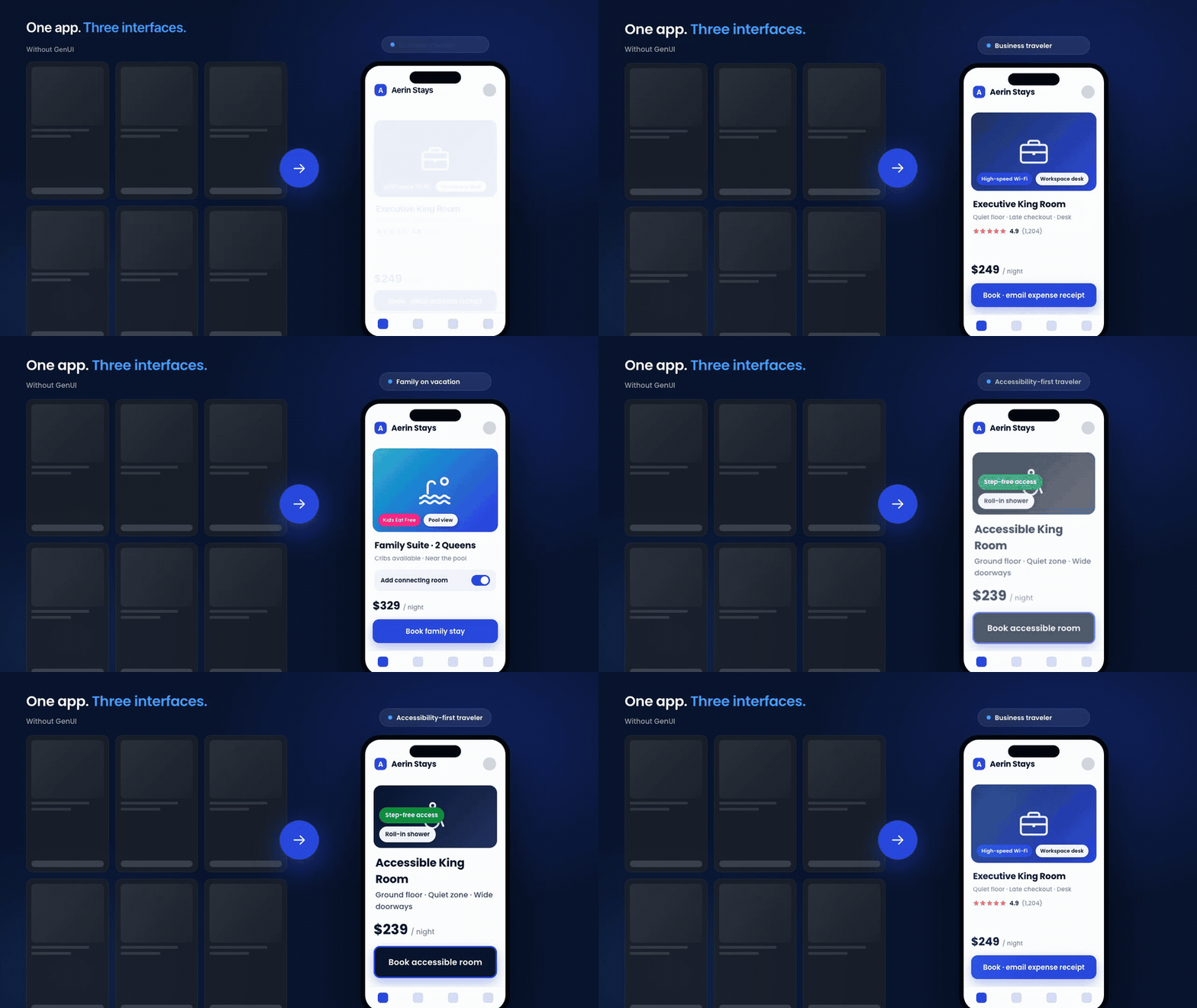
Look closely and you will see the same app three times, not three different apps. The booking card, the brand, the component library, and the navigation never change. What changes is the interface the AI assembles for the person in front of it. The business traveler gets the workspace and the expense receipt. The family gets the pool, the connecting room, and “Kids Eat Free.” The guest who needs step-free access gets a simpler, higher-contrast layout with the right room surfaced first. That is the real potential of personalized GenUI. One product can read a user’s data, context, and intent and compose the experience that fits them, in real time, while the brand stays exactly where you set it. Thousands of users stop sharing one frozen screen and each get an interface built for the moment.
GenUI vs. GenAI: what’s the difference?
GenAI and GenUI are easy to confuse and frequently used interchangeably, but they sit at different layers of the AI product stack.
Generative AI is the creative engine. It produces content, such as text, images, code, audio, and structured data, by learning patterns from large datasets and predicting new output. Chatbots, code assistants, image generators, and summarization tools are all GenAI.
Generative UI is the experience layer that presents that intelligence to users. It turns model output into interactive cards, editable forms, comparison views, and context-aware controls assembled at runtime.
The simplest mental model:
- GenAI decides what to say or create.
- GenUI decides how users see it and act on it.
The two are most powerful together. Picture an AI travel planner. GenAI generates a personalized itinerary. GenUI renders it as a timeline, an interactive map, editable booking cards, and context-aware recommendations. Without GenUI, the user gets a long block of text. Without GenAI, the interface is static and manual. For a deeper breakdown of where each one lives and which teams should own it, see GenAI vs. GenUI: What’s the Difference and Why It Matters for Product Teams.
How GenUI actually works
GenUI does not mean the model writes and ships UI code at runtime. That would be unsafe and impossible to govern. Instead, modern GenUI runs on a structured contract, often called an app-to-UI protocol. The model returns JSON that describes which approved components to render and how to configure them. Your app deserializes that JSON and renders real, native components. The AI-generated UI is therefore assembled from your building blocks, not invented from scratch.
This is also where GenUI differs from server-driven UI (SDUI). With SDUI, a backend ships a fixed UI definition that the client renders, and a human decides what that definition contains. With GenUI, an AI model decides at runtime which components to assemble and how to configure them for the specific user. SDUI moves control to the server. GenUI moves part of the composition to the model, within the boundaries you set.
Three concepts make this work, and they show up in every GenUI implementation we build:
- Catalog. The vocabulary of components you expose to the AI. The model can only use what you register, so the catalog is a hard boundary, not a suggestion.
- Surface. The region of the screen where AI-assembled content appears. A single screen can host one surface or several.
- Conversation. The stateful interaction loop that tracks message history and feeds user actions back to the model. This feedback loop is what makes GenUI generative rather than merely dynamic.
The mental shift is significant. The question stops being “what should this screen look like?” and becomes “what components should I give the AI to work with?” Our Getting Started with GenUI tutorial builds a working example from these three primitives, and the Flutter GenUI home screen tutorial shows how streaming, shared state, and interaction callbacks fit together in a real app.
Governing GenUI: where your design system ends and the LLM begins
The biggest fear teams have about GenUI is loss of control. The answer is governance, and it is where most of the real engineering happens.
The model should never pick a color, a font, or a piece of freeform markup. It picks from a curated menu and chooses semantic options you define. A helpful analogy: your design system is the kitchen where you decide every recipe, the catalog is the menu of dishes you are willing to serve, and the LLM is the waiter who takes the order and places it from that menu. The waiter never invents a dish. We expand on this in Where Does Your Design System End and the LLM Begin?.
You control freedom through the schema. A component might expose a variant property limited to filled or outlined, or a deltaDirection limited to positive or negative. The model picks the semantic meaning, and the component decides what color that maps to. Every property you expose is a degree of freedom, and calibrating those degrees is an ongoing design decision.
The sizing of the components themselves matters just as much. Borrowing from atomic design, exposing only atoms gives the model too much freedom and produces disjointed layouts, while exposing full pages removes the flexibility that makes GenUI worthwhile. Molecules, self-contained components with a locked internal layout that the model chooses when to show, are usually the right default. We cover this calibration in The Chemistry of GenUI.
At VGV we wrap this discipline in a framework we call Structured Creativity. It decouples the presentation layer, which is generative and adaptive, from the brand rules, which are fixed and safe. The AI acts strictly as an orchestrator. It selects the right component and configures content to match the user’s need, and it never violates brand guidelines. That is how you get the magic of adaptive interfaces with the safety the enterprise requires.
GenUI in production: architecture and devices
A common surprise is that GenUI does not require an exotic architecture. The four-layer pattern we use across our Flutter work still applies, with presentation, business logic, repository, and data layers. The repository hides GenUI complexity behind a small API, the SDK’s internal events get mapped into your own domain events so a future SDK change cannot ripple through the app, and the catalog and the system prompt are treated as first-class, independently testable code. We walk through these decisions in GenUI Meets the VGV Architecture.

Responsive behavior is its own discipline. The pattern that works is a clear division of responsibility: the model decides which component, what content, and what relative size, and the component owns its internal layout across screen sizes. Trying to give the model device-specific components or swapping catalogs per breakpoint both break down in practice. Prompt rules and component constraints turn out to be two sides of the same coin, a lesson we learned building across phones, tablets, and desktops in GenUI Across Devices.
This is also where Flutter earns its place. One codebase and one rendering engine reach mobile, web, desktop, kiosks, and wearables. Layer a single approved catalog and one governance model on top, and you get adaptive experiences everywhere your customers are, governed once. We call this one brain, many screens.
Where GenUI delivers the most value
GenUI is not the right tool for every feature. It shines where personalization drives outcomes, where the user journey is predictable enough to design components for, and where trust and clarity matter. A few proven patterns:
- Guided wizards over open chat. For high-stakes, step-by-step tasks, a generative wizard gives every step a clear next action while still adapting to the user, which is often better than a blank chat box. See Beyond the Chat Box: How We Built a Generative UI Wizard for GCN.
- Booking and commerce flows. GenUI replaces walls of text with interactive cards, sliders, and selectors that move users toward a decision. See Redefining the Digital Booking Experience with Generative UI and the Flutter GenUI shopping assistant tutorial.
- Closing the last mile in regulated industries. Banks spend heavily on GenAI, yet much of that intelligence never reaches the interface. GenUI interprets intent like “save for my daughter’s college fund” and assembles the right flow in real time. See The Last Mile Gap: How Generative UI Drives New Account Openings in Retail Banking.
The strongest early fit is any industry that combines high-context personalization with a multi-screen customer journey. Hospitality, retail banking, retail and QSR ordering, and entertainment all qualify.
Building GenUI: the tooling around it
A production GenUI app is more than a model and a catalog. A few pieces tend to come up:
- Orchestration. Tools like Genkit add named, observable flows, middleware for retries and logging, and validated tool calls, so AI work becomes testable infrastructure rather than ad-hoc API calls. See Genkit for Flutter: Flows, Middleware, and Tools in a GenUI Shopping Assistant.
- Server-side AI. Moving data-only AI logic to a Dart backend keeps API keys off the client while leaving the UI layer untouched. See Genkit for Flutter: Moving AI Logic to a Dart Backend.
- Rich motion. Pairing GenUI with Rive lets designers drive loading and transition animations through state machines without touching widget code. See Rive Animations + GenUI: Flutter Integration Guide.
The bottom line
GenUI represents a shift from screens to conversations, from flows to intent, and from interfaces to experiences. In the same way mobile-first design reshaped software in the 2010s, AI-native design powered by GenUI will define the next era. The teams that win will not just adopt AI. They will design the layer where AI meets the user, with the catalog as the contract and governance as the guardrail.
Very Good Ventures helps brands build that layer, combining GenUI strategy and product design with multi-platform Flutter delivery built for scale and compliance. If you are ready to explore what GenUI can unlock in your product, contact our team.