In Part 1 we built a conversational shopping assistant powered by Flutter, GenUI, and Firebase AI. In Part 2 we swapped Firebase AI for Genkit and added flows, middleware, custom tools, structured output, and context — all running client-side.
Client-side Genkit is fine for prototyping. But when all your AI logic runs in the app, the API key is embedded in the client — exposed in a web build, readable from DevTools. The natural fix is to move logic that doesn’t need the UI to a backend server, where the API key never leaves.
In this post we move the AI logic that has no UI dependency to a Dart backend server using genkit_shelf. The Gemini API key moves with it, off the client for good.
The best part: since both the server and the Flutter app are Dart, the code barely changes.
The full source is available on the genkit-refactor-part2 branch.
What We’re Building
The architecture shift looks like this:
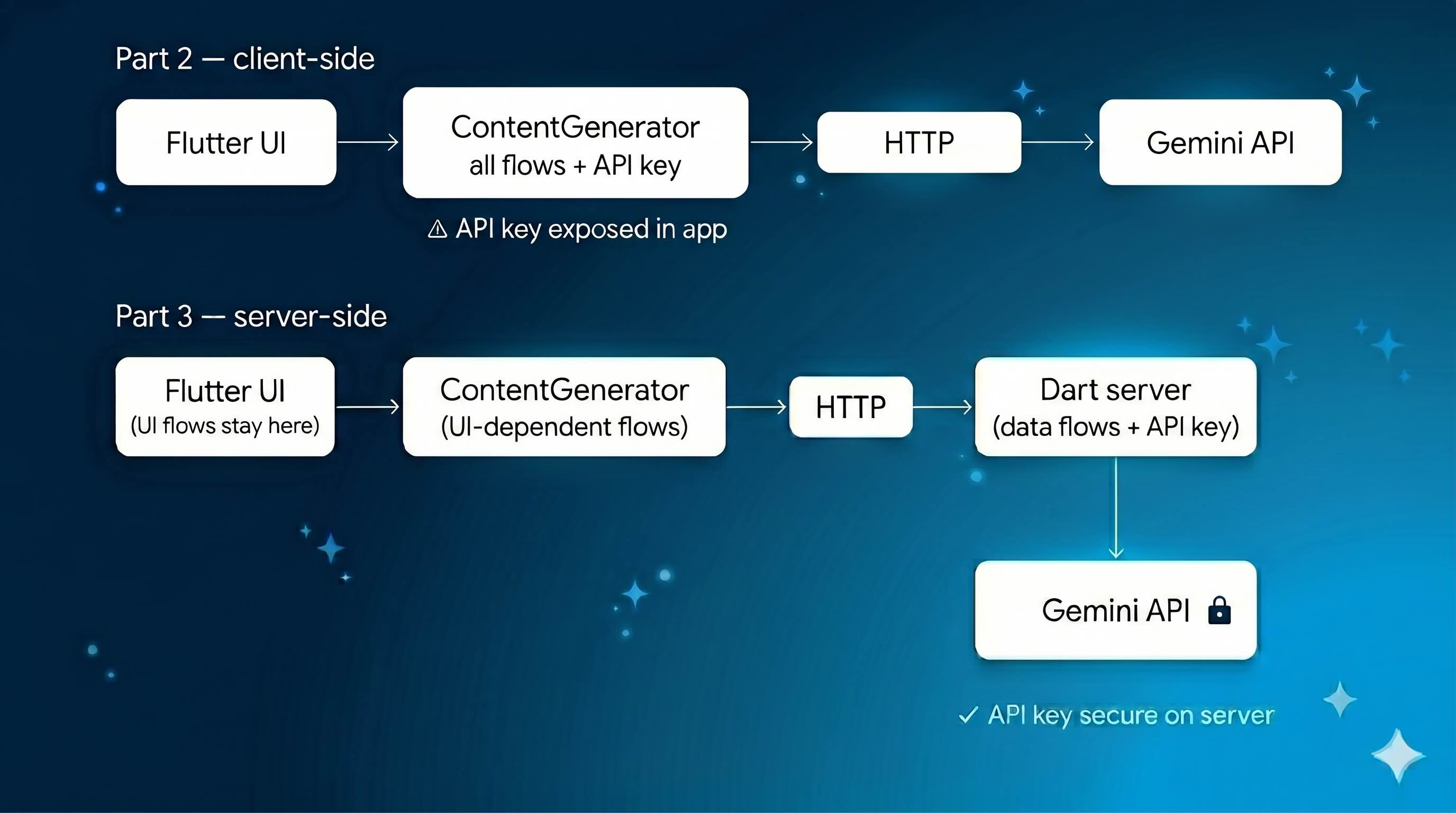
The UI layer stays completely untouched. The ContentGenerator interface is the same. We’re only changing where the data work happens.
1. Understanding the Split
Before writing any server code, it helps to be precise about what belongs on the server and what doesn’t.
The GenUI tools — surfaceUpdate, beginRendering, deleteSurface — emit events to streams that drive the Flutter widget tree. They need direct access to the UI. They stay in the Flutter app.
The shoppingAssistantFlow orchestrates those UI tools, so it stays in Flutter too.
But two flows have zero UI dependency:
searchProductsFlow— takes a query, searches an inventory, returns JSONquickRecommendationFlow— takes a user query, calls Gemini with structured output, returns typed recommendations
Both are pure data operations. Both belong on the server.
| What | Lives on | Why |
|---|---|---|
surfaceUpdate, beginRendering, deleteSurface | Flutter app | Needs UI access |
shoppingAssistantFlow | Flutter app | Orchestrates UI tools |
searchProductsFlow | Dart server | Pure data, no UI dependency |
quickRecommendationFlow | Dart server | Pure data, no UI dependency |
| Gemini API key | Dart server | Never exposed to client |
ShoppingContext | Flutter app | Source of truth for cart state |
The Flutter app remains the source of truth for cart state — it sends that state to the server with each request. The server uses it, derives what it needs, and discards it. This keeps the server stateless, which matters: a shared mutable context on the server means user A’s cart bleeds into user B’s request. Each request gets its own fresh ShoppingContext instance derived purely from the payload.
2. Setting Up the Dart Server
Create a backend/ folder at the root of the project with its own pubspec.yaml:
name: shopping_assistant_backend
description: Dart backend server for the GenUI Shopping Assistant.
publish_to: none
version: 0.0.1

environment:
  sdk: '^3.10.0'

dependencies:
  genkit: ^0.12.0
  genkit_google_genai: ^0.2.3
  genkit_shelf: ^0.1.0
  schemantic: ^0.4.0

dev_dependencies:
  lints: ^4.0.0
Add an analysis_options.yaml referencing package:lints/recommended.yaml so linting rules are enforced in the backend package just as they are in the Flutter app. Then run dart pub get inside backend/ and you’re ready.
Note:
product_data.dartandshopping_context.dartare copied intobackend/lib/for simplicity in this demo. In a production app, extract shared models into a separate Dart package and reference it via path dependency from both the Flutter app and the backend. This avoids the risk of the two copies drifting out of sync.
3. Exposing Flows as HTTP Endpoints
Create backend/bin/server.dart. Flows are defined exactly as they were in the Flutter app — defineFlow works the same on the server. The only difference is that instead of calling them directly, you pass them to startFlowServer, which exposes each flow as a POST endpoint at /<flowName>.
void main() async {
  final apiKey = Platform.environment['GOOGLE_API_KEY'] ?? '';
  if (apiKey.isEmpty) { print('ERROR: GOOGLE_API_KEY is not set.'); exit(1); }

  final ai = Genkit(plugins: [googleAI(apiKey: apiKey), RetryPlugin()]);

  final searchProductsFlow = ai.defineFlow<Map<String, dynamic>, String, void, void>(
    name: 'searchProductsFlow',
    fn: (input, _) async { /* ... */ },
  );

  final quickRecommendationFlow = ai.defineFlow<String, List<Map<String, dynamic>>, void, void>(
    name: 'quickRecommendationFlow',
    fn: (userQuery, _) async { /* ... */ },
  );

  await startFlowServer(
    flows: [searchProductsFlow, quickRecommendationFlow],
    port: 3400,
    cors: {'origin': Platform.environment['ALLOWED_ORIGIN'] ?? '*'},
  );
}
The API key comes from an environment variable — never hardcoded. ALLOWED_ORIGIN defaults to * for local development and should be set to your app’s domain in production.
One production detail worth calling out: each request to searchProductsFlow gets a fresh ShoppingContext derived from the payload. The Flutter app sends its current cart state with every request, and the server uses it to annotate results.
fn: (input, _) async {
  // Fresh instance per request — a shared instance would bleed
  // cart state between users on the server.
  final shoppingContext = ShoppingContext();
  final cartItems = (input['cartItems'] as List<dynamic>?)
      ?.map((e) => e as String).toList() ?? [];
  for (final item in cartItems) {
    shoppingContext.addToCart(item, 0);
  }
  // ... search and return results
},
The flow definitions themselves — tools, outputSchema, retry middleware — are identical to Part 2. They moved files, not concepts. The full implementation is in backend/bin/server.dart.
Start the server:
GOOGLE_API_KEY=your_key dart run bin/server.dartBefore touching the Flutter app, verify both endpoints work independently:
# Test searchProducts
curl -X POST http://localhost:3400/searchProductsFlow \
  -H "Content-Type: application/json" \
  -d '{"data": {"query": "running shoes"}}'

# Test quickRecommendation
curl -X POST http://localhost:3400/quickRecommendationFlow \
  -H "Content-Type: application/json" \
  -d '{"data": "recommend me something for running"}'
Both should return JSON responses. The server is working.
4. Updating the Flutter App
Add http: ^1.2.0 to the Flutter app’s pubspec.yaml. Then open genkit_content_generator.dart and update the fn inside _searchProductsTool. This is the only meaningful change — instead of calling searchProducts() locally, it calls the server:
// Before (Part 2): local call
fn: (input, _) async {
  final results = searchProducts(query: input['query'] as String, ...);
  return jsonEncode(results.map((p) => p.toJson()).toList());
},

// After (Part 3): server call
fn: (input, _) async {
  final backendUrl = const String.fromEnvironment(
    'BACKEND_URL',
    defaultValue: 'http://localhost:3400',
  );
  final response = await http.post(
    Uri.parse('$backendUrl/searchProductsFlow'),
    headers: {'Content-Type': 'application/json'},
    body: jsonEncode({
      'data': {
        'query': input['query'],
        if (input['category'] != null) 'category': input['category'],
        'cartItems': _shoppingContext.cartItems.map((i) => i.productName).toList(),
      }
    }),
  );
  if (response.statusCode != 200) {
    throw Exception('Backend error: ${response.statusCode}');
  }
  return (jsonDecode(response.body) as Map<String, dynamic>)['result'] as String;
},
The BACKEND_URL comes from --dart-define so it works in both development and production without a code change. The same pattern applies to _handleRecommendationQuery, which now calls quickRecommendationFlow on the server instead of running locally.
Also remove the _quickRecommendationFlow field and product_data.dart import from the Flutter app — neither is needed anymore.
5. Running the Full Stack
Two terminals — one for the server, one for Flutter.
Terminal 1:
cd backend
GOOGLE_API_KEY=your_key dart run bin/server.dart
Terminal 2:
flutter run -d chrome \
  --dart-define=GOOGLE_API_KEY=your_key \
  --dart-define=BACKEND_URL=http://localhost:3400
In production, set BACKEND_URL to your deployed server URL and ALLOWED_ORIGIN to your app’s domain. Neither value is hardcoded anywhere in the source.
What We Gained
The change across the whole project is small — two methods updated in the Flutter app, a new backend/ folder, one new dependency. What it delivers:
Security. The Gemini API key lives only on the server. It never touches the Flutter app.
Stateless server flows. Each request to searchProductsFlow gets a fresh ShoppingContext derived from the payload. No state bleeds between users.
Configurable URLs. BACKEND_URL and ALLOWED_ORIGIN come from environment variables. The same binary works in development, staging, and production without a rebuild.
Clean separation. Flows with UI dependencies stay in Flutter. Flows with data dependencies move to the server. The split follows a clear rule rather than being arbitrary — and it’s a pattern that scales to any Flutter AI integration, not just this app.
The UI didn’t change. The user experience didn’t change. The ContentGenerator abstraction means the Flutter app never needed to know where the work happened — and now it doesn’t need to know the server exists either.
What’s Next
The remaining Genkit logic — shoppingAssistantFlow itself — still runs in the Flutter app because it orchestrates the GenUI UI tools, which need direct access to the widget tree. Moving that flow to the server requires a different approach — specifically an A2UI agent backend, where the server drives UI events over a streaming protocol. The genui_a2a package is designed exactly for this. That’s the natural next step for teams building production GenUI apps, and we’ll cover it in a future post.
The full source code for this post is on the genkit-refactor-part2 branch. Parts 1 and 2 cover the GenUI architecture and the client-side Genkit setup.