Accessibility at most teams lives at the end of the pipeline. Release dates are fixed, compliance checks get a half day, everyone knows the right answer, but few teams have time to do it. The users on the other end pay the difference.
We built /vgv-accessibility to move WCAG 2.2 review from the release-day crunch into the moment you’re writing code. Type /vgv-accessibility, answer two questions, and you get a conformance report in seconds. The skill translates WCAG into plain language so you don’t have to parse the standards.
The /vgv-accessibility skill is part of the Very Good AI Flutter Plugin. Install it to add WCAG audits to your Claude Code workflow.
Why accessibility matters: building for everyone
Accessibility isn’t optional. Over a billion people globally live with disability, and in the US one in four adults has some type of disability. Skip it and you exclude them from your product. Inaccessible interfaces lock out screen reader users. Videos without captions lock out deaf users. Insufficient contrast locks out people with low vision. Small touch targets lock out people with motor impairments. You’re shipping to part of your market.
Accessible design also makes products better for everyone. Captions work in noisy environments. Keyboard navigation benefits power users. Good focus visibility helps anyone navigate. Text scaling helps mobile readers and people with low vision. Accessible design compounds—what works for people with disabilities works better for everyone.
Three conformance levels: pick your standard
WCAG comes in three conformance levels. A is the baseline, AA is what most projects ship to, and AAA is the gold standard that rarely ships because it demands extensive user testing and design trade-offs.
Most teams default to AA without considering what it means or that AA itself changes between WCAG versions as new criteria are added. Your conformance target depends on your product type. A financial product with regulated flows might need AAA on specific screens, while a marketing site can ship at A and iterate later. The skill makes you choose instead of defaulting.
When you run /vgv-accessibility, the first question is conformance level. Three options:
Level A
The baseline. It catches non-keyboard-operable buttons, missing button roles, and missing image labels. If your screen fails Level A, it fails for everyone.
Level AA
The practical standard for production apps. It adds requirements for contrast, focus visibility, text scaling, and keyboard navigation. WCAG 2.2 introduced three new AA criteria this year.
Level AAA
Full conformance. Every AAA criterion applies and is used when regulation, litigation risk, or mission-critical access demands it.
Each level is cumulative. AA includes all A criteria. AAA includes all AA criteria. When the skill audits at AA, it checks every A criterion too.
The difference between levels is material. A checkout screen at AA passes with 4.5:1 contrast. At AAA the same screen needs 7:1 contrast. AAA also disallows authentication methods that rely on a single sense. That’s not busywork. It’s the difference between a product colorblind users can access and one that locks them out entirely.
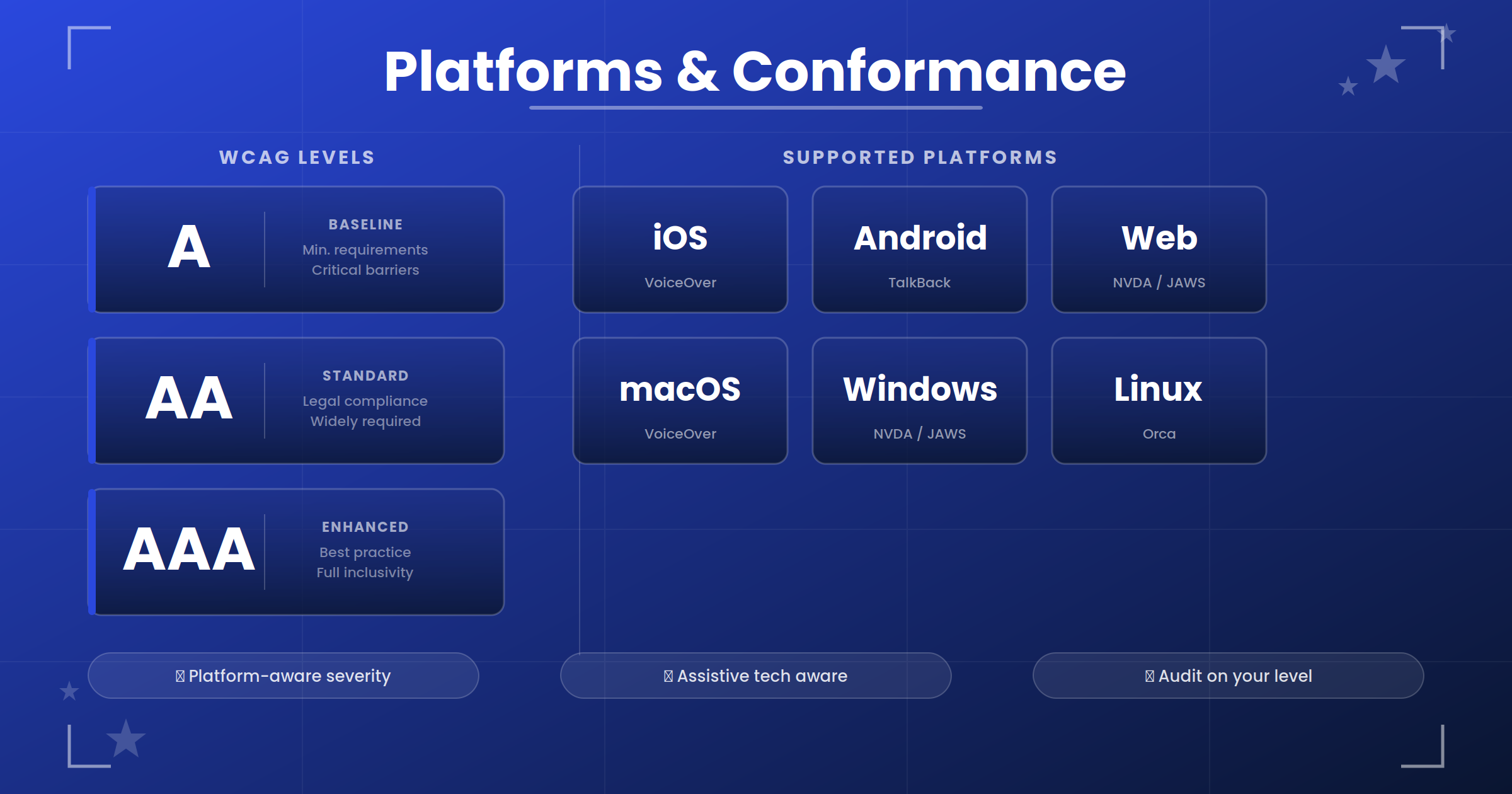
WCAG conformance levels and platform support matrix
Platform shapes severity
Same code runs differently on different platforms, which is what makes Flutter accessibility hard and why the skill’s platform awareness matters.
Take a TextField near the bottom of a form. On iOS and Android, the keyboard pushes content up automatically, so a sticky BottomAppBar that doesn’t move ends up covering the field. A keyboard user can’t see what they’re typing, which is CRITICAL severity.
The same code on Web behaves differently. The keyboard lives in the browser chrome and doesn’t push the viewport, so the BottomAppBar still covers the field but leaves it partially visible. A user can scroll to find it, so this is MAJOR severity, not CRITICAL.
The skill supports six platforms—iOS, Android, Web, macOS, Windows, and Linux—each with its own assistive technology and its own rules.
iOS and Android run VoiceOver and TalkBack with touch targets sized for fingers. Keyboard shortcuts exist but are secondary. When a sticky bar covers a focused field, it’s CRITICAL because the keyboard user can’t see what they’re typing.
Web runs NVDA, JAWS, and VoiceOver, which are third-party assistive technologies rather than baked-in features. Focus visibility is nonnegotiable because screen readers aren’t always on. When a sticky bar covers a focused field, it’s MAJOR because the user can scroll to find it.
macOS, Windows, and Linux use keyboard navigation as primary interaction. A 16x16 icon button that works on iOS is too small on desktop and needs 48 CSS pixels of actual hit area.
The skill captures this. When you pick platforms, it loads platform-specific rules and adjusts severity. A dragging-without-alternative issue is CRITICAL on iOS and Android but MAJOR on Web where keyboard arrows usually work. On desktop it depends on the implementation.
Mapping findings to WCAG criteria
Every finding ties to a specific WCAG criterion, not a broad concept like “focus is important.” The real criterion is WCAG 2.2 2.4.11 Focus Not Obscured (Minimum) at Level AA.
That specificity matters. When a designer asks “why is this CRITICAL?”, you point to the exact criterion instead of guessing. You have one report that documents your conformance level and maps every finding to WCAG 2.2, whether you’re sharing it with stakeholders, a client, or an external auditor. One source of truth built during development, not created at ship time.
Here’s a real finding from a checkout-flow audit:
### Finding: Cart item swipe-to-delete has no non-drag alternative
- File: lib/cart/cart_item_tile.dart ~L38
- WCAG: 2.5.7 Dragging Movements (Level AA, WCAG 2.2)
- Platforms: iOS (CRITICAL), Android (CRITICAL), Web (MAJOR)
- Issue: Items can only be removed via swipe. Switch users and keyboard users cannot delete an item.
The criterion is 2.5.7. It’s new in WCAG 2.2. It’s AA level. It applies differently to mobile and web. An engineer reading this sees immediately: every drag operation needs a non-drag alternative on the same screen.
The report is your compliance paper trail
After the audit, the skill produces a markdown report. Every finding includes the platform breakdown, severity, WCAG criterion, and plain-language explanation. It also lists every check that passed.
# Flutter Accessibility Audit Report

Conformance Level: AA
Platforms: iOS, Android
Date: 2026-05-15
Files audited: lib/widgets/product_card.dart, lib/widgets/product_badge.dart, lib/checkout/checkout_button.dart

## Summary
| Metric | Value |
|--------|-------|
| Total Findings | 5 |
| CRITICAL | 1 |
| MAJOR | 4 |

## Findings

### Finding 1.1 [CRITICAL] — Missing semantic label on product image
**File:** lib/widgets/product_card.dart (line 28)
**WCAG:** 1.1.1 Non-text Content
**Issue:** VoiceOver and TalkBack cannot convey what the image shows.

### Finding 2.1 [MAJOR] — Target size below 24×24 dp minimum
**File:** lib/widgets/product_card.dart (line 62)
**WCAG:** 2.5.8 Target Size (Minimum)
**Issue:** Motor-impaired users cannot reliably tap an 18×18 dp target.

### Finding 5.1 [MAJOR] — Fixed-height container clips at larger text scales
**File:** lib/widgets/product_badge.dart (line 18)
**WCAG:** 1.4.4 Resize Text
**Issue:** At iOS Dynamic Type 2x or Android font scale 2x, text clips.

### Finding 6.1 [MAJOR] — Animations not gated on disableAnimations
**File:** lib/widgets/product_card.dart (line 68)
**WCAG:** 2.3.3 Animation from Interactions
**Issue:** Plays at full speed even with Reduce Motion enabled. Vestibular-triggered users experience dizziness.

## Passed Checks
- 1.2.1 Audio-only and Video-only (Prerecorded): PASS
- 1.3.1 Info and Relationships: PASS
- 1.4.3 Contrast (Minimum): PASS
- 2.1.1 Keyboard: PASS
- 2.4.3 Focus Order: PASS
- 2.4.7 Focus Visible: PASS
- 2.5.7 Dragging Movements (Level AA): PASS

Remediation: Fixed 5 findings (CRITICAL, MAJOR).
The passed checks matter. A reviewer can confirm “we checked focus visible,” compliance has the evidence they need, and an auditor can see your WCAG version in the report.
The skill runs the audit but doesn’t auto-fix everything. After you review the findings, you choose what to address: all issues, critical and major only, critical only, or specific findings by number. You stay in control of scope.
WCAG 2.2 was the push
WCAG 2.2 shipped in October 2023 and added seven new AA criteria. Three are platform-neutral, three are mobile-specific, and one governs authentication. The audit rules changed fundamentally.
Before 2.2, a 16x16 icon button was fine at AA if it had a 48 dp bounding box. WCAG 2.2 tightened this. 2.5.8 Target Size Minimum now requires 24 CSS pixels of actual touch target at AA. 2.5.5 at AAA requires 44 CSS pixels. The skill audits against this new standard.
WCAG lives in standards documents, but the skill lives in your editor. When you ship Flutter code now, you’re shipping against WCAG 2.2, though most teams don’t know which version applies. The skill makes that explicit.
What the skill is not
The skill is a code reviewer. It doesn’t run the app, screenshot it under VoiceOver, or interview a user with low vision. It catches the patterns that experienced engineers spot in code review but misses what only emerges in real use.
Every project still needs testing with assistive technology. The skill is the floor. When the obvious issues are gone, the interesting work begins.
Up next is what the skill actually catches in code: the patterns, the diffs, and the fixes that let you ship accessibility from the moment you write the widget.