Apple opened iPhone Duo preorders on October 16. The $1,999 foldable sold out in minutes.
If your iPhone app is still built with Xcode 26, some of your most valuable users are about to open it on that phone and see it boxed into a small window with black bars on both sides. They won’t blame Apple. They’ll blame you.
We’ve spent the last few weeks running Dart and Flutter apps on the Duo simulator alongside client teams. Flutter handles the Duo well, with one gap we cover below. Getting an app to feel at home there still takes deliberate work, and the first step can’t wait.
 Duo GT, a Flutter demo app David Castaño built, running next to Safari on the open iPhone Duo.
TL;DR
- Move to Xcode 27.1 or later as soon as you can. That removes the black bars. Apps still on the old app-delegate lifecycle need to adopt
UIScenefirst, or the new build crashes on launch. - Rework navigation for the open screen. List and detail views move side by side, and Apple puts tab bars, toolbars, and the back button in a strip on the right.
- Design for the crease and the poses. Keep buttons, modals, and sheets off the fold, and give each half of the screen its own job.
Why this can’t wait
The Duo won’t be the most common iPhone anytime soon. Supply is tight, and reports said Apple was building only a few hundred units a day ahead of launch. Look at who is buying it, though.
| What happened | Detail |
|---|---|
| Preorders sold out | Within minutes on Oct. 16, with store pickup in the New York area selling out in about 3 minutes |
| Deliveries slipped | Every configuration moved to late January 2027 |
| Price | $1,999 to $3,199 |
| Resale | eBay listings at $4,000 and up |
| Launch day | Oct. 23, with Apple warning that walk-in stock is limited |
These buyers pay $1,999 or more for a phone and wait months to get it. They’re the customers your app most wants to keep, and they notice when something looks off.
Right now, something does. An app built with Xcode 26 opens on the Duo’s inner screen in compatibility mode, with the phone layout framed by black bars. Apple calls that a safety net. Users see an app nobody bothered to update, and that can show up in reviews and support tickets.
The deadline is fixed, too. Starting April 2027, every app submitted to the App Store must include iPhone Duo screenshots. If your app still has black bars by then, every update you ship will need Duo screenshots that show them.
Tier 1: Get rid of the black bars
Every iPhone app needs this tier. Do nothing, and your app renders letterboxed on the open Duo. Rebuild with Xcode 27.1 or later, and the bars go away. Your app fills the inner screen.
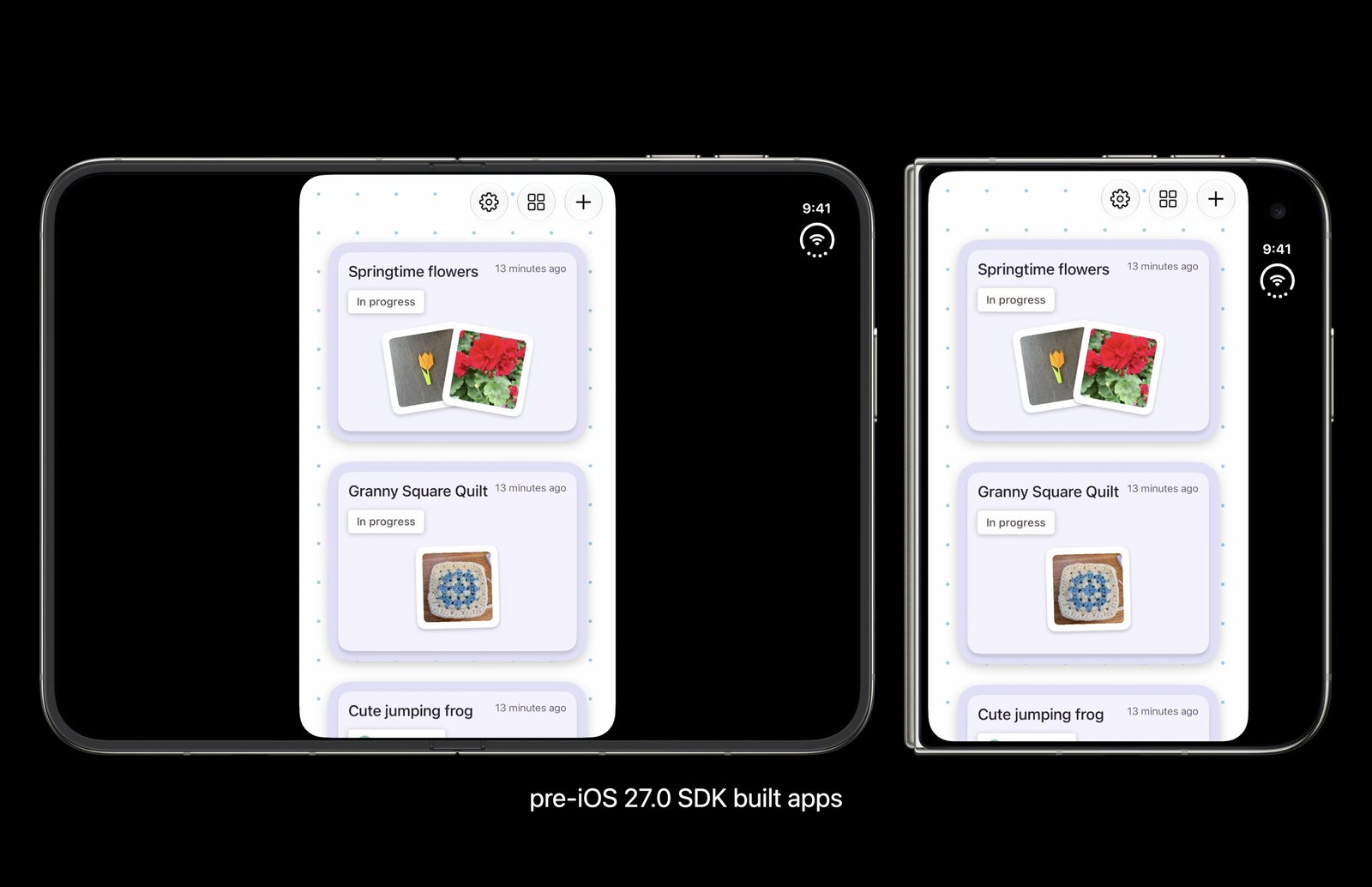 Image: Apple Developer
The app lifecycle is where teams get stuck. The iOS 27 SDK requires the scene-based lifecycle (UIScene). Flutter has warned about this for over a year, and Flutter 3.41 migrates apps automatically if the iOS app delegate is untouched. Many production apps have customized the delegate for push notifications, deep links, analytics, or native code. Those apps need a manual migration. An app still on the app-delegate lifecycle crashes on launch when built with the new SDK.
For some teams Tier 1 takes an afternoon. For others it’s a small project. On a Flutter app, we work through it in this order:
- Upgrade Flutter and check whether the scene migration ran.
- Migrate a customized app delegate by hand, following Flutter’s
UISceneguide. - Update or replace plugins that hook the lifecycle, especially push, deep links, and sign-in.
- Build with Xcode 27.1 and walk every flow on the Duo simulator, folded and open.
Removing the bars also removes Apple’s safety net. Your app now lays out at the full width of the inner screen, and anything sized by width stretches. Tier 2 addresses that. Until then, a phone-width column centered on wide screens is a good stopgap, though it brings back some of the boxed-in look.
Tier 2: Rearrange navigation
Open the Duo and you’re holding a small tablet. That can change the layout of every page in your app.
Duo GT opening in half the screen, then reflowing into its two-column layout as it expands to full width.
Start with the simplest pattern, a list and its details. Folded, they’re two pages. Tap a row and the detail screen slides in. Open, they belong side by side in a split view, like a messaging app with channels on the left and the conversation on the right. Apps built without that in mind face a lot of work here, because the change touches routing, state, and every screen built on that pattern.
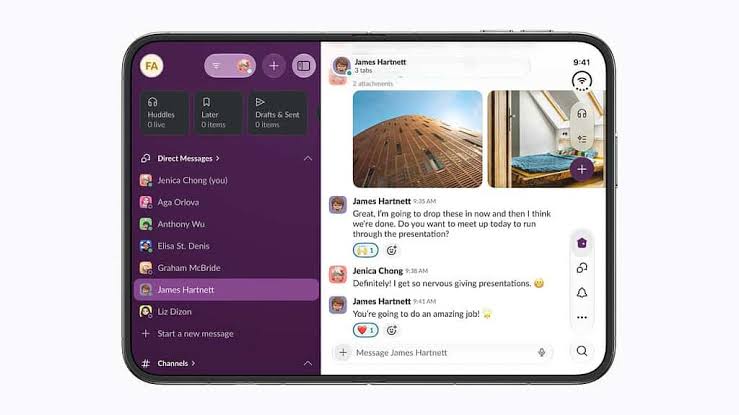 Image: Apple Developer
The bigger change is where navigation lives. On the open Duo, Apple moved bottom tab bars and toolbar items, including the back button, into a vertical strip on the right side of the screen. That strip sits under the Dynamic Island and status bar. Apple’s own apps already work this way. An app that keeps its tab bar at the bottom will look a generation behind.
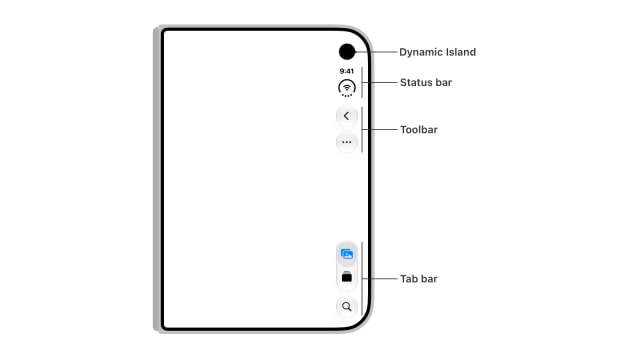 Image: Apple Developer
Treat this tier as a redesign. Plan for design time alongside engineering time.
Tier 3: Design for the crease and the poses
Apple doesn’t want people touching the crease while the inner screen is partly folded. Build on the split view from Tier 2. Half-open, the list should fill the left half and the detail the right, with nothing tappable in the middle. Modals, sheets, and popovers move to one side instead of centering over the fold.
A VGV demo app reading the Duo’s pose and hinge angle, then adjusting its split view as the device moves between closed, book, and laptop poses.
People also use the Duo in more than one shape. A video can play on the upright half while the phone sits on a table like a laptop, with controls on the flat bottom half. A recipe can stand open on the counter. A shopping app can show the product on one side and the cart on the other.
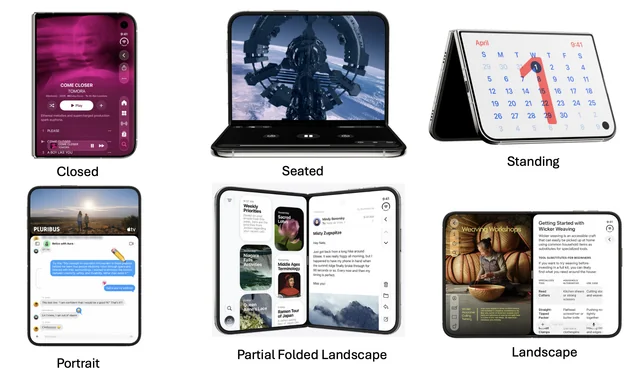 Image: Apple Developer
Not every app needs this tier. Apps people browse, compare, order from, or spend long sessions in earn it. A quick single-task tool can stop at Tier 2.
This isn’t a Flutter problem
Every new Apple device brings the same question about whether Flutter can keep up. It can. A Flutter app on iOS is a native iOS app with Flutter running inside it. Anything iOS knows, your app can reach through a platform channel.
Duo GT rearranging its controls, climate, and map views as the iPhone Duo folds and unfolds in the simulator.
Flutter draws its own UI, so a Flutter tab bar won’t jump to the right side of the Duo on its own. A native app with a custom bar won’t either. Only native apps built on Apple’s stock navigation containers get that move for free, and Apple still asks every team to check their layouts. Rearranging navigation is design work in any framework.
Flutter has one gap today. The framework can’t read the fold on iOS yet, and support for it is in review. In the meantime, a small native bridge gives your app the fold, the hinge angle, and the pose. You can throw it away once Flutter ships native support. Bridges like this already exist for the Duo, so you don’t have to start from scratch.
With that bridge in place, Dart and Flutter are ready for the Duo. Making an app feel natural there takes intentional work, the same as it would in Swift.
Start with the deadline
Flutter apps have been here before. Teams adopted dark mode, the Dynamic Island, and home screen widgets as iOS evolved. Each time, the same playbook worked. Adapt what makes sense for your users, and push hard where it matters.
The Duo fits that pattern with one difference. Tier 1 has a deadline. Move to Xcode 27.1 now, then work through Tiers 2 and 3 as your roadmap allows. Prioritize the screens your users spend the most time on.
The layout work pays off beyond the Duo. The inner screen behaves like a small tablet, so the split views and adaptive navigation you build for it largely carry over to iPad and Android foldables. If tablet support has been sitting in your backlog, the Duo just moved it up.
Sources
Launch coverage
- Apple’s $1,999 iPhone Duo hits stores Friday amid limited supplies (Yahoo Finance): sellout, limited walk-in stock, $4,000+ eBay listings
- Apple iPhone Duo preorders sell out, deliveries extend to late January (Yahoo Finance)
- iPhone Duo Sells Out Immediately, Now Backordered Until Next Year (Slashdot, via 9to5Mac): late-January ship dates, constrained supply
- iPhone Duo Sells Out in 3 Minutes, Ships Hit 2027: pricing tiers, NYC-area pickup sellout
- Apple Warns of Limited iPhone Duo Stock for Walk-In Buyers (Technology.org)
Apple
- Prepare and submit your apps for iPhone Duo: Duo screenshots required for App Store submissions from April 2027, and the Xcode 27.1 recompile guidance
- Designing for iPhone Duo (Human Interface Guidelines)
- Prepare your app for iPhone Duo (tech talk 111461)
- TN3187: Migrating to the UIKit scene-based life cycle
Flutter
- Migrating to UIScene
- flutter/flutter #193025: fold support on iOS, in review