Most LLM demos stop at generating text. The interesting (and scary) part starts when the model can call functions that change real data.
While preparing for the Claude Certified Architect certification, I wanted to see that in practice, so I gave a Claude-powered agent one job: handle support chats inside a Flutter app, including issuing refunds. My test case was a simple support ticket: “the keyboard I ordered arrived scratched”.
To close that ticket correctly, the agent has to chain several steps: verify who the customer is, find the order, check that it was actually delivered, decide whether the amount is within its limit, and then either refund or hand the case to a human.
A chatbot isn’t enough here. It can explain the refund policy, but the customer still waits for someone to act on it. A fixed workflow isn’t enough either. It can act, but it expects every ticket to follow the same path, and support tickets rarely do. One customer forgets their order number, another’s package is still in transit, another wants a repair instead of a refund, and another asks for more than the refund limit. An agent reads the request in the customer’s own words, picks the next step based on what it just learned, and knows when to hand the case to a person.
That flexibility is also the risk, because every one of those steps is a place where a bad decision has real consequences. That leads to the question this post is about: where do you put the guardrails when an LLM can trigger side effects? To put it to the test, I built an application with a Flutter chat client, a FastAPI backend and a Claude tool-use loop with five tools and two hooks. Let’s go through the important pieces with real code.
Architecture overview
One turn of the system looks like this:
- The Flutter app sends
user_id,messagesandconversation_idtoPOST /chat. - FastAPI calls
run_conversation, which runs the Claude tool-use loop. - Every tool request goes through input validation, a pre-hook, the tool function and a post-hook.
- The final text reply, the updated message history and the
conversation_idgo back to the app.
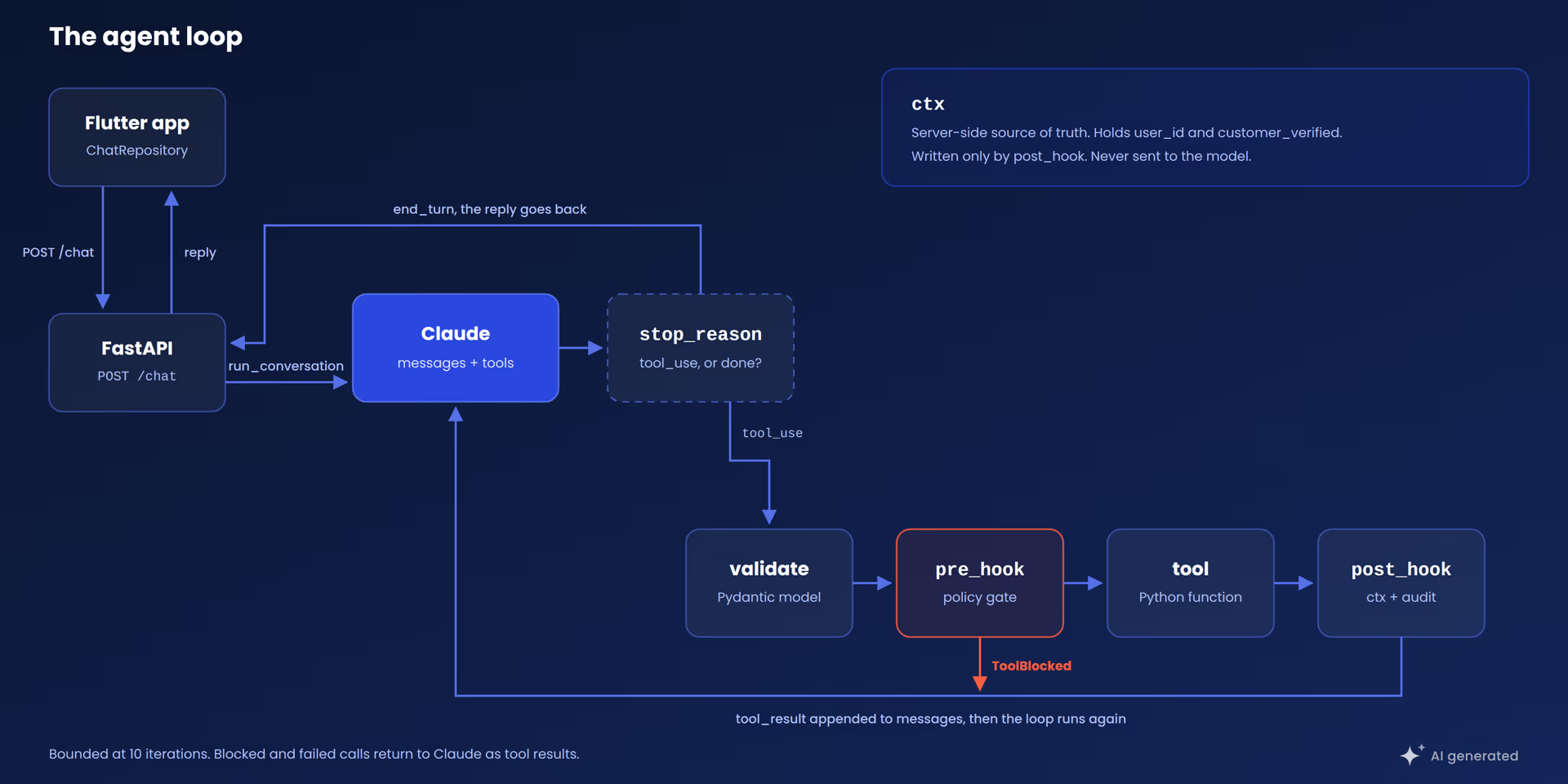
One turn of the loop. The ctx box holds the facts the model never sees.
The design principle I kept coming back to is simple: the model proposes, the backend decides. The model never executes anything. It emits a request, and my code is the only thing that can act on it.
The tool-use loop
When Claude wants to use a tool, the response comes back with stop_reason == "tool_use" and one or more tool_use content blocks, each carrying a tool name, an id and an input object. I run the function, send the output back as a tool_result block tied to that id, and call the API again.
This is the loop from the application, with error handling removed:
def run_conversation(
    user_id: str,
    messages: list,
    model: str = MODEL,
    conversation_id: str | None = None,
) -> dict:
    conversation_id, ctx = _session_for(conversation_id, user_id)
    max_iterations = 10
    iteration = 0

    while iteration < max_iterations:
        iteration += 1
        response = client.messages.create(
            model=model,
            max_tokens=1024,
            system=SYSTEM,
            tools=TOOLS,
            messages=messages,
        )
        messages.append({
            "role": "assistant",
            "content": [block.model_dump() for block in response.content],
        })

        if response.stop_reason != "tool_use":
            reply = "".join(b.text for b in response.content if b.type == "text")
            return {"reply": reply, "messages": messages, "conversation_id": conversation_id}

        tool_results = []
        for block in response.content:
            if block.type != "tool_use":
                continue
            validated_input = _validate_tool_input(block.name, dict(block.input))
            safe_input = pre_hook(block.name, validated_input, ctx)
            raw = run_tool(block.name, safe_input)
            result = post_hook(block.name, safe_input, raw, ctx)
            tool_results.append({
                "type": "tool_result",
                "tool_use_id": block.id,
                "content": json.dumps(result),
                "is_error": False,
            })

        messages.append({"role": "user", "content": tool_results})
Three details worth noticing:
- The full assistant content is appended, including
tool_useblocks. The API requires eachtool_resultto match a precedingtool_useid. max_iterations = 10is a hard ceiling. Without it, a model that loops on a failing tool burns tokens against a metered API with no upper bound.- The order is fixed: validate, pre-hook, execute, post-hook. The model can influence the input of that pipeline, but never skip a stage.
Tool definitions vs. implementations
Each tool has two parts that never touch. The first is the schema sent to the API, which is the only thing the model sees:
{
    "name": "process_refund",
    "description": (
        "Issue a refund for an order. Only call after confirming the order exists, "
        "is delivered (not in transit), is refundable, and the amount is at most "
        "the order total. If the customer reported a technical problem, first ask "
        "whether they want a repair or a refund."
    ),
    "input_schema": {
        "type": "object",
        "properties": {
            "order_id": {"type": "string"},
            "amount": {"type": "number", "description": "Refund amount in the order currency."},
            "reason": {"type": "string", "description": "Short reason for the refund."},
        },
        "required": ["order_id", "amount", "reason"],
    },
}
The description is the most important field. It is the instruction the model uses to decide when to call the tool, so I treat it as part of the prompt, not as a comment. When the agent’s behavior is off, I go there first, before touching the model.
The agent has exactly five tools: get_customer, lookup_order, list_recent_orders, process_refund and escalate_to_human. Keeping the count around four or five per agent is deliberate, because tool selection gets less reliable as the list grows. Beyond that, split the work across focused subagents.
The second part is the implementation, a plain Python function the model can only ask for:
def get_customer(identifier: str) -> dict:
    """Look up a customer by id or email. Returns the profile or a not_found marker."""
    customer = _find_customer(identifier)        # replace: db.find_customer(identifier)
    if customer is None:
        return {"found": False, "identifier": identifier}
    return {"found": True, "customer": customer}
Storage is an in-memory dict, and each # replace: comment marks the line I’d swap for a real datastore. Now the refund, where the side effect lives:
def process_refund(order_id: str, amount: float, reason: str) -> dict:
    """Issue a refund for an order. Money side effects live here."""
    order = _ORDERS.get(order_id.strip())           # replace: db.get_order(order_id)
    if order is None:
        return {"status": "rejected", "reason": "order not found", "order_id": order_id}

    if order["status"] == "shipped":
        return {
            "status": "rejected",
            "reason": "order is still in transit, it can be refunded once delivered",
            "order_id": order_id,
        }

    if not order["refundable"]:
        return {"status": "rejected", "reason": "order is not refundable", "order_id": order_id}

    if amount <= 0 or amount > order["total"]:
        return {
            "status": "rejected",
            "reason": "amount must be greater than zero and at most the order total",
            "order_id": order_id,
            "order_total": order["total"],
        }

    receipt_id = f"R-{len(_REFUNDS) + 9001}"        # replace: payments.refund(order_id, amount)
    _REFUNDS.append({                               # replace: db.write_refund(record)
        "receipt_id": receipt_id,
        "order_id": order_id,
        "amount": amount,
        "reason": reason,
        "refunded_at": _now(),
    })
    return {"status": "refunded", "order_id": order_id, "amount": amount, "receipt_id": receipt_id}
The function re-checks everything the description told the model to confirm. That is defense in depth: the description makes the model likely to behave, and the function makes misbehavior harmless. I don’t trust the schema description alone for anything that issues a refund, and I wouldn’t recommend it either.
Hooks: enforcing policy outside the model
Hooks are the layer most teams skip in the first version. A pre-hook runs before every tool call and can block it. A post-hook runs after and records what actually happened.
def pre_hook(tool_name: str, tool_input: dict, ctx: dict) -> dict:
    if not ctx.get("user_id"):
        raise ToolBlocked("unauthenticated request")

    if tool_name == "process_refund":
        if not ctx.get("customer_verified"):
            raise ToolBlocked(
                "you must verify the customer identity first by calling get_customer, "
                "then confirm the order with lookup_order before processing a refund"
            )
        if float(tool_input.get("amount", 0)) > REFUND_LIMIT:
            raise ToolBlocked(
                f"refund of {tool_input['amount']} is over the {REFUND_LIMIT} limit, "
                "escalate to a human instead"
            )

    log.info("tool_start name=%s user=%s", tool_name, ctx.get("user_id"))
    return tool_input
def post_hook(tool_name: str, tool_input: dict, result: dict, ctx: dict) -> dict:
if tool_name == "get_customer" and result.get("found"):
ctx["customer_verified"] = True
if tool_name == "process_refund" and result.get("status") == "refunded":
AUDIT.append({
"user_id": ctx.get("user_id"),
"action": "refund",
"order_id": result.get("order_id"),
"amount": result.get("amount"),
"receipt_id": result.get("receipt_id"),
})
return resultTogether they give you:
- Authentication: no
user_idinctx, no tool execution. - Precondition enforcement:
customer_verifiedis set only by the post-hook, and only after a real lookup returned a real customer. - A spending limit: a single constant,
REFUND_LIMIT, so changing it from 200 to 500 is a one-line diff. - An audit trail: every executed refund is recorded with user, order, amount and receipt.
You may ask why enforce in code what the system prompt already asks for. Because a prompt is a request and a hook is a rule. Claude follows the prompt reliably, but for anything that changes an account or issues a refund, the guarantee has to come from code that runs on every turn, including the rare one where the model doesn’t comply.
Not every rule belongs in a hook. The “repair or refund?” question lives in the prompt and the tool description, because no function can reliably tell a broken keyboard from a disappointing one. My rule of thumb: hooks for invariants, the model for judgment.
Returning blocks as model-readable feedback
When a hook raises ToolBlocked, the message is returned to the model as the tool result. So the message is written for the model, not for a log file. “You must verify the customer identity first by calling get_customer” reads as an instruction, and Claude usually makes the right call on its next turn.
Take a refund request for a 499 monitor with a limit of 200:
- Claude calls
get_customer, thenlookup_order. - Claude calls
process_refundwithamount=499. - The pre-hook raises
ToolBlocked("...over the 200 limit, escalate to a human instead"). - Claude calls
escalate_to_humanwith a summary of what it learned. - The customer gets a ticket number and an honest explanation.
No branch in the code handles this sequence. The rule lives in one place and the model routes around it.
Validation and runtime errors follow the same pattern and come back as structured data:
content = json.dumps({
    "error": "validation_failed",
    "message": err.message,
    "details": err.errors,
    "retryable": False,
})
I added a retryable flag so the model knows whether to try again. After two consecutive unrecoverable failures, the loop stops retrying and escalates to a human instead of spinning.
Server-side session state
Each message from the app is a separate HTTP request, so the facts the hooks rely on, like customer_verified, have to survive between requests. And they can’t come from the client: the message history is editable, so anyone could forge a lookup that never happened. Facts that authorize an action must live on the server.
The backend issues a conversation_id on the first reply and keeps ctx under it:
def _session_for(conversation_id: str | None, user_id: str) -> tuple[str, dict]:
    ctx = _SESSIONS.get(conversation_id) if conversation_id else None
    if ctx is None or ctx["user_id"] != user_id:
        conversation_id = uuid.uuid4().hex
        ctx = {"user_id": user_id}
        _SESSIONS[conversation_id] = ctx
    return conversation_id, ctx
An unknown id, or one that belongs to a different user_id, simply starts a fresh conversation with nothing verified. In this demo _SESSIONS is a plain dict, but I’d swap it for a real session store with an expiry before shipping anything.
Flutter client architecture
To connect the agent with the Flutter app, this demo uses a simple FastAPI server. It exposes a single endpoint, and it’s deliberately thin:
@router.post("/chat")
def chat(req: ChatRequest) -> dict:
    return run_conversation(
        req.user_id, req.messages, conversation_id=req.conversation_id
    )
The agent code has no HTTP dependency, so I can unit test it without a server. The Claude API key lives in the backend’s .env file and never reaches the Flutter app.
On the Flutter side I used Layered Architecture:
- The API client handles JSON and status codes.
- The repository owns the conversation and is the only class that touches the client.
- The bloc owns UI state and never sees a network call.
Future<ChatMessage> sendMessage(String text) async {
  _history.add({'role': 'user', 'content': text});

  final response = await _apiClient.sendChat(
    userId: _userId,
    messages: _history,
    conversationId: _conversationId,
  );
  _conversationId = response.conversationId;

  _history
    ..clear()
    ..addAll(response.messages);

  return ChatMessage(role: ChatRole.assistant, text: response.reply);
}
The repository replaces its local history with the server’s list on every round trip. That list includes every tool_use and tool_result block, so the next request carries the full record and the model doesn’t repeat lookups. One source of truth, refreshed every time.
When you should not build an agent
Agents add cost, latency and risk, so before I build one I run through these seven questions:
- Does the task end with an action or an answer? For answers, a single model call is usually enough.
- Does it need data from your own systems? If yes, it needs tools. If not, it probably doesn’t.
- Are the steps the same every time? A fixed sequence is cheaper and easier to test as a plain workflow.
- Is the input free text or a form? Structured fields rarely need a model to interpret them.
- Can I write down what it may do? If I can list actions, limits and escalation cases, they become hooks. If not, the policy work comes first.
- What is the cost of one wrong action? The higher it is, the more identity checks, limits, an audit trail and a human path I want in place.
- How many actions does it need? One to about five fits a single agent. Beyond that, I’d split the work into subagents.
None of them is about model quality, which is the point.
Summary
The pattern is small and reusable: a bounded loop, a narrow tool list, checks that assume the model got it wrong, and session facts kept on the server. Swap the five tools for claims intake, IT support or dispatch, and the loop stays the same while tools and hooks carry the domain.
Conclusion
Building this was one of the most useful things I’ve learned lately, and the best part is how simple it was to implement. The loop is a few dozen lines, each tool is a normal function, and the hooks are just a couple of short files you can read in one sitting. There is no magic in there, and that’s exactly why I trust it.
I really think this has a lot of potential. Adding AI workflows to a product doesn’t need a huge rewrite. I started with one small agent, a handful of tools and a few rules, and from here I can keep growing it: more tools, more hooks, another agent for another job. And because the policy lives in my code and not in the model, I can keep adding power without losing control.
The full code is at VGVentures/dash_support_agent_poc. Clone it, break a hook on purpose and watch what the agent does.
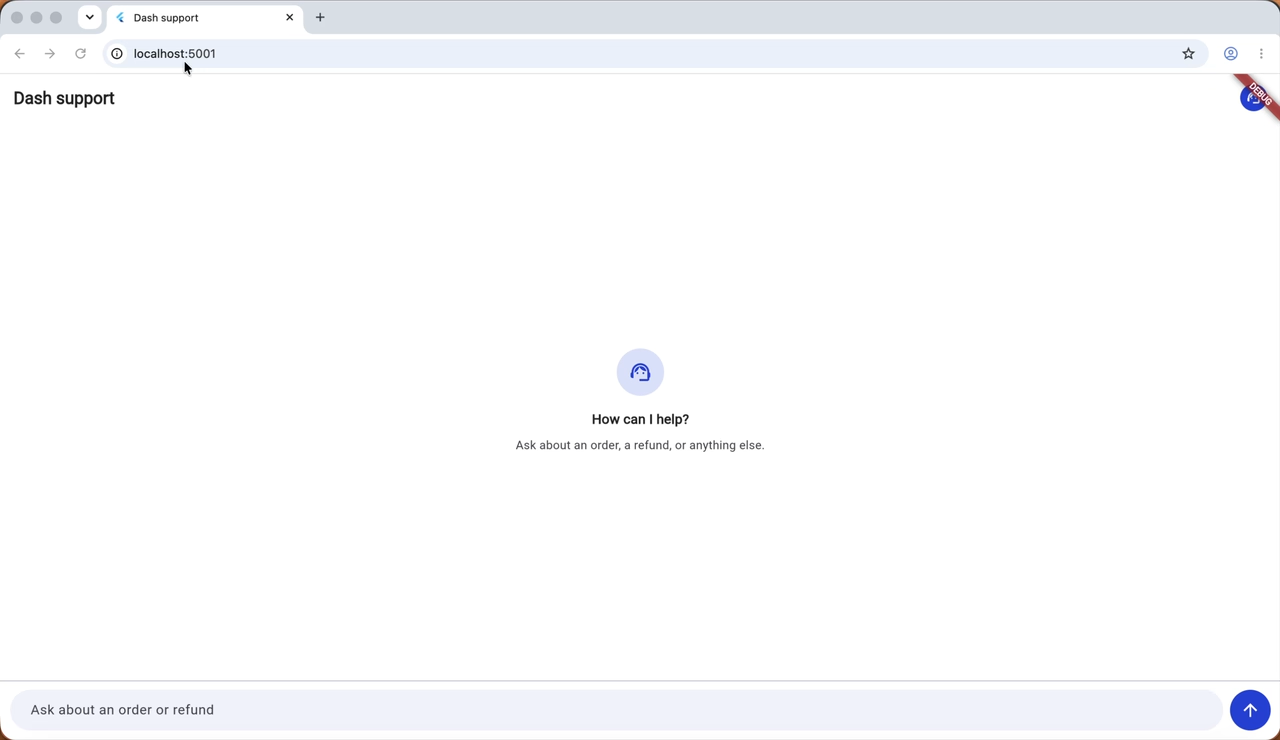
The agent running locally, with the Flutter app in front and the agent resolving the request behind it.