The Flutter GenUI SDK was designed with model portability in mind. The ContentGenerator interface decouples your app from any specific LLM — swap the implementation and the widget catalog, rendering pipeline, and conversation state stay untouched. We wanted to see what that actually felt like in practice, so we took the shopping assistant from Jorge Coca’s GenUI tutorial and extended the Flutter AI integration to support Claude alongside Gemini. Same app, same catalog, same prompts. The only thing that changed was which model drove the conversation.
What the ContentGenerator Abstraction Actually Buys You
The original tutorial uses FirebaseAiContentGenerator backed by Gemini 2.5 Flash. To connect Claude, we used genui_dartantic — a ContentGenerator implementation built on dartantic_ai that supports Anthropic as a provider. The widget catalog stayed the same: three custom items (ProductCard, ProductCarousel, PriceRangeFilter) alongside GenUI’s core layout components. Nothing in the rendering pipeline changed.
One practical constraint worth knowing up front: Anthropic’s API doesn’t support direct browser-to-API calls. Browsers block the preflight because api.anthropic.com doesn’t return the Access-Control-Allow-Origin header — this is intentional on Anthropic’s side, since API keys embedded in a web app are trivially extractable from devtools. The Claude path runs on macOS desktop, where requests aren’t subject to browser CORS policy. Gemini via Firebase AI Logic runs on web. In the app, kIsWeb picks the right generator automatically:
_contentGenerator = kIsWeb
    ? buildFirebaseAiContentGenerator()
    : buildClaudeContentGenerator();
For a production app you’d add a server-side proxy and lose that platform constraint entirely. For a demo, the split is clean.
How the Demo Played Out
We ran both backends through the same three-query session: “Show me running shoes,” “I want something under $80,” and “Show me lightweight backpacks between $50 and $120.” After each add-to-cart action, the assistant surfaced accessory suggestions.
Both backends understood the intent and correctly mapped it to the right tools. Price filtering worked as expected on both sides — “$0–$80” and “$50–$120” came through accurately. At that level, the architecture held up regardless of the model.
The differences showed up everywhere else.
Speed vs. Depth: The Real Tradeoff
Gemini was faster across the board. On the first query it was noticeably quicker. The gap widened considerably on the price filter query, where Claude took significantly longer to respond. By the backpack query Claude had closed the gap somewhat, but Gemini’s latency advantage was real and consistent throughout the session.
That speed came with a tradeoff in response quality.
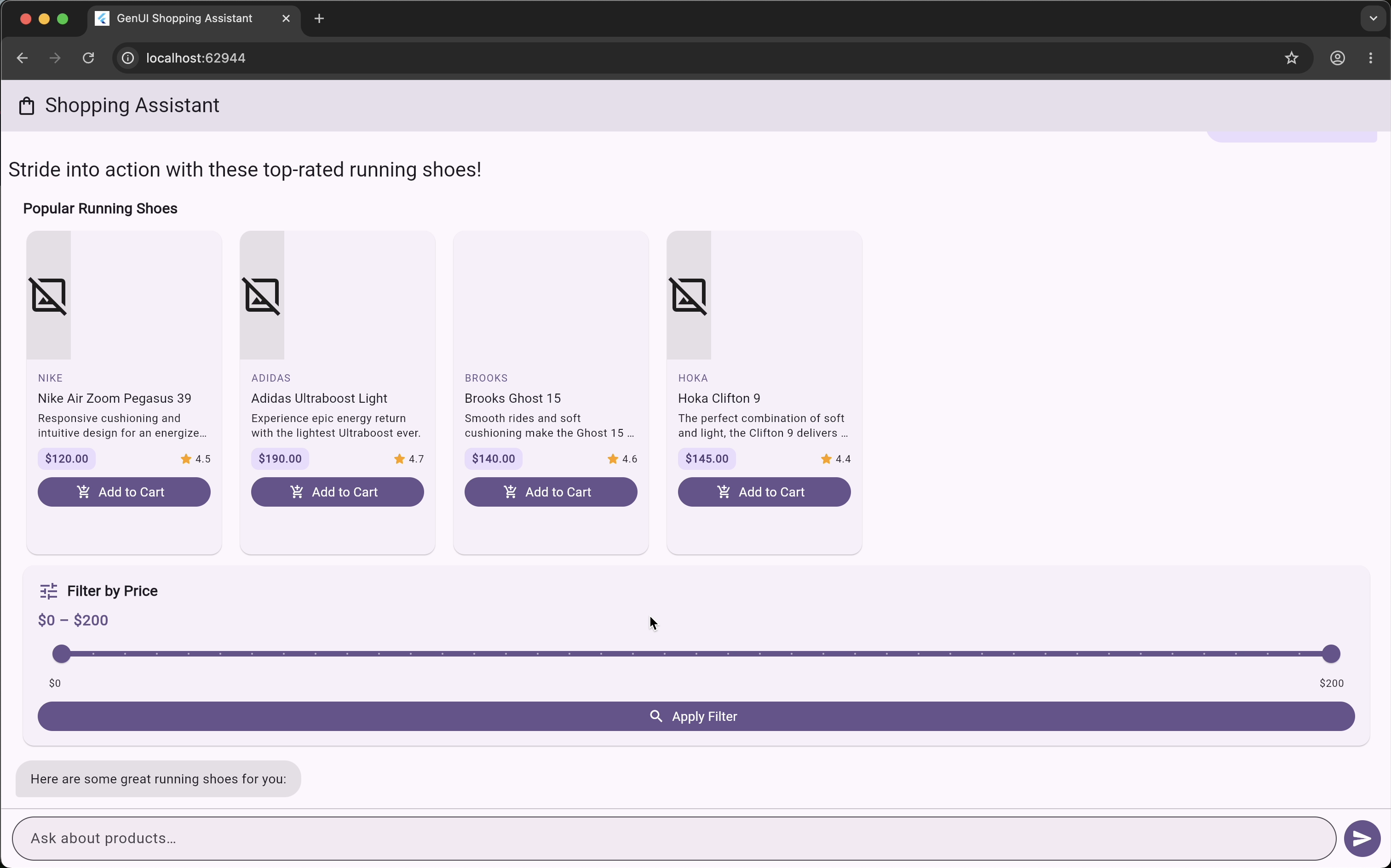
Gemini’s text responses were functional but flat. “Here are some great running shoes for you.” “Here are some running shoes that fit your budget!” The messages were grammatically correct and topically accurate. They didn’t add anything. The accessory suggestions that appeared after adding to cart also showed broken image placeholders on several cards. The system prompt explicitly instructs the model to omit imageUrl when it doesn’t have a real value — Gemini fabricated URLs anyway, which resolved to nothing.
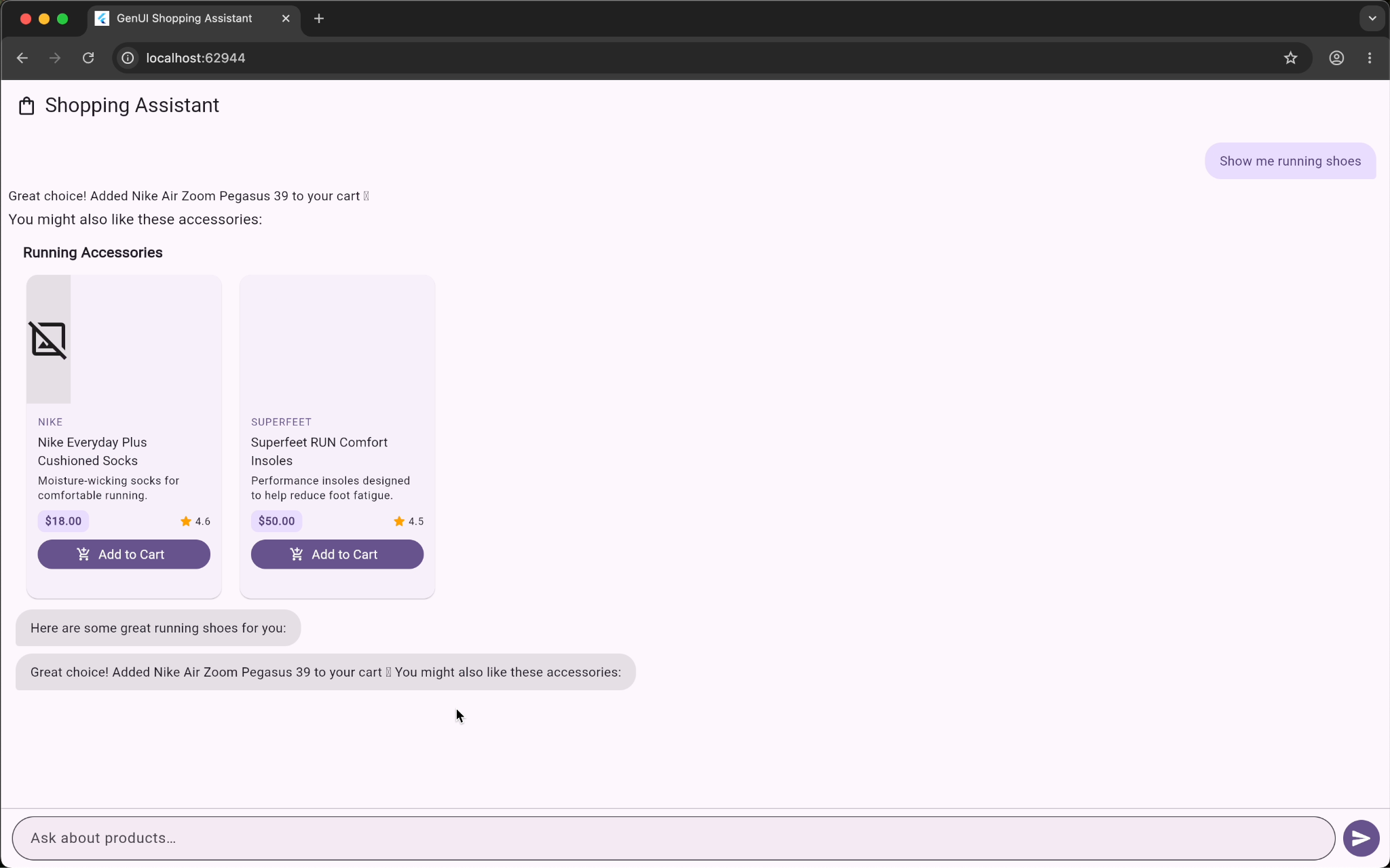 Gemini accessory suggestions after add-to-cart — broken image placeholders where product cards should be
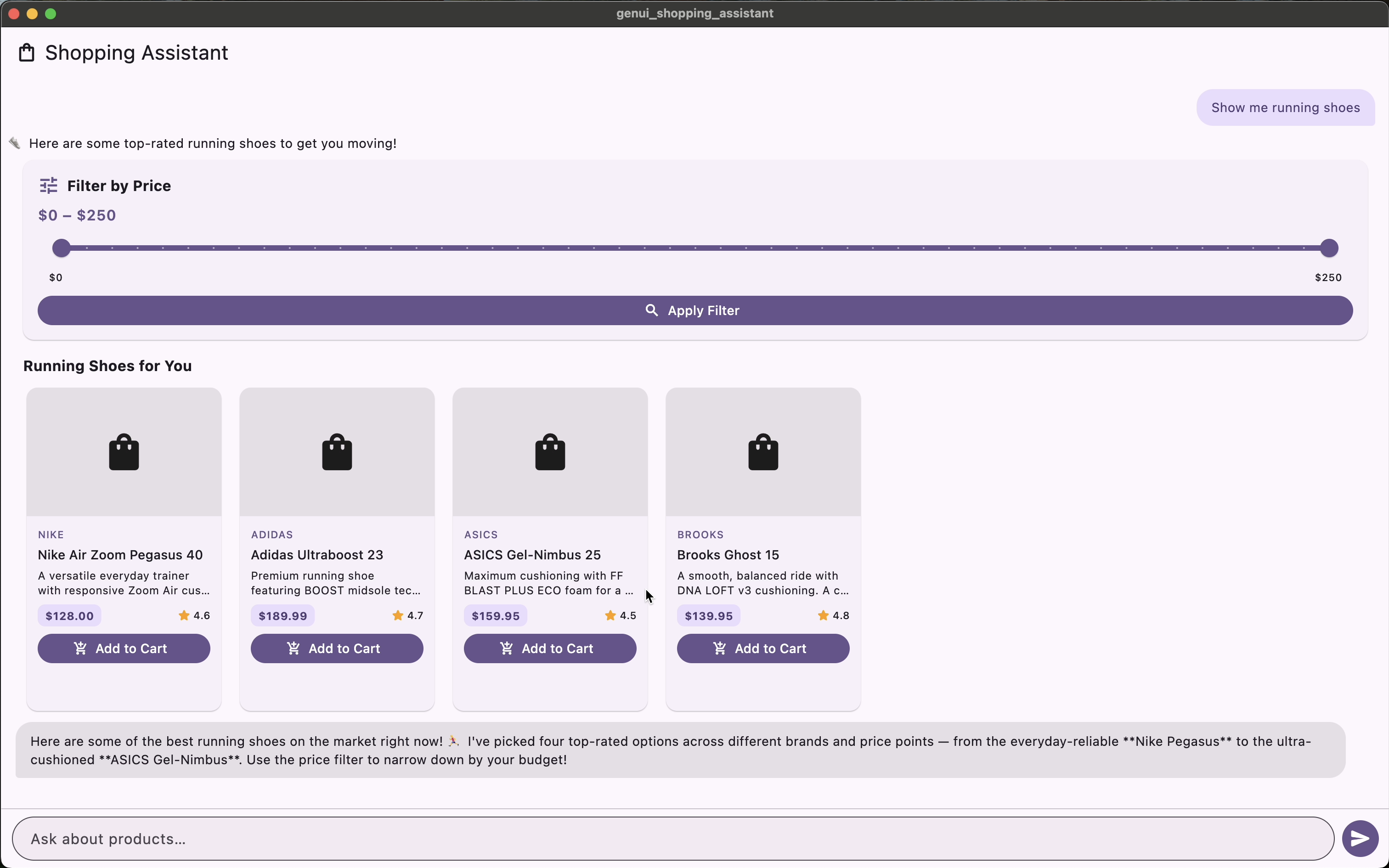
Claude’s responses used markdown formatting, called out specific products by name, and connected the suggestion to what the user had just done. After adding the Nike Air Zoom Pegasus to cart, the message read: “Complete your run — accessories to pair with your new Pegasus 40.” The follow-on suggestions included running socks, insoles, and a handheld water bottle — all thematically coherent with the shoe that was just selected. The upsell felt like a recommendation, not a random list.
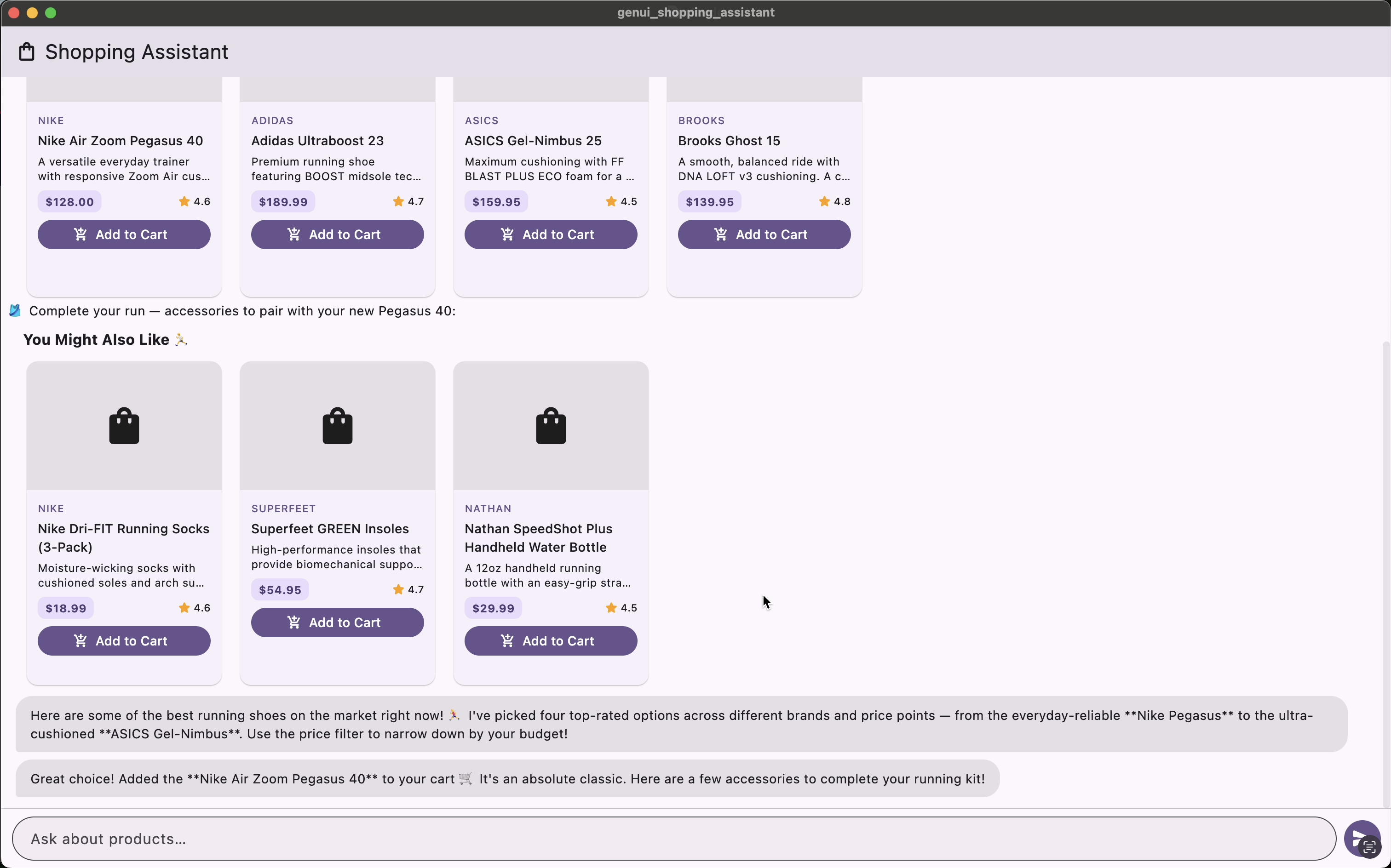 Claude accessory suggestions after add-to-cart — contextual copy and fully rendered product cards
The product grid also rendered cleanly across all three queries on the Claude side. No broken images.
What This Means for the Architecture
The Flutter layer is genuinely model-agnostic. The widget rendering code never changed between platforms. The same ProductCard, ProductCarousel, and PriceRangeFilter widgets rendered regardless of which model was driving. That’s the promise of this pattern — your UI primitives stay stable, and the model’s output populates them.
What isn’t model-agnostic is the experience that results. Claude traded latency for richer, more contextual responses. Gemini prioritized speed but returned shallower, less personalized text and had some asset rendering inconsistencies.
Neither outcome is wrong. They reflect different model priorities and, in a real product, would call for different design decisions. A shopping assistant where speed is the primary driver — think quick reorder flows or high-frequency browsing — might favor Gemini’s latency profile. A shopping assistant where personalization and cross-sell performance matter more might justify the extra seconds Claude needs to produce a richer response.
The Flutter architecture doesn’t make that choice for you. It makes the choice possible.
Swapping the ContentGenerator
The two transport files are nearly symmetric. The Gemini side uses FirebaseAiContentGenerator from genui_firebase_ai; the Claude side uses DartanticContentGenerator from genui_dartantic, backed by AnthropicProvider:
// claude_ai_transport.dart
const _anthropicApiKey = String.fromEnvironment('ANTHROPIC_API_KEY');

DartanticContentGenerator buildClaudeContentGenerator() {
  return DartanticContentGenerator(
    provider: AnthropicProvider(apiKey: _anthropicApiKey),
    modelName: 'claude-sonnet-4-6',
    catalog: shoppingCatalog,
    systemInstruction: shoppingSystemInstructions,
  );
}
// firebase_ai_transport.dart
FirebaseAiContentGenerator buildFirebaseAiContentGenerator() {
return FirebaseAiContentGenerator(
catalog: shoppingCatalog,
systemInstruction: shoppingSystemInstructions + GenUiPromptFragments.basicChat,
);
}Both receive the same shoppingCatalog and shoppingSystemInstructions. The GenUiConversation in the page doesn’t change at all — it receives whichever ContentGenerator kIsWeb selects, and the rest of the rendering code is identical on both platforms.
What We’d Do Differently
A few things stood out as areas to improve for a production version of this pattern.
Streaming matters more than we expected. Both demos used non-streaming responses, which contributed to the perceived latency gaps. Streaming tool results back to the UI — showing cards as they resolve rather than all at once — would substantially improve the feel of both backends.
Tool definitions need to be model-aware. We used identical tool schemas for both backends, but models interpret schemas differently. Claude responded more precisely to constrained price range parameters; Gemini occasionally returned items at the boundary of the requested range. Tuning the tool descriptions for each model’s behavior would tighten this up.
The broken images on the Gemini side are worth addressing in the system prompt, not just the widget layer. The current instruction tells the model to omit imageUrl when it doesn’t have a real value — that worked with Claude, but Gemini hallucinated URLs regardless. Making the instruction more explicit, or validating URLs before passing them to the widget, would close the gap. A graceful fallback in the ProductCard widget is still good practice, but the root fix is prompt-level.
The Takeaway
The ContentGenerator abstraction in the GenUI SDK isn’t a footnote. It’s one of the more consequential design decisions in the library. It means you can ship with one model and migrate to another without touching your widget catalog, your rendering pipeline, or your state management.
What changes with the model is the texture of the experience — how the assistant talks, how it connects what you just did to what it suggests next, how the content feels when it arrives. That’s worth measuring before you pick a backend, and it’s worth building the infrastructure to test before you commit to one.
If you haven’t built the shopping assistant yet, start with Jorge’s tutorial. The full source for both the original Gemini implementation and the Claude ContentGenerator is available in the genui_shopping_assistant repository on GitHub. For a broader look at how VGV applies generative UI across retail, travel, banking, and QSR, see the GenUI solutions resource page.