Anthropic released Claude Design in April 2026 as a research preview. In their own words:
Claude Design is a new Anthropic Labs product that lets you collaborate with Claude to create polished visual work like designs, prototypes, slides, one-pagers, and more.
Since it landed, I’ve been using it to build presentations.
The first time I built a deck, I went straight into Claude Design and got good results. One thing I noticed, though, was that working on the content in Claude Design felt slow. Every time I adjusted the text, Claude Design had to do more than just edit words: the text has to fit the slide and get rendered, so each small change took longer than it would in plain text. So the next time I tried something different: I wrote the content first as markdown in a regular Claude chat, where iterating on text is fast, and only then took that markdown into Claude Design.
What Claude Design is
Claude Design is a separate Anthropic Labs product, available to Pro, Max, Team, and Enterprise subscribers. When it launched in April 2026, it was powered by Claude Opus 4.7. It now has a model selector, so you can pick which model to use, including Opus 4.8. It has two panes: a chat on the left and a live canvas on the right. You describe what you want, Claude builds a first version, and you refine from there through conversation, inline comments, direct edits, or sliders that Claude generates when you want to dial something in.
You can start from multiple sources: a simple prompt, other files like PDFs, markdown, or images, or elements grabbed from a live site with the web capture tool. You can start a brand-free design or use a custom design system that you or your organization defined. Once you’re happy with the results, you can export to Canva, PDF, PPTX, standalone HTML, or an internal share URL.
The workflow
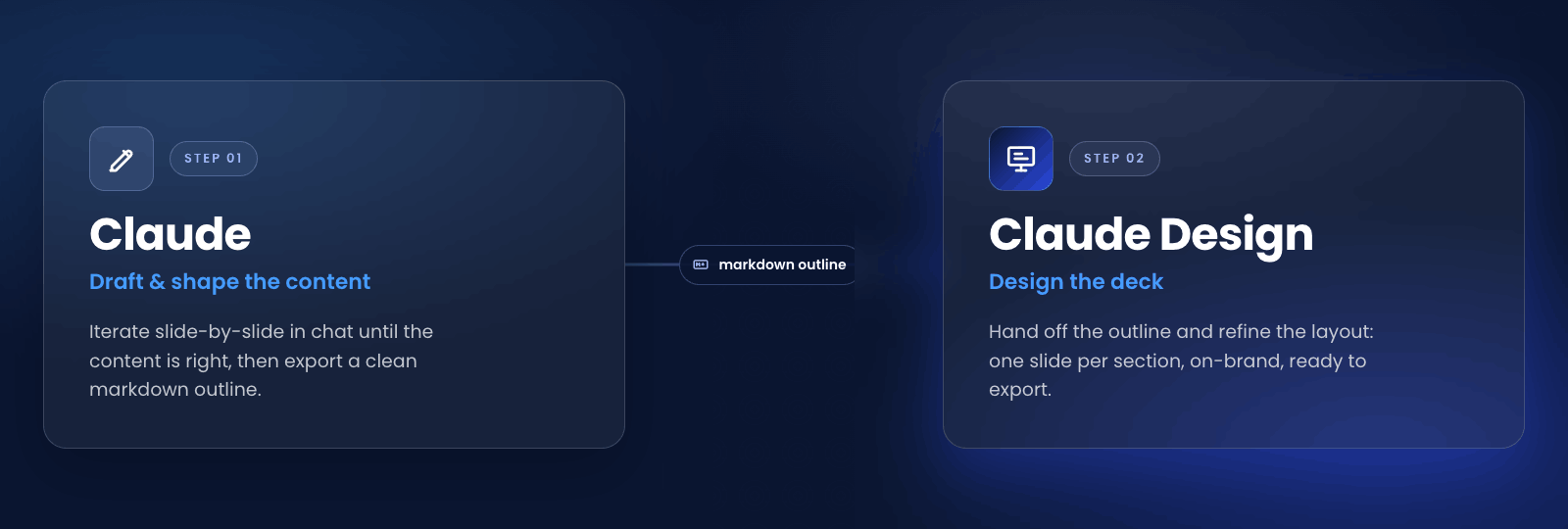
I’ve been experimenting with different workflows to figure out which one gives the best results. Here’s the one that works best for me.
First I write a draft myself: what are the topics I want to present, and how do I want to organize the content? Then I bring that into a regular Claude chat and we iterate on it slide by slide, adding examples, sharpening each point, until the content feels kind of ready. The draft starts from me, and Claude helps me work it into shape.
Once the structure feels solid, I ask Claude to turn it into a clean markdown outline: one section per slide, with the content underneath. I read it end to end before moving on. If a slide isn’t pulling its weight I cut it, and if a section is out of order I fix it in the markdown first. Editing text is faster than editing slides. At this stage I don’t focus much on layout. I want to focus on pure content, since for me visualizing the design in markdown is much harder, and that’s what Claude Design is for.
Once the content feels ready, I take that markdown into Claude Design. Here I try to use each tool for a different job. The content is already decided, so in Design I’m not rewriting the message, I’m focused on how it looks: the layout, the structure, whether something should be one slide or split into two.
💡 Tip: give Claude Design a standing rules doc.
There’s no official CLAUDE.md feature in Claude Design, but you can get most of the way there. Add a rules file to your project as context and Claude treats it as a standing instruction for that project. It isn’t documented and it isn’t reloaded as strictly as a CLAUDE.md in Claude Code. Even with that caveat, it’s been one of the most useful things for working more efficiently with Claude Design.
My first rule: the content is already defined, so Claude Design shouldn’t change the copy on its own. If it wants to adjust wording, it asks me first. That keeps it doing what it does best, layout and design, and leaves the content to me.
The handoff prompt itself is short. Something close to: “Build a presentation deck from this outline, one slide per section, using the existing design system.” Claude Design generates the first pass based on that.
From there I refine from both sides. In Design I move slide by slide, using direct edits for small tweaks and inline comments for bigger ones. When something needs to change across the whole deck, the chat handles it in one round: tighten the body copy, move every chart to the right, use the secondary brand color for accents. And if the content itself needs to change, I go back to Claude chat rather than rewriting it in Design.
When the deck is ready, I export. PPTX if it’s going to someone who needs editable slides, PDF if it’s read-only, or the internal share URL for a quick review from a teammate first.
A few caveats
Claude Design is still in research preview, so the exports aren’t all equally clean. Exporting to PDF, for example, sometimes messes up images or elements like cards, with the styling coming out wrong. PPTX usually opens fine in PowerPoint and Keynote, but complex layouts can drift on the way out. A final pass after exporting is needed.
Editing small style details can be painful. Something as simple as making a few words bold takes longer than it should. You can edit directly in the slide, but it’s far more complicated than selecting the text and clicking a button in a traditional editor, so I often end up describing the change to the chat instead. The UX could be improved here.
The design system inheritance works best when your organization actually has one configured in Claude Design. Without it, you’ll spend more time in Design dialing in colors and fonts by hand.
Takeaways
The main thing I took from this is to think first and design second. Claude Design gives great results, but they’re only as good as the content you bring it. So I get the content right first, and let Design do what it’s good at.