Wingspan is an AI-assisted development framework for Claude Code that orchestrates your full development lifecycle — brainstorming, planning, building, and quality review — while enforcing Very Good Ventures’ engineering standards throughout. Built on lessons from shipping production Flutter apps, it catches edge cases brainstorming misses, flags architectural violations before they ship, and keeps your codebase to consistent patterns even as you move fast.
This tutorial teaches each Wingspan skill using a real app — a Fish Tank Tracker — as an ongoing example. We built this app from a blank slate to a fully functional Flutter application with AI-powered species identification, image management, and water parameter tracking. Along the way, Wingspan’s review agents caught real bugs, its planning agents found over twenty edge cases we’d missed, and its build phase produced clean, well-tested code.
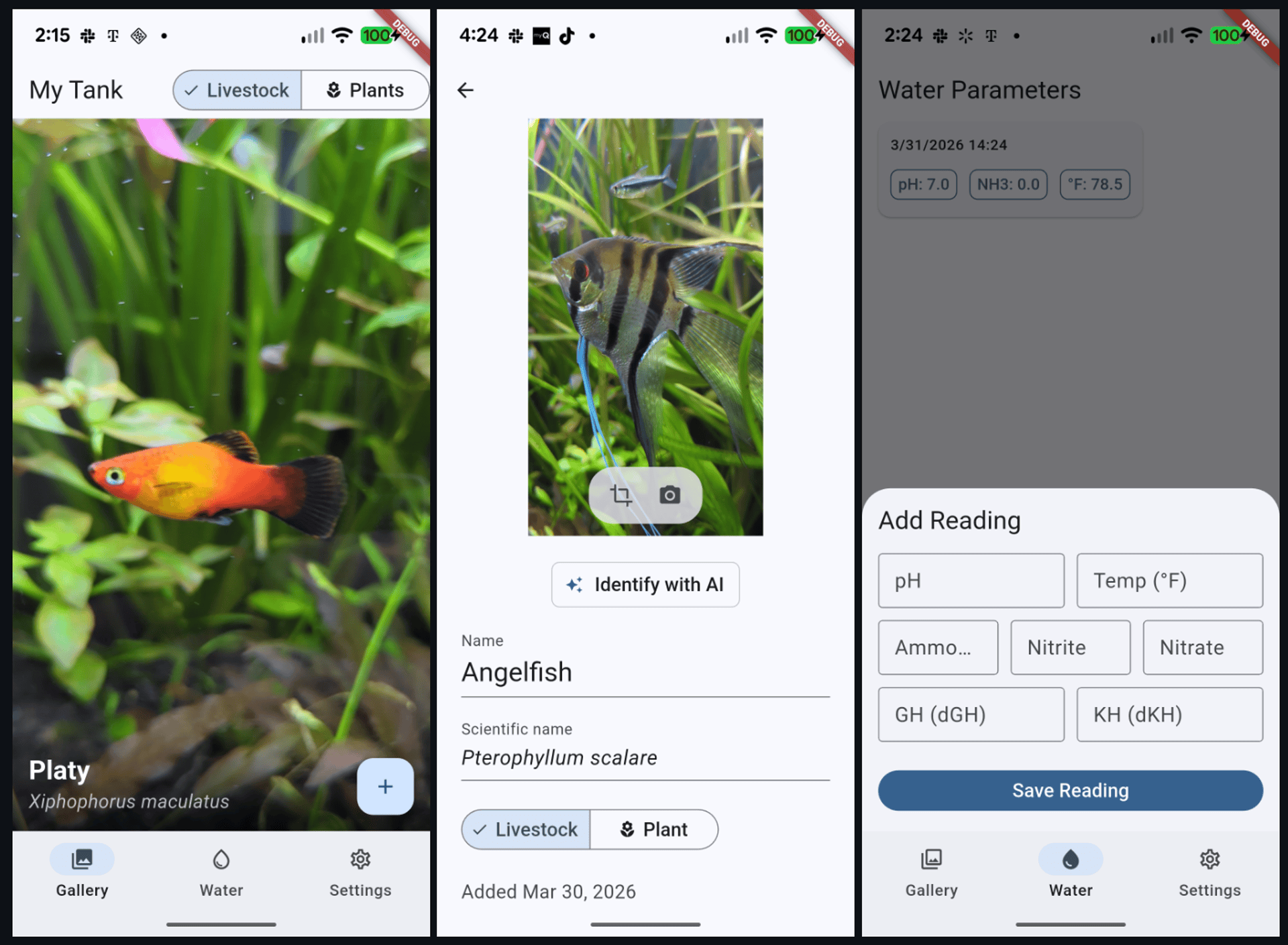
You don’t need to build the same app. The skills work on any project. Follow along with your own idea, or use the examples here to learn the workflow.
Prerequisites
Before installing Wingspan, you need Claude Code running. If you already have it, skip to Installing Wingspan.
Installing Claude Code
Claude Code is Anthropic’s command-line interface for running Claude. Install it globally:
npm install -g @anthropic-ai/claude-codeYou’ll need an Anthropic API key or an active Claude subscription. Run claude in your terminal to authenticate.
Already using Claude Code? Jump to Installing Wingspan.
Installing Wingspan
Navigate to your Flutter project and load Wingspan. Inside Claude Code:
/plugin marketplace add VeryGoodOpenSource/very_good_claude_marketplace
/plugin install vgv-wingspan@very_good_claude_marketplace
That’s it. Wingspan’s skills are now available as slash commands.
The Wingspan Workflow
Wingspan follows a four-phase workflow: brainstorm, plan, build, and review. Each phase produces documents that feed into the next, so you can start a fresh Claude Code session between steps without losing work.
/brainstorm  →  /plan  →  /build  →  /review
     ↕              ↕
/refine-approach  /plan-technical-review
You don’t have to follow it linearly—jump in at any phase based on what you already know, and loop back to refine decisions before moving forward.
You don’t have to use every phase. Simple bug fix? Jump to /build. Already know what you want? Start at /plan. Wingspan adapts to what you need.
Quick Reference
| Skill | Command | When to use |
|---|---|---|
| Brainstorm | /brainstorm <idea> | Exploring a new feature or big change |
| Refine Approach | /refine-approach | Tightening a brainstorm or plan before moving on |
| Plan | /plan <feature> | Turning ideas into a step-by-step implementation plan |
| Plan Technical Review | /plan-technical-review | Validating a plan with opposing review perspectives |
| Build | /build <plan path> | Writing code and tests from a plan |
| Review | /review [path] | Running quality review agents to assess code quality |
| Hotfix | /hotfix <bug> | Emergency bug fixes with enforced review |
Wingspan is a guide, not a cage. We used the full sequence for the initial app build, a shorter version for adding the entry detail feature, and a mix of structured and ad-hoc work for polish and refactoring. The workflow adapts to how you actually work.
You don’t need to memorize any of these commands. When each phase finishes, Wingspan presents multiple-choice options for what to do next — refine your brainstorm, move to planning, start building, or clear context and pick up later. You can learn the workflow just by following the prompts.
Phase 1: Brainstorm
What it does
/brainstorm opens a collaborative dialogue to explore your idea. Instead of dumping requirements, Wingspan asks targeted questions (often multiple-choice) to help you think through purpose, users, constraints, and trade-offs. It proposes approaches and captures decisions in a persistent document.
Try it
/brainstorm add a way to photograph fish and identify species using AIWingspan will ask you questions one at a time. Here’s what a typical exchange looks like:
Wingspan asks:
Should the AI identification happen automatically after capture, or on-demand?
- Automatically after every photo
- On-demand via a button
- Both — auto-identify but allow re-identification
You pick an option, Wingspan asks the next question. After several rounds, it proposes two to three concrete approaches with trade-offs:
Approach A: Cubit with debounced auto-save (Recommended)
The edit page gets its own Cubit that handles inline saves…
- Pros: Follows existing patterns, clean separation
- Cons: Needs a new cubit + state
- Best when: Consistency with existing architecture matters
You choose an approach, and Wingspan writes a brainstorm document to docs/brainstorm/:
docs/brainstorm/2026-03-30-gallery-entry-detail-brainstorm-doc.mdThis document captures what you’re building, why this approach, key decisions, and open questions. It becomes the input to the next phase.
What we learned building the Fish Tank Tracker
When we brainstormed the initial app concept, Wingspan asked about navigation layout and generated ASCII mockups to compare options before writing any code. Later, when brainstorming the image cropping feature, it explored three package options (image_cropper, crop_image, croppy) with pros and cons for each, and we picked the native crop UI approach.
Tips
- Give context up front.
/brainstorm add authenticationproduces generic results./brainstorm add email/password and OAuth login for our e-commerce app that currently has guest checkoutproduces focused questions. - Push back. If Wingspan suggests something you disagree with, say so. The brainstorm adapts to your feedback.
- Run
/refine-approachafter. This catches contradictions and gaps in the brainstorm before you invest in planning. When we refined our initial app brainstorm, it caught logical contradictions we’d glossed over in the excitement of ideation.
Phase 2: Plan
What it does
/plan transforms your brainstorm into a structured implementation plan. It launches research agents in parallel to understand your codebase and identify gaps, then produces an actionable document with acceptance criteria, technical design, and implementation order.
Try it
/plan implement the gallery entry detail page from our brainstormIf a recent brainstorm document exists, Wingspan picks it up automatically:
Found brainstorm from 2026-03-30: gallery-entry-detail. Using as context for planning.
What happens behind the scenes
Wingspan runs multiple agents in parallel:
- Codebase review agent — reads your existing code to understand patterns and conventions
- User-flow analysis agent — analyzes the feature for completeness and edge cases
- External research agents (when needed) — fetches docs for frameworks and libraries
The user-flow analysis agent is particularly valuable. When planning the entry detail page, the flow agent found twelve gaps the brainstorm had missed:
Gap: Debounce-on-close data loss
When the user edits the name and immediately presses back, the debounce timer may not have fired yet. The pending save is lost. The user sees their edit on screen, presses back thinking it saved, and returns to find the old name.
Gap: currentIndex out of bounds after deletion
If the user deletes the last entry in a list, the currentIndex may point beyond the new list length, causing a range error.
These are real bugs that would have shipped without this analysis. Across two planning phases for the Fish Tank Tracker, the user-flow agent found over twenty edge cases—debounce failures, index-out-of-bounds errors, race conditions—the kind that typically slip to production. When we planned a major refactor merging the “add entry” and “edit entry” flows, the flow agent found eleven more gaps. These included orphaned image handling on cancel, app-kill recovery, and race conditions between debounced saves and the cancel action.
The plan document
The output lands in docs/plan/:
docs/plan/2026-03-30-feat-gallery-entry-detail-page-plan.mdIt includes:
- Title, type, and acceptance criteria
- Technical design with file paths and code sketches
- Implementation order
- Risks and mitigations
- What’s explicitly out of scope
Optional: Technical Review
Before building, you can validate the plan:
/plan-technical-reviewThis runs two agents with deliberately opposing perspectives:
- A code-simplicity reviewer that flags over-engineering and YAGNI violations
- A VGV-standards reviewer that checks architectural rigor
This tension produces a plan that avoids both gold-plating and shortcuts. When we ran this on the initial Fish Tank Tracker plan, the simplicity reviewer flagged six YAGNI items (features we didn’t need yet) while the VGV reviewer upgraded the architecture to a multi-package monorepo. The final plan was both leaner and more production-grade than either perspective alone would have produced.
Refining plans with your own feedback
Plans aren’t rigid. When our unified entry flow plan suggested auto-deleting entries with empty names on close, we pushed back: “I’m fine if the name is empty; there should always be an image.” Wingspan updated the plan, and that single piece of feedback eliminated an entire category of complexity—no PopScope interception, no auto-delete logic, no special back-navigation handling. The implementation was significantly simpler as a result.
Tips
- Skip external research when your codebase has strong patterns. Wingspan decides automatically, but you can guide it: “My codebase already has good examples of this pattern.”
- You can skip planning entirely. For small bug fixes or simple changes, go straight to
/buildwith a description. - Not every plan needs a technical review. We used
/plan-technical-reviewfor the initial app build but skipped it for subsequent features where the patterns were already established. Use it when the stakes are high or when you’re exploring unfamiliar territory.
Phase 3: Build
What it does
/build executes your plan—writing code, writing tests, and running static analysis. It follows the plan’s implementation order and validates at each step.
Try it
/build docs/plan/2026-03-30-feat-gallery-entry-detail-page-plan.mdWingspan summarizes the scope and asks for confirmation before starting:
Plan scope: 6 tasks, ~8 files to create/modify, moderate complexity.
- Start building
- Review the plan first
- Adjust scope
What happens during the build
Wingspan breaks the plan into phased tasks and tracks progress as it works through each one:
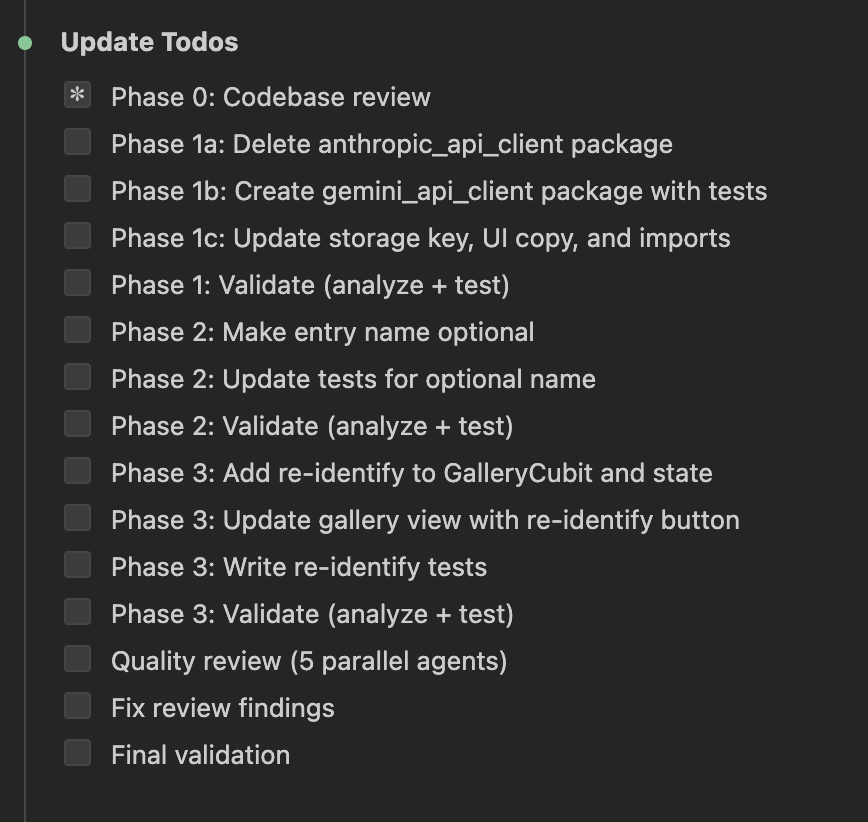
You don’t need to manage these steps — Wingspan handles them automatically. For each task in the plan, it writes the code, writes tests alongside it, runs flutter analyze and flutter test to validate, and gives you a brief progress update before moving to the next task. If something fails, it fixes the issue and re-runs validation.
The initial Fish Tank Tracker build produced six packages and four features across roughly fifty files, using sealed classes, Bloc/Cubit state management, and go_router navigation. It shipped with twenty-three passing tests and zero analysis issues.
Tips
- Clear context between phases. Wingspan offers this option after each phase. A fresh context window produces better results for the next phase.
Phase 4: Review
What it does
/review launches four review agents in parallel to assess code quality and catch issues before they reach PR. You can run it on changed files, specific paths, or the full project.
Try it
/reviewOr target a specific path:
/review lib/entry_detail/The four review agents
- VGV standards agent — conventions, doc comments, naming
- Code simplicity agent — YAGNI audit, dead code, unnecessary abstractions
- Test quality agent — coverage gaps, anti-patterns, missing edge cases
- Architecture agent — layer separation, dependency direction, Bloc/Cubit correctness
The quality review isn’t ceremonial; it catches real issues. Here’s what the agents found building the Fish Tank Tracker:
During the initial build, the code-simplicity agent found broken wiring that left the AI identification button connected to the UI, but the Cubit event handler was never wired up—no crashes, no errors, just silent failure. Without this review, the feature would have shipped appearing to work in development but doing nothing in production. The test-quality agent flagged missing widget tests and failure-path coverage.
When building the entry detail page, the architecture agent found a TextEditingController initialized inside build()—a common Flutter anti-pattern that causes subtle lifecycle bugs (controllers are recreated on every rebuild, losing their state). The VGV agent flagged missing error handling in the save method, which could have masked database failures silently.
During a major refactor (unifying the add and edit entry flows), the architecture agent caught a layer violation: a widget was calling the repository directly instead of going through the cubit. This broke the pattern used everywhere else in the codebase and would have left the business logic untestable without a widget test.
After the review, Wingspan categorizes findings and asks you how to proceed—you stay in control of what gets fixed:
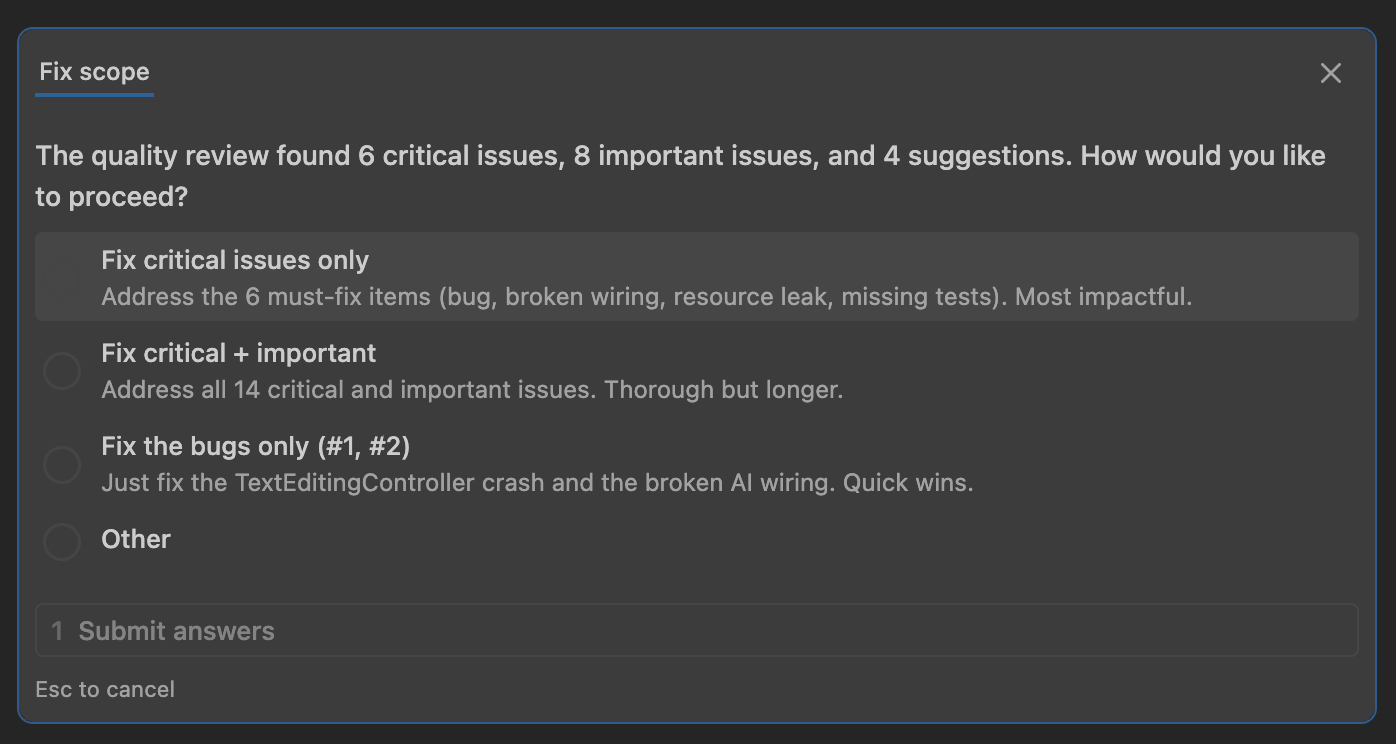
You choose the scope, and Wingspan fixes the selected issues automatically, re-running analysis and tests after each fix.
The limits of automated review and where domain knowledge takes over
The review agents missed one issue: type-only changes (switching a fish’s category without editing its name) weren’t saving. The save method had an empty-name guard that prevented category changes on unnamed entries. Four review agents ran, and none flagged it.
Similarly, the agents also recommended deprecated packages (google_generative_ai, now firebase_ai) and a Gemini model (gemini-2.0-flash) that was blocked for new users despite appearing in official documentation. These required manual debugging with curl to resolve.
This is where domain knowledge—yours, not the AI’s—becomes the final checkpoint. Use Wingspan to catch what patterns can reveal; use your own testing to catch what only behavior reveals. You know your users’ workflows. You understand why certain shortcuts matter. You can tap through your app and spot the UI bugs, race conditions under load, and edge cases that only emerge when you live with the software. Wingspan handles the scaffolding; you handle the ship-readiness.
The takeaway: automated review catches architectural and pattern issues exceptionally well, but it can’t replace running the app, tapping through the flows yourself, and thinking through the workflows your users actually follow.
Tips
- The quality review is when architecture and pattern violations surface. Skipping it means shipping design debt disguised as working code.
- Manual testing still matters. Run the app. Tap every button. Try edge cases. The AI catches patterns; you catch behavior.
Working Outside the Phases
Not everything needs the full brainstorm-plan-build-review cycle. During the Fish Tank Tracker development, most quick fixes and polish work bypassed the structured phases—by design.
Quick changes
Just describe what you need in natural language:
Change the livestock icon from a paw print to a fish iconThe camera preview should be centered instead of left-justifiedPin the intl dependency to ^0.20.2The API key field shouldn't be obscured like a passwordWingspan handles these without invoking a skill, allowing small changes to flow in parallel with structured workflows. We added scientific name editing, a retake photo feature, a custom SVG fish icon, and various UI fixes this way—all flowing in parallel with the structured Wingspan workflows.
Mixing structured and ad-hoc work
You can also use individual skills for specific decisions. When choosing an image cropping package, we ran /brainstorm for that single decision. It explored three options with trade-offs, and we picked one in under two minutes. No plan or build phase needed; we implemented it directly.
Emergency fixes
We never needed /hotfix during the Fish Tank Tracker build — nothing was in production yet. But if the app had been live and users reported a crash on the crop button, this is what we’d reach for:
/hotfix users are getting a crash when they tap the crop button on Android/hotfix applies a minimal fix with enforced review and testing, skipping the brainstorm and planning phases. It’s designed for production emergencies where speed matters but you still want guardrails.
Putting It All Together
Here’s how a typical feature development flows with Wingspan:
The full cycle (new features, big changes)
/brainstorm add image cropping to the edit page
  → Explores packages, UX approaches, placement decisions
  → Output: docs/brainstorm/2026-03-31-image-crop-brainstorm-doc.md

/refine-approach
  → Catches gaps and contradictions

/plan implement image cropping from our brainstorm
  → Codebase review, user-flow analysis, external docs research
  → Output: docs/plan/2026-03-31-feat-image-crop-plan.md

/plan-technical-review
  → Simplicity vs rigor review

/build docs/plan/2026-03-31-feat-image-crop-plan.md
  → Code + tests + analysis

/review
  → Four agents assess quality in parallel
  → Fixes critical/important findings
The short cycle (medium changes)
/brainstorm add a way to edit entries in the gallery
  → Quick Q&A, approach selection

/plan implement entry detail page
  → Picks up brainstorm, runs research agents

/build docs/plan/...
  → Full implementation

/review
  → Quality check before merge
No cycle (small changes, bug fixes)
The empty state shows a paw print icon, change it to a fishOr for production bugs:
/hotfix users are seeing a render overflow on the edit page when the keyboard opensWhat to Expect
After building the Fish Tank Tracker from scratch with Wingspan, a few patterns stood out:
Parallel review agents catch real bugs. Broken wiring, crash-causing anti-patterns, and architectural violations. Not theoretical issues—actual problems that would ship otherwise. The review phase paid for itself on the very first build.
The user-flow analysis agent stands out. It consistently finds edge cases brainstorming misses: debounce data loss, index-out-of-bounds errors, race conditions between concurrent operations. These are the bugs that typically ship to production.
The workflow is flexible by design. You don’t always need every step. We skipped /refine-approach and /plan-technical-review for well-scoped features, used /brainstorm for a two-minute package selection, and handled a dozen quick fixes with plain natural language. Rigidity would have made it unusable. Flexibility makes it practical.
Human judgment still drives the product. We pushed back on implementation choices (no auto-deleting empty entries) and caught bugs agents missed (type-only saves failing). We also spotted UI issues that required actually running the app (overlapping buttons, render overflows) and made UX decisions that shaped the architecture (relocating the AI button near the fields it fills). Wingspan handles the scaffolding and catches the details; the developer sets the direction.
How you frame the project matters. Calling something a “demo app” gives the AI permission to cut corners. If you want production-grade architecture, set that expectation upfront. The AI responds to the same context cues a junior developer would. Tell Wingspan you’re shipping production, and it’ll enforce architectural rigor. The AI doesn’t know your intention unless you state it explicitly.
AI tools have knowledge gaps. Deprecated packages, blocked API models, missing platform configuration—these are areas where the developer’s real-world testing complements what AI agents can verify. We’re building detection for these gaps into future Wingspan versions.
Next Steps
- Wingspan on GitHub — Installation, full skills reference, and source code
- Very Good Ventures — Questions about Wingspan for your team