On this page
- Why go_router
- Configure Routes Declaratively
- Navigate with go, push, and replace
- Guard Routes with Redirects
- Understand Navigator Keys
- Set Up Bottom Navigation
- Set Up Tab Bar Navigation
- Nest Shells Inside Shells
- Pass Data Between Routes
- Manage Transition Animations
- Refresh Routes Reactively
- Test Your Routes
- Use Type-Safe Routes
- Handle Deep Links
- Handle Errors Gracefully
- Checklist
Every Flutter app beyond a single screen needs routing. Get it wrong and you inherit tangled navigation logic, broken deep links, and state that vanishes when users press the back button. Get it right and navigation fades into the background — reliable, testable, invisible.
This guide covers the patterns that scale: declarative route configuration with go_router, authentication guards, nested navigation, bottom bars, tab bars, navigator key management, type-safe routes, and deep linking.
Why go_router
Flutter ships with Navigator and Navigator 2.0. The first handles simple push/pop stacks. The second exposes the full Router API — powerful, but verbose. Writing a custom RouterDelegate and RouteInformationParser by hand demands significant boilerplate for features most apps need out of the box.
go_router sits on top of Navigator 2.0 and handles that boilerplate. It gives you:
- Declarative route configuration — define your entire route tree in one place
- URL-based navigation — every screen maps to a path
- Deep linking — works on web, iOS, and Android without extra setup
- Redirection — centralized auth guards and conditional routing
- Nested navigation — bottom nav bars and tabbed interfaces that preserve state
Add it to your project:
dependencies:
  go_router: ^14.0.0
Configure Routes Declaratively
Define your route tree as a single, readable structure. Each GoRoute maps a URL path to a widget builder:
final router = GoRouter(
  initialLocation: '/',
  routes: [
    GoRoute(
      path: '/',
      builder: (context, state) => const HomeScreen(),
      routes: [
        GoRoute(
          path: 'products',
          builder: (context, state) => const ProductsScreen(),
          routes: [
            GoRoute(
              path: ':id',
              builder: (context, state) {
                final id = state.pathParameters['id']!;
                return ProductDetailScreen(productId: id);
              },
            ),
          ],
        ),
      ],
    ),
  ],
);
Three rules keep this tree maintainable:
- Nest routes to reflect hierarchy. A product detail screen lives under
/products/:id, not as a top-level route. The URL structure mirrors the UI structure. - Keep builders thin. Extract widget construction into the screen itself. The builder’s job is to read parameters and pass them — nothing more.
- Define the tree in one file. Scattering route definitions across the codebase makes it difficult to reason about navigation flow. A single
router.dartfile acts as a map of your entire app.
Navigate with go, push, and replace
go_router offers three navigation methods. Each serves a distinct purpose:
// Replaces the entire navigation stack. Use for top-level navigation.
context.go('/products');

// Pushes onto the stack. Use when the user should be able to pop back.
context.push('/products/42');

// Replaces the current screen without adding to the stack.
context.pushReplacement('/login');
Use go for declarative navigation. It rebuilds the stack to match the target path. Navigating to /products/42 with go creates a stack of [Home, Products, ProductDetail] — every ancestor route appears automatically.
Use push for imperative additions. It adds a single screen on top of the current stack. This suits flows where users must return to the exact screen they came from, such as opening a modal or a detail view from a search result.
Use pushReplacement for one-off transitions. A login screen that transitions to a home screen should replace, not push — the user should not navigate back to the login form.
Guard Routes with Redirects
Authentication checks belong in a redirect, not scattered across individual screens. go_router evaluates the redirect callback on every navigation event:
final router = GoRouter(
  redirect: (context, state) {
    final isLoggedIn = AuthService.of(context).isLoggedIn;
    final isLoggingIn = state.matchedLocation == '/login';

    if (!isLoggedIn && !isLoggingIn) return '/login';
    if (isLoggedIn && isLoggingIn) return '/';

    return null; // No redirect needed.
  },
  routes: [ /* ... */ ],
);
This pattern centralizes access control. Every route passes through the same check. No screen needs to know whether the user is authenticated — the router handles it before the screen builds.
Two guidelines for redirects:
- Return
nullto allow navigation. Any non-null return triggers a redirect to that path. - Guard against redirect loops. Always check whether the user is already heading to the redirect target. Without the
isLoggingIncheck above, an unauthenticated user triggers an infinite loop:/loginredirects to/loginredirects to/login.
For route-level guards, place a redirect on the individual GoRoute:
GoRoute(
  path: '/admin',
  redirect: (context, state) {
    final isAdmin = AuthService.of(context).isAdmin;
    if (!isAdmin) return '/';
    return null;
  },
  builder: (context, state) => const AdminScreen(),
),
Understand Navigator Keys
Before building any nested navigation, understand how go_router uses navigator keys. Every navigator in your app — root and nested — needs a unique GlobalKey<NavigatorState>. These keys determine where a route renders.
final rootNavigatorKey = GlobalKey<NavigatorState>(debugLabel: 'root');
final shellNavigatorKey = GlobalKey<NavigatorState>(debugLabel: 'shell');
final feedNavigatorKey = GlobalKey<NavigatorState>(debugLabel: 'feed');
final searchNavigatorKey = GlobalKey<NavigatorState>(debugLabel: 'search');
final profileNavigatorKey = GlobalKey<NavigatorState>(debugLabel: 'profile');
Declare all keys in your router.dart file, at the top, before the router definition. Name each key with a debugLabel — it appears in error messages and Flutter DevTools, and saves you from guessing which navigator threw an exception.
Three rules govern navigator keys:
- The root key goes on
GoRouter. This is the top-level navigator that owns the entire screen. Every route renders here unless directed elsewhere.
final router = GoRouter(
  navigatorKey: rootNavigatorKey,
  routes: [ /* ... */ ],
);-
Shell keys go on
ShellRouteorStatefulShellBranch. Each shell or branch creates a nested navigator. Assign it a key so child routes can reference it — or escape it. -
parentNavigatorKeycontrols where a route renders. By default, a route renders in the nearest enclosing navigator. SetparentNavigatorKeyto override this. Point it at the root key to break out of a shell; point it at a specific branch key to render within that branch.
// Renders inside the shell (default behavior).
GoRoute(
  path: 'settings',
  builder: (context, state) => const SettingsScreen(),
),

// Renders on the root navigator, outside the shell.
GoRoute(
  path: 'checkout',
  parentNavigatorKey: rootNavigatorKey,
  builder: (context, state) => const CheckoutScreen(),
),
Common Navigator Key Mistakes
Reusing the same key for two navigators. Each key must be unique. Sharing a key between a ShellRoute and a StatefulShellBranch triggers a runtime assertion.
Forgetting to pass the root key to GoRouter. Without it, you cannot reference the root navigator from nested routes. The parentNavigatorKey on a child route has nothing to point at.
Creating keys inside build methods. A GlobalKey created during build gets recreated on every frame. Declare keys as top-level variables or static fields — they must persist across rebuilds.
Set Up Bottom Navigation
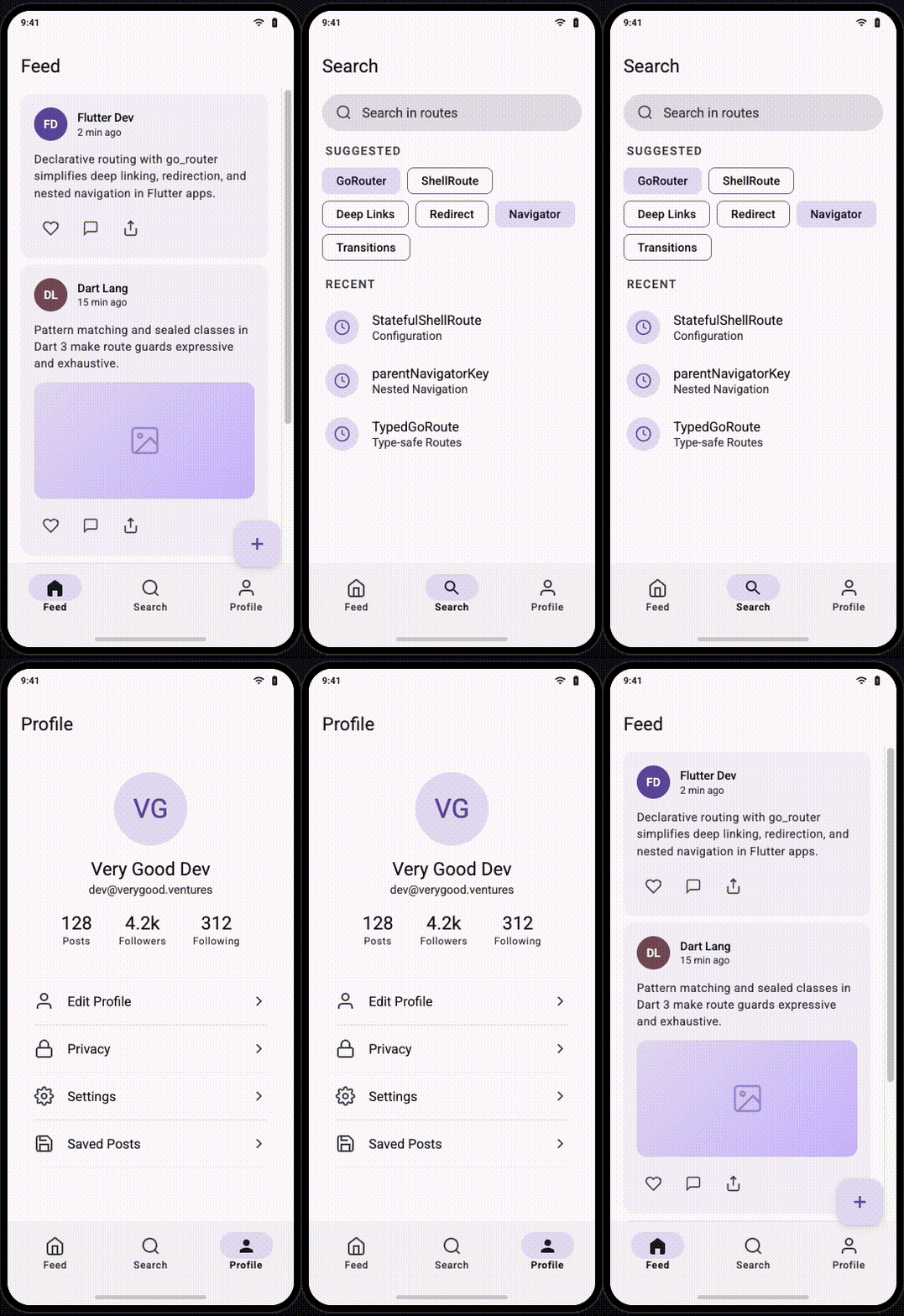
Bottom navigation bars are the most common shell pattern. The bar persists across tabs; the content area swaps. Here is the complete setup, from route definition to widget.
With ShellRoute (Stateless)
Use ShellRoute when your tabs hold simple, read-only content that can rebuild without consequence — a news feed, a settings menu, a static list:
final rootNavigatorKey = GlobalKey<NavigatorState>(debugLabel: 'root');

final router = GoRouter(
  navigatorKey: rootNavigatorKey,
  initialLocation: '/feed',
  routes: [
    ShellRoute(
      builder: (context, state, child) {
        return ScaffoldWithBottomNav(child: child);
      },
      routes: [
        GoRoute(
          path: '/feed',
          builder: (context, state) => const FeedScreen(),
          routes: [
            GoRoute(
              path: ':postId',
              parentNavigatorKey: rootNavigatorKey,
              builder: (context, state) => PostDetailScreen(
                postId: state.pathParameters['postId']!,
              ),
            ),
          ],
        ),
        GoRoute(
          path: '/search',
          builder: (context, state) => const SearchScreen(),
        ),
        GoRoute(
          path: '/profile',
          builder: (context, state) => const ProfileScreen(),
        ),
      ],
    ),
  ],
);
The ScaffoldWithBottomNav widget reads the current location to highlight the active tab:
class ScaffoldWithBottomNav extends StatelessWidget {
  const ScaffoldWithBottomNav({required this.child, super.key});

  final Widget child;

  @override
  Widget build(BuildContext context) {
    return Scaffold(
      body: child,
      bottomNavigationBar: NavigationBar(
        selectedIndex: _calculateSelectedIndex(context),
        onDestinationSelected: (index) => _onTap(context, index),
        destinations: const [
          NavigationDestination(icon: Icon(Icons.home), label: 'Feed'),
          NavigationDestination(icon: Icon(Icons.search), label: 'Search'),
          NavigationDestination(icon: Icon(Icons.person), label: 'Profile'),
        ],
      ),
    );
  }

  int _calculateSelectedIndex(BuildContext context) {
    final location = GoRouterState.of(context).matchedLocation;
    if (location.startsWith('/feed')) return 0;
    if (location.startsWith('/search')) return 1;
    if (location.startsWith('/profile')) return 2;
    return 0;
  }

  void _onTap(BuildContext context, int index) {
    switch (index) {
      case 0:
        context.go('/feed');
        break;
      case 1:
        context.go('/search');
        break;
      case 2:
        context.go('/profile');
        break;
    }
  }
}
Note: Tab switching uses
context.go, notcontext.push.goresets the navigation stack for that path.pushwould stack screens on top of each other, and the back button would cycle through every tab the user visited.
With StatefulShellRoute (Stateful)
Use StatefulShellRoute when tabs contain scroll positions, form input, or in-progress state that must survive tab switches. Each branch maintains its own navigator and widget tree:
final rootNavigatorKey = GlobalKey<NavigatorState>(debugLabel: 'root');

final router = GoRouter(
  navigatorKey: rootNavigatorKey,
  initialLocation: '/feed',
  routes: [
    StatefulShellRoute.indexedStack(
      builder: (context, state, navigationShell) {
        return ScaffoldWithStatefulNav(navigationShell: navigationShell);
      },
      branches: [
        StatefulShellBranch(
          navigatorKey: GlobalKey<NavigatorState>(debugLabel: 'feed'),
          routes: [
            GoRoute(
              path: '/feed',
              builder: (context, state) => const FeedScreen(),
              routes: [
                GoRoute(
                  path: 'details/:id',
                  builder: (context, state) => FeedDetailScreen(
                    id: state.pathParameters['id']!,
                  ),
                ),
              ],
            ),
          ],
        ),
        StatefulShellBranch(
          navigatorKey: GlobalKey<NavigatorState>(debugLabel: 'search'),
          routes: [
            GoRoute(
              path: '/search',
              builder: (context, state) => const SearchScreen(),
            ),
          ],
        ),
        StatefulShellBranch(
          navigatorKey: GlobalKey<NavigatorState>(debugLabel: 'profile'),
          routes: [
            GoRoute(
              path: '/profile',
              builder: (context, state) => const ProfileScreen(),
            ),
          ],
        ),
      ],
    ),
  ],
);
The scaffold uses StatefulNavigationShell instead of a raw child. This shell exposes goBranch for tab switching and currentIndex for highlighting:
class ScaffoldWithStatefulNav extends StatelessWidget {
  const ScaffoldWithStatefulNav({
    required this.navigationShell,
    super.key,
  });

  final StatefulNavigationShell navigationShell;

  @override
  Widget build(BuildContext context) {
    return Scaffold(
      body: navigationShell,
      bottomNavigationBar: NavigationBar(
        selectedIndex: navigationShell.currentIndex,
        onDestinationSelected: (index) {
          navigationShell.goBranch(
            index,
            // Navigate to the initial location of the branch
            // if the user taps the active tab again.
            initialLocation: index == navigationShell.currentIndex,
          );
        },
        destinations: const [
          NavigationDestination(icon: Icon(Icons.home), label: 'Feed'),
          NavigationDestination(icon: Icon(Icons.search), label: 'Search'),
          NavigationDestination(icon: Icon(Icons.person), label: 'Profile'),
        ],
      ),
    );
  }
}
The initialLocation parameter on goBranch handles a common UX pattern: tapping the already-active tab resets it to the root screen. A user deep inside /feed/details/42 taps the feed tab and returns to /feed. Without this flag, the tap does nothing.
When to Choose Which
| Scenario | Use |
|---|---|
| Tabs hold static or easily rebuilt content | ShellRoute |
| Tabs contain scroll positions, forms, or media playback | StatefulShellRoute |
| You need independent back stacks per tab (like Instagram) | StatefulShellRoute |
| Your app has only two or three simple screens | ShellRoute |
Set Up Tab Bar Navigation
A TabBar inside an AppBar differs from bottom navigation in structure but follows the same routing principles. The tabs live inside a screen that is itself a route, and each tab panel maps to a sub-route.
Tabs as Sub-Routes
Define the tabbed screen as a ShellRoute whose builder provides the TabController and TabBar. Each tab panel is a child route:
final tabNavigatorKey = GlobalKey<NavigatorState>(debugLabel: 'tabs');

ShellRoute(
  navigatorKey: tabNavigatorKey,
  builder: (context, state, child) {
    return DashboardScreen(child: child);
  },
  routes: [
    GoRoute(
      path: '/dashboard/overview',
      builder: (context, state) => const OverviewTab(),
    ),
    GoRoute(
      path: '/dashboard/analytics',
      builder: (context, state) => const AnalyticsTab(),
    ),
    GoRoute(
      path: '/dashboard/reports',
      builder: (context, state) => const ReportsTab(),
    ),
  ],
),
The DashboardScreen manages the TabBar and maps tab indices to routes:
class DashboardScreen extends StatelessWidget {
  const DashboardScreen({required this.child, super.key});

  final Widget child;

  @override
  Widget build(BuildContext context) {
    return DefaultTabController(
      length: 3,
      child: Scaffold(
        appBar: AppBar(
          title: const Text('Dashboard'),
          bottom: TabBar(
            onTap: (index) => _onTabTapped(context, index),
            tabs: const [
              Tab(text: 'Overview'),
              Tab(text: 'Analytics'),
              Tab(text: 'Reports'),
            ],
          ),
        ),
        body: child,
      ),
    );
  }

  void _onTabTapped(BuildContext context, int index) {
    switch (index) {
      case 0:
        context.go('/dashboard/overview');
        break;
      case 1:
        context.go('/dashboard/analytics');
        break;
      case 2:
        context.go('/dashboard/reports');
        break;
    }
  }
}
Tabs with Preserved State
For tabs that must retain state — a chart the user has zoomed, a form partially filled — wrap the tab routes in a StatefulShellRoute nested inside the parent shell:
StatefulShellRoute.indexedStack(
  builder: (context, state, navigationShell) {
    return DashboardScreen(navigationShell: navigationShell);
  },
  branches: [
    StatefulShellBranch(
      routes: [
        GoRoute(
          path: '/dashboard/overview',
          builder: (context, state) => const OverviewTab(),
        ),
      ],
    ),
    StatefulShellBranch(
      routes: [
        GoRoute(
          path: '/dashboard/analytics',
          builder: (context, state) => const AnalyticsTab(),
          routes: [
            GoRoute(
              path: ':metricId',
              builder: (context, state) => MetricDetailScreen(
                metricId: state.pathParameters['metricId']!,
              ),
            ),
          ],
        ),
      ],
    ),
    StatefulShellBranch(
      routes: [
        GoRoute(
          path: '/dashboard/reports',
          builder: (context, state) => const ReportsTab(),
        ),
      ],
    ),
  ],
),
The user drills into /dashboard/analytics/conversion-rate, switches to the Reports tab, then switches back — the metric detail screen is still there, scroll position intact.
Nest Shells Inside Shells
Real apps combine bottom navigation with tab bars, sidebars with detail panels, or drawers with nested tab views. go_router supports this through shell nesting.
Rules for Nesting Shells
- Each shell must own a distinct navigator. Assign separate
GlobalKeys. Two shells sharing a key will conflict. - The outermost shell controls persistence. If the outer shell is a
StatefulShellRoute, inner branches survive tab switches. If it is a plainShellRoute, they rebuild. - Full-screen routes sit outside all shells. Place routes like onboarding, login, or media viewers as siblings of the outermost shell, not inside it. Point them at
rootNavigatorKey. - Limit nesting depth to two. Three or more nested shells become difficult to debug. If your navigation requires a third level, reconsider whether the UX itself is too complex.
Consider an app with a bottom navigation bar and a dashboard tab that itself contains a TabBar:
final rootNavigatorKey = GlobalKey<NavigatorState>(debugLabel: 'root');

final router = GoRouter(
  navigatorKey: rootNavigatorKey,
  initialLocation: '/home',
  routes: [
    StatefulShellRoute.indexedStack(
      builder: (context, state, navigationShell) {
        return MainScaffold(navigationShell: navigationShell);
      },
      branches: [
        // Tab 1: Home (simple screen)
        StatefulShellBranch(
          routes: [
            GoRoute(
              path: '/home',
              builder: (context, state) => const HomeScreen(),
            ),
          ],
        ),
        // Tab 2: Dashboard (contains its own TabBar)
        StatefulShellBranch(
          routes: [
            ShellRoute(
              builder: (context, state, child) {
                return DashboardScreen(child: child);
              },
              routes: [
                GoRoute(
                  path: '/dashboard/overview',
                  builder: (context, state) => const OverviewTab(),
                ),
                GoRoute(
                  path: '/dashboard/analytics',
                  builder: (context, state) => const AnalyticsTab(),
                ),
              ],
            ),
          ],
        ),
        // Tab 3: Settings (simple screen)
        StatefulShellBranch(
          routes: [
            GoRoute(
              path: '/settings',
              builder: (context, state) => const SettingsScreen(),
            ),
          ],
        ),
      ],
    ),
    // Full-screen routes that cover everything
    GoRoute(
      path: '/onboarding',
      parentNavigatorKey: rootNavigatorKey,
      builder: (context, state) => const OnboardingScreen(),
    ),
  ],
);
The outer StatefulShellRoute manages the bottom bar. The inner ShellRoute manages the dashboard’s TabBar. Each layer owns its own navigator. The user’s position in the dashboard tabs survives switching to the Home tab and back, because the outer shell preserves the branch state.
Pass Data Between Routes
Routes often need data beyond path parameters. go_router provides three mechanisms, each suited to a different scenario.
Path Parameters
Use when the value identifies the resource and must survive deep links, browser refreshes, and URL sharing.
Scenario: A push notification links to a specific order. The user taps it, the OS opens https://myapp.com/orders/98712, and the app navigates straight to that order — even if it was killed in the background. The URL alone carries enough information to reconstruct the screen.
GoRoute(
  path: '/orders/:orderId',
  builder: (context, state) {
    final orderId = state.pathParameters['orderId']!;
    return OrderDetailScreen(orderId: orderId);
  },
),

// From a notification handler:
context.go('/orders/98712');
The same URL works when a support agent pastes it into a chat, when a user bookmarks it on web, or when the browser reloads the page. Path parameters are the source of truth for which resource the screen displays.
Another scenario: A social app where tapping a username anywhere — in a comment, a like notification, a mention — opens that profile:
GoRoute(
  path: '/users/:username',
  builder: (context, state) {
    final username = state.pathParameters['username']!;
    return ProfileScreen(username: username);
  },
),

// From a mention in a post body:
context.go('/users/dash_flutter');
The URL /users/dash_flutter is shareable, indexable by search engines on Flutter web, and works as a deep link from an email or SMS.
Query Parameters
Use when the value modifies how a screen behaves but is optional — the screen renders without it, and sharing the URL preserves the customization.
Scenario: An e-commerce app with a product listing screen. Users filter by category, price range, and sort order. These filters do not identify a specific product — they shape which products appear. A colleague sends the link https://myapp.com/products?category=shoes&sort=price_asc&min=50 and the recipient sees the same filtered view:
GoRoute(
  path: '/products',
  builder: (context, state) {
    final category = state.uri.queryParameters['category'];
    final sort = state.uri.queryParameters['sort'] ?? 'relevance';
    final minPrice = state.uri.queryParameters['min'];
    return ProductListScreen(
      category: category,
      sort: sort,
      minPrice: minPrice != null ? double.tryParse(minPrice) : null,
    );
  },
),

// Navigate with filters applied:
context.go('/products?category=shoes&sort=price_asc&min=50');

// Navigate without filters — still works:
context.go('/products');
Remove every query parameter and the screen still loads — it shows all products with default sorting. That optionality is what distinguishes query parameters from path parameters.
Another scenario: A search screen with pagination. The user searches, scrolls to page 3, and shares the URL. The recipient lands on the same page of results:
GoRoute(
  path: '/search',
  builder: (context, state) {
    final query = state.uri.queryParameters['q'] ?? '';
    final page = int.tryParse(
      state.uri.queryParameters['page'] ?? '',
    ) ?? 1;
    return SearchScreen(query: query, page: page);
  },
),

// Navigate:
context.go('/search?q=go_router+deep+linking&page=3');
Extra
Use when you need to pass data that cannot serialize to a URL — an in-memory object, a file handle, raw bytes, or a complex model that already exists in the widget tree.
Scenario: Multi-step form wizard. The user fills out a shipping address on screen one and taps “Continue.” Screen two needs the validated ShippingAddress object to display a confirmation and calculate costs. No server call has happened yet — this data exists only in memory:
GoRoute(
  path: '/checkout/confirm',
  builder: (context, state) {
    final address = state.extra! as ShippingAddress;
    return ConfirmationScreen(address: address);
  },
),

// After the user fills the address form:
context.push('/checkout/confirm', extra: validatedAddress);
This works because the user reached the confirmation screen through in-app navigation. They did not type the URL into a browser. They will not share this link. The data’s lifetime matches the navigation flow.
Scenario: Local photo editing. The user picks a photo from their device gallery. The edit screen needs the raw Uint8List image bytes to render filters and crop tools. There is no server, no ID, no URL-friendly representation of this data:
GoRoute(
  path: '/editor',
  builder: (context, state) {
    final imageBytes = state.extra! as Uint8List;
    return PhotoEditorScreen(imageBytes: imageBytes);
  },
),

// After picking a photo:
final bytes = await picker.pickImage();
if (bytes != null) {
  context.push('/editor', extra: bytes);
}
No path parameter or query string can carry raw bytes. extra is the only option.
Scenario: Returning a selection. A checkout screen opens an “address picker” screen. The user selects an address, and the picker pops back with the chosen Address object. The picker pushes the result back through extra and pop:
// In the address picker, when the user taps an address:
context.pop(selectedAddress);

// In the checkout screen, capturing the result:
final address = await context.push<Address>('/addresses/pick');
if (address != null) {
  setState(() => _selectedAddress = address);
}
Tip: Treat
extraas a last resort. Data passed viaextradoes not survive browser refreshes, deep links, or URL sharing. It vanishes when the user copies the URL or hits F5. If you rely onextra, provide a fallback: fetch the data from a repository whenextrais null.
When to Use Which
| Question | Path param | Query param | Extra |
|---|---|---|---|
| Does it identify which resource the screen shows? | Yes | ||
| Should the URL work as a deep link or bookmark? | Yes | Yes | |
| Is it optional — the screen works without it? | Yes | ||
| Is it a filter, sort, or pagination value? | Yes | ||
| Is it an in-memory object with no URL representation? | Yes | ||
| Does it only exist during a single navigation flow? | Yes | ||
| Must it survive a browser refresh? | Yes | Yes |
Manage Transition Animations
go_router uses platform-default transitions. To customize them, use pageBuilder instead of builder and return a CustomTransitionPage:
GoRoute(
  path: '/details/:id',
  pageBuilder: (context, state) {
    return CustomTransitionPage(
      key: state.pageKey,
      child: DetailScreen(id: state.pathParameters['id']!),
      transitionsBuilder: (context, animation, secondaryAnimation, child) {
        return FadeTransition(opacity: animation, child: child);
      },
    );
  },
),
Three guidelines for transitions:
- Use
state.pageKeyas the page key. This allowsgo_routerto distinguish between pages and trigger the correct animation. Omitting it causes stale pages to linger in the navigator. - Match transitions to the navigation pattern. Forward navigation (push) suits slide-in. Lateral navigation (tab switch) suits fade or none. Modal presentation suits slide-up.
- Disable transitions for tab switches. Within a bottom bar or tab bar, instant swaps feel correct. Animation between tabs feels sluggish:
pageBuilder: (context, state) {
  return const NoTransitionPage(child: FeedScreen());
},
Refresh Routes Reactively
Authentication state, locale, or theme can change while the app runs. When they do, go_router must re-evaluate its redirects. Pass a Listenable to the refreshListenable parameter:
final authNotifier = AuthNotifier(); // extends ChangeNotifier

final router = GoRouter(
  refreshListenable: authNotifier,
  redirect: (context, state) {
    if (!authNotifier.isLoggedIn) return '/login';
    return null;
  },
  routes: [ /* ... */ ],
);
When authNotifier calls notifyListeners(), the router re-runs its redirect callback. A user whose session expires navigates to /login automatically — no manual check required.
Combine multiple listenables when several sources can trigger a re-evaluation:
final refreshNotifier = Listenable.merge([
  authNotifier,
  localeNotifier,
  onboardingNotifier,
]);

final router = GoRouter(
  refreshListenable: refreshNotifier,
  redirect: (context, state) {
    if (!authNotifier.isLoggedIn) return '/login';
    if (!onboardingNotifier.isComplete) return '/onboarding';
    return null;
  },
  routes: [ /* ... */ ],
);
Test Your Routes
Routing logic deserves tests. A broken redirect or a miswired navigator key surfaces only at runtime — often in production. Write tests that exercise the router directly.
Test Redirects
test('redirects unauthenticated users to login', () {
  final authNotifier = AuthNotifier()..setLoggedIn(false);

  final router = GoRouter(
    refreshListenable: authNotifier,
    redirect: (context, state) {
      if (!authNotifier.isLoggedIn) return '/login';
      return null;
    },
    routes: [
      GoRoute(path: '/', builder: (_, __) => const HomeScreen()),
      GoRoute(path: '/login', builder: (_, __) => const LoginScreen()),
    ],
  );

  router.go('/');
  expect(router.state.matchedLocation, '/login');
});
Test Parameter Extraction
test('extracts product ID from path', () {
  String? capturedId;

  final router = GoRouter(
    routes: [
      GoRoute(
        path: '/products/:id',
        builder: (context, state) {
          capturedId = state.pathParameters['id'];
          return const Placeholder();
        },
      ),
    ],
  );

  router.go('/products/42');
  expect(capturedId, '42');
});
Test Shell Navigation
Verify that tapping a tab navigates to the correct location and that the shell persists:
testWidgets('bottom nav switches tabs', (tester) async {
  await tester.pumpWidget(MaterialApp.router(routerConfig: router));
  await tester.pumpAndSettle();

  // Verify initial tab
  expect(find.byType(FeedScreen), findsOneWidget);

  // Tap search tab
  await tester.tap(find.text('Search'));
  await tester.pumpAndSettle();

  expect(find.byType(SearchScreen), findsOneWidget);
  // Bottom nav still visible
  expect(find.byType(NavigationBar), findsOneWidget);
});
Use Type-Safe Routes
String-based paths are prone to typos and refactoring hazards. go_router supports code-generated, type-safe routes via the go_router_builder package:
dependencies:
  go_router: ^14.0.0

dev_dependencies:
  go_router_builder: ^2.7.0
  build_runner: ^2.4.0
Define routes as classes annotated with @TypedGoRoute:
part 'routes.g.dart';

@TypedGoRoute<HomeRoute>(
  path: '/',
  routes: [
    TypedGoRoute<ProductsRoute>(
      path: 'products',
      routes: [
        TypedGoRoute<ProductDetailRoute>(path: ':id'),
      ],
    ),
  ],
)
class HomeRoute extends GoRouteData {
  const HomeRoute();

  @override
  Widget build(BuildContext context, GoRouterState state) {
    return const HomeScreen();
  }
}

class ProductsRoute extends GoRouteData {
  const ProductsRoute();

  @override
  Widget build(BuildContext context, GoRouterState state) {
    return const ProductsScreen();
  }
}

class ProductDetailRoute extends GoRouteData {
  const ProductDetailRoute({required this.id});

  final String id;

  @override
  Widget build(BuildContext context, GoRouterState state) {
    return ProductDetailScreen(productId: id);
  }
}
Run dart run build_runner build to generate the routing code. Navigate with type-checked constructors instead of raw strings:
// Type-safe — the compiler catches errors.
const ProductDetailRoute(id: '42').go(context);

// String-based — typos compile fine and fail at runtime.
context.go('/products/42');
Type-safe routes eliminate an entire category of bugs. Path parameters become constructor arguments. Change a parameter name and the compiler flags every call site.
Handle Deep Links
go_router handles deep links by default. Any URL that matches a defined route resolves automatically — on web, via Android App Links, or via iOS Universal Links.
For platform-specific deep link setup, configure your AndroidManifest.xml and apple-app-site-association file to route your domain’s URLs to your app. Once the OS delivers the URL, go_router parses it and navigates to the matching route.
Test deep links during development:
# Android
adb shell am start -a android.intent.action.VIEW -d "https://example.com/products/42"

# iOS
xcrun simctl openurl booted "https://example.com/products/42"
Two practices for robust deep linking:
- Validate parameters in builders. A deep link may contain an invalid product ID. Handle missing or malformed data gracefully — show an error screen rather than crashing.
- Match your route structure to your URL structure. Deep links work because URLs map directly to routes. Break this mapping and deep links break with it.
Handle Errors Gracefully
When a user navigates to a route that does not exist — through a stale deep link, a mistyped URL, or a broken in-app link — show a helpful error screen:
final router = GoRouter(
  errorBuilder: (context, state) {
    return ErrorScreen(error: state.error);
  },
  routes: [ /* ... */ ],
);
The error screen should offer a clear path back: a button that navigates to the home screen, a search bar, or a relevant suggestion. A blank page or an unhandled exception teaches the user nothing.
Checklist
Before shipping your routing layer, verify these points:
- All routes and navigator keys defined in a single file
- Every navigator key has a unique
debugLabel - Navigator keys declared as top-level variables, not inside
build redirecthandles authentication at the router levelrefreshListenablere-evaluates redirects when auth state changes- Redirect callbacks guard against infinite loops
ShellRouteorStatefulShellRoutewraps persistent navigation UIStatefulShellRouteused where tab state must survive switches- Full-screen overlays use
parentNavigatorKeyto escape the shell - Nested shells limited to two levels
- Tab switches use
go, notpush goBranchwithinitialLocationresets tabs on re-tap- Path parameters used for resource identifiers
- Query parameters used for optional filters and sort orders
extraused sparingly, with a fallback fetch strategy- Type-safe routes replace string-based paths
pageBuilderwithstate.pageKeyused for custom transitions- Deep links tested on Android, iOS, and web
errorBuilderprovides a graceful fallback for unknown routes- Navigation methods (
go,push,pushReplacement) chosen deliberately - Redirect, parameter, and shell navigation covered by tests
Routing is infrastructure. Build it once with clear conventions, and every feature you ship afterward navigates without friction.