Your Business Doesn’t Fit on a Phone — Neither Should Your Flutter App
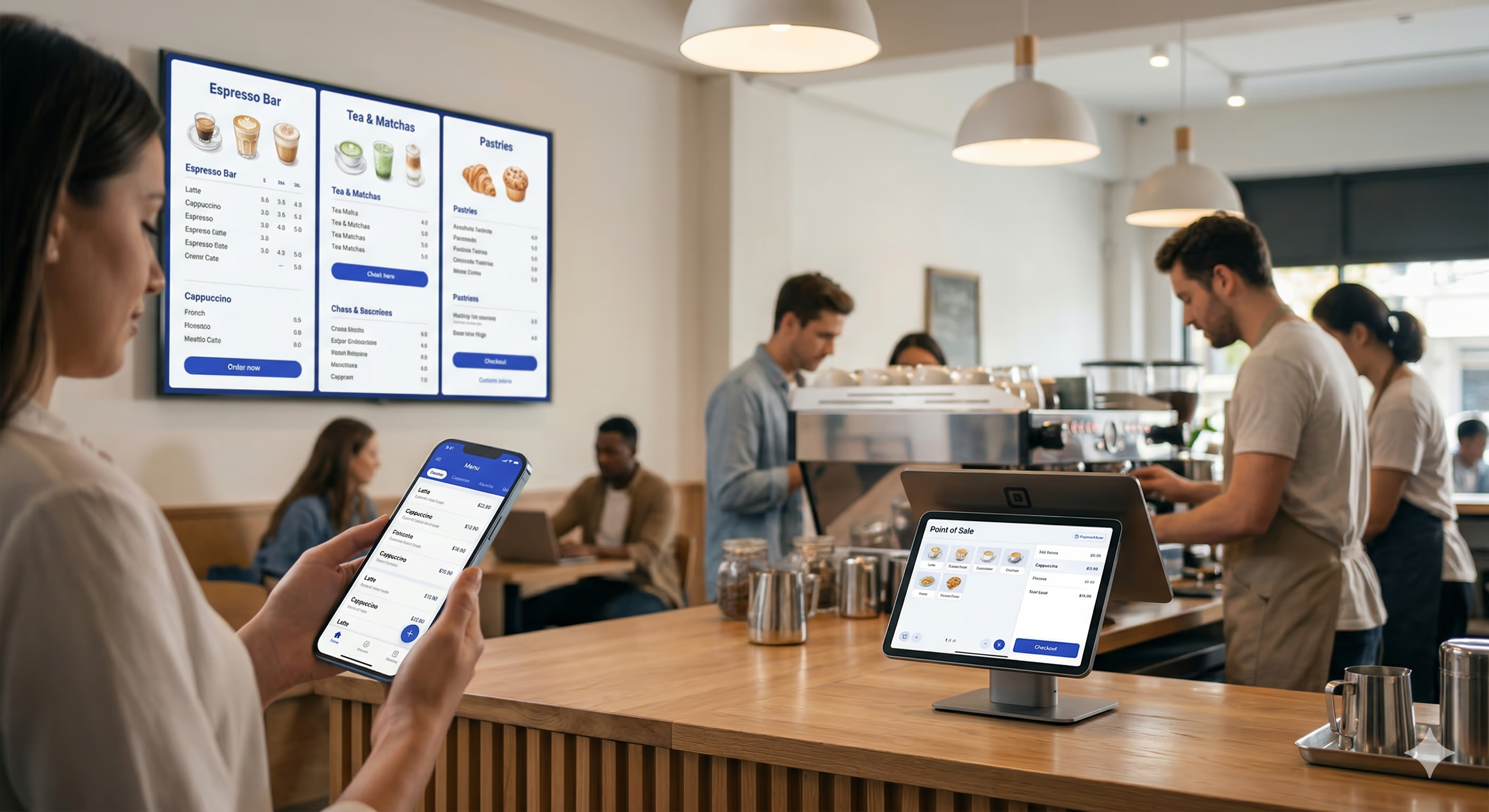
A modern coffee shop runs on many screens. On the guest side: a mobile app, a website, a self-order kiosk, drive-thru and in-store menu boards, and an order-ready display are all common these days. Behind the counter: a point-of-sale system and a kitchen display. Each application has its own platform expectations, hardware, and operating systems.
Most businesses build one or two of these, then buy off-the-shelf products for the rest — separate teams, separate codebases, separate release cycles. It seems “good enough”, but often the data lives in multiple systems, they don’t look exactly the same, there are actions you can complete on some devices but not others, and the whole experience is “just fine”. What if there were another way?
I address this head on in my recent talk “Your Business Doesn’t Fit on a Phone — Neither Should Your Flutter App”. Here’s the twist: this talk isn’t really about the architecture. It’s about a question I keep coming back to: when technology makes you more efficient, what do you do with that efficiency?
The Coffee Shop That Started It All
I’ve written before about my path from college barista to Google Developer Expert for Flutter and Dart — building a coffee shop app, becoming Director of Technology, eventually joining Very Good Ventures and working on mobile ordering for brands like Dutch Bros Coffee.
What I saw over all those years was the same pattern: coffee shops kept adding more tech, and that tech made operations more efficient. Drinks got made faster. Lines moved quicker. Fewer mistakes. But here’s the thing about efficiency — it’s a gift, and you have to decide what to do with it.
You can pocket the savings. Staff fewer people. Run leaner. Or you can reinvest it. Give your baristas more time to connect with customers. Keep the store cleaner. Make better drinks. The technology is neutral. The choice is yours.
Five Apps, One Codebase
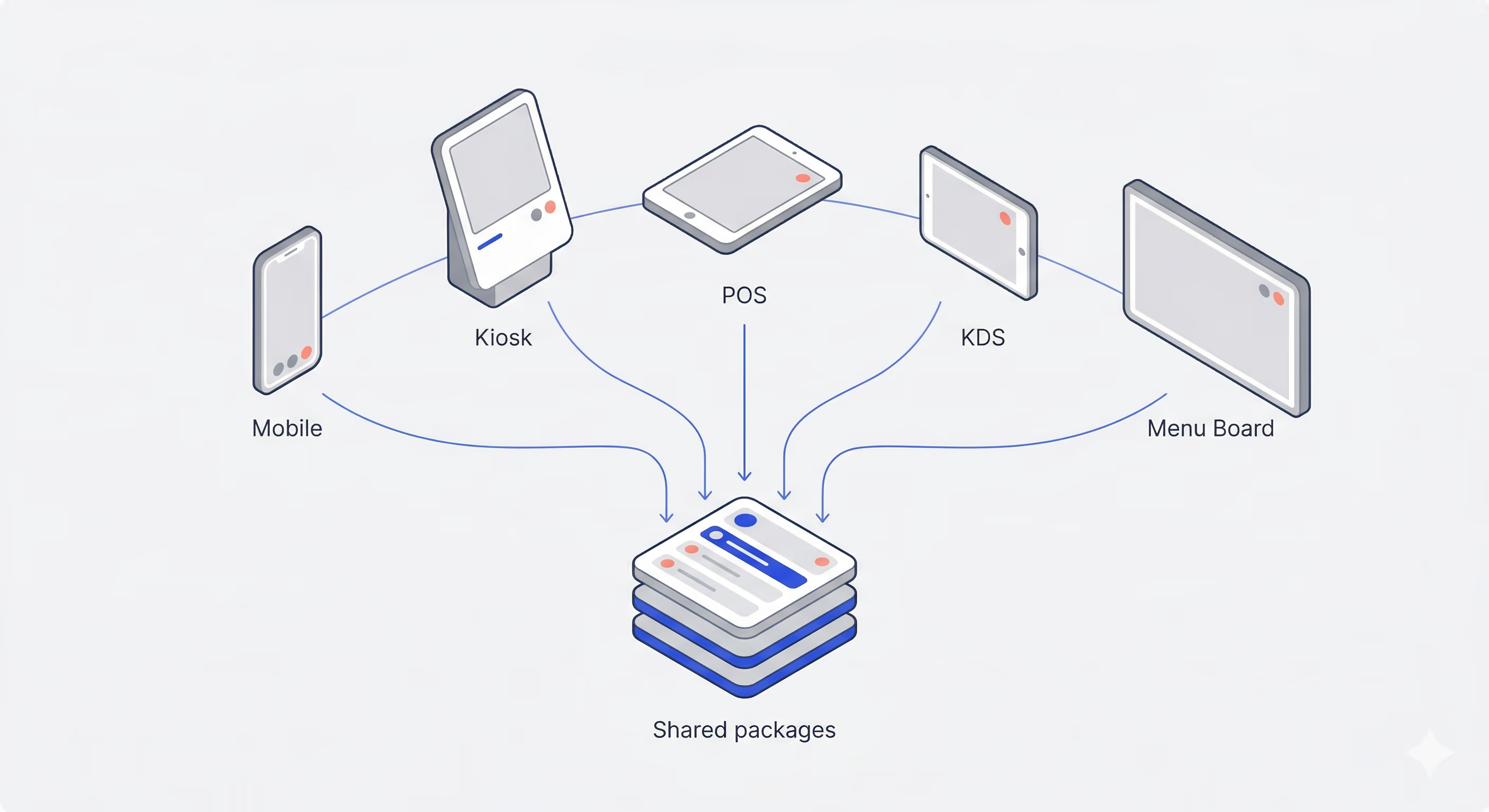
For the talk, I built a project called Very Yummy Coffee — a full coffee shop tech stack designed to show what Flutter can do when you think beyond the phone. The monorepo has five apps:
- Mobile App — customers browse the menu, customize drinks with modifiers, and place orders from their phone
- Kiosk App — an in-store touchscreen with a horizontal category row and item grid for walk-up ordering
- POS App — the cashier’s iPad for taking orders and managing item availability
- KDS (Kitchen Display System) — a tablet behind the counter with a three-column Kanban view: New, In Progress, Ready
- Menu Board App — a read-only display on a big screen with a three-panel layout for featured items and categories
Every app imports the same shared models, the same repositories, and the same UI components. Eight shared packages sit underneath those five apps, covering everything from the API client and connection management to shared menu features and a common UI library. Teams that ship multi-package Flutter repos often wire this up with configurable CI workflows so each package stays testable and releasable. For day-to-day testing across nested packages, Very Good CLI’s recursive test flow is built for exactly this shape of repo.
These apps run on iOS, macOS, Android, and even Linux. Built traditionally, this would be multiple product teams with separate skills trying to make products that work together and look the same.
With Flutter? Across the five apps, about 21% of all app code is shared. And that’s before I’ve extracted the cart and checkout flows into their own packages.
Every Device Just Knows
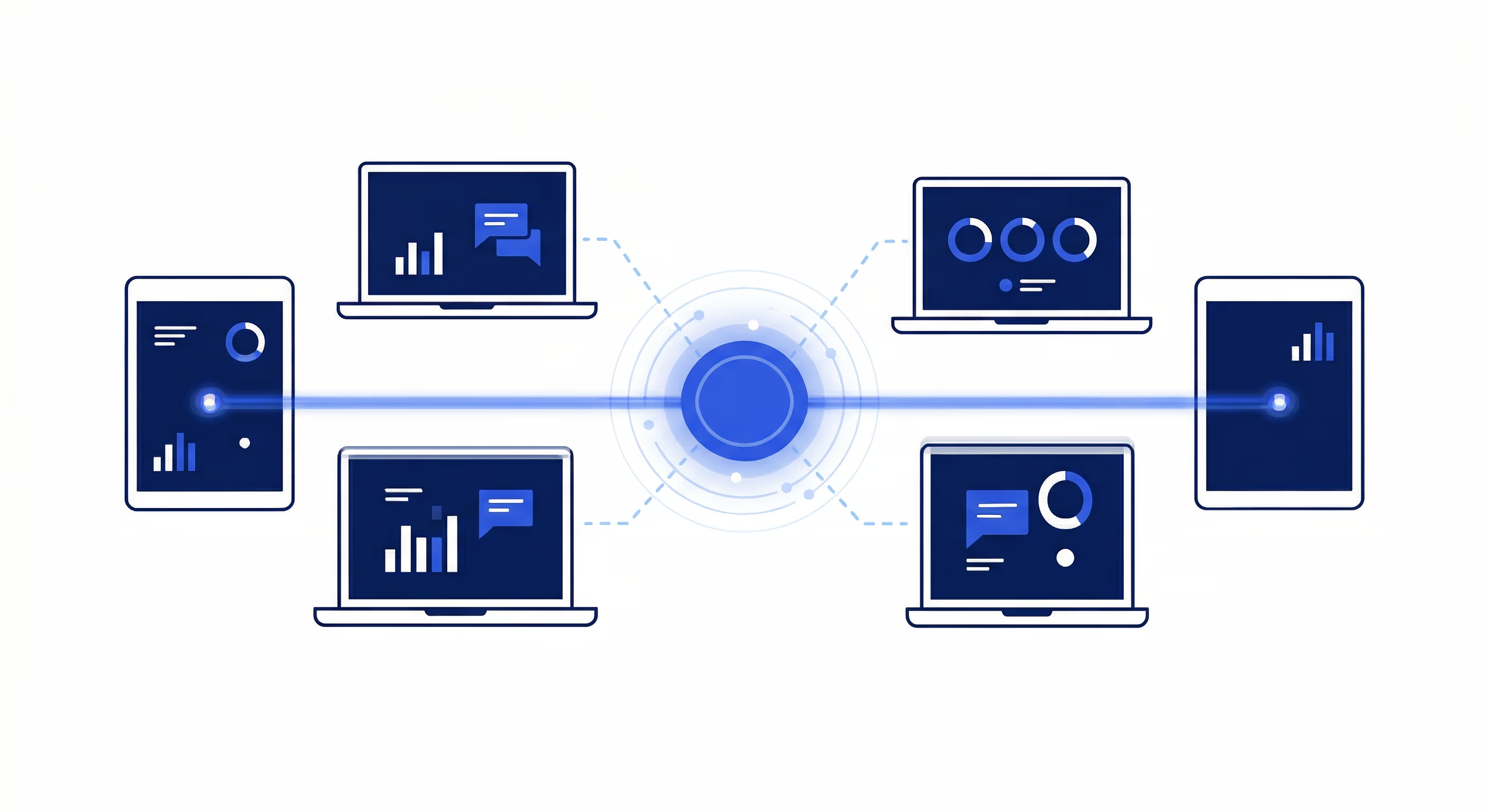
The real magic of this setup is that every device is always aware of what’s happening on every other device — and nobody had to build that per-app.
A Dart Frog server holds state in memory and broadcasts updates over WebSocket topics like menu, orders, and order:<id>. Each app opens a single WebSocket connection through a shared WsRpcClient that lives in the api_client package. That client multiplexes all of an app’s subscriptions over one connection — the first subscriber to a topic opens it, the last one closes it, and everything auto-resubscribes on reconnect.
From shared/api_client/lib/src/ws_rpc_client.dart in Very Yummy Coffee:
/// Returns a broadcast stream of update payloads for [topic]. If already
/// subscribed, returns the existing stream; otherwise opens the topic on the wire.
Stream<Map<String, dynamic>> subscribe(String topic) {
  if (_controllers.containsKey(topic)) {
    return _controllers[topic]!.stream;
  }
  _controllers[topic] = StreamController<Map<String, dynamic>>.broadcast();
  _ensureListening();
  _connection.send(RpcSubscribeMessage(topic: topic).toMap());
  return _controllers[topic]!.stream;
}

void sendAction(RpcAction action) {
  _connection.send(
    RpcActionClientMessage(
      action: action.actionName,
      payload: action.toPayloadMap(),
    ).toMap(),
  );
}
When apps need to mutate state, they send strongly typed actions. A sealed RpcAction class hierarchy defines every possible mutation: CreateOrderAction, MarkOrderReadyAction, UpdateMenuItemAvailabilityAction, and so on. Each action knows how to serialize itself, and the server knows how to deserialize it back into the same Dart class. There’s JSON under the hood, but you never have to think about it — the same Dart classes are being converted on both sides of the wire.
From shared/very_yummy_coffee_models/lib/src/rpc/rpc_action.dart:
sealed class RpcAction {
  const RpcAction();
  String get actionName;
  Map<String, dynamic> toPayloadMap();
}

class UpdateMenuItemAvailabilityAction extends RpcAction {
  const UpdateMenuItemAvailabilityAction({
    required this.itemId,
    required this.available,
  });

  final String itemId;
  final bool available;

  @override
  String get actionName => 'updateMenuItemAvailability';

  @override
  Map<String, dynamic> toPayloadMap() => {
    'itemId': itemId,
    'available': available,
  };
}
When the cashier toggled Pumpkin Spice Latte to unavailable during the demo, the POS sent an UpdateMenuItemAvailabilityAction over WebSocket. The server flipped a boolean and broadcast the updated menu to every subscriber. That’s it. Every screen updated because every screen was already listening.
Even the “what happens when the connection drops?” experience is shared. An AppBloc in the app_shell package listens to the connection state from a shared ConnectionRepository. When the WebSocket disconnects, every app shows the same ConnectingView — a spinner with a message — and automatically redirects back when the connection recovers. Five apps, one connection experience. Nobody had to build or maintain that logic five times.
One Brand, Every Screen
When your business runs on multiple devices, visual consistency matters. A customer who orders on the mobile app and picks up at a kiosk should feel like they’re interacting with the same brand. When those devices are built by separate teams on separate tech stacks, that’s aspirational at best. When they all share a single UI package, it’s automatic.
The very_yummy_coffee_ui package defines the entire design system in one place. A CoffeeTheme sets up colors, typography, and component styles that every app imports. AppColors is a ThemeExtension with around 28 color tokens — primary, secondary, status variants, navigation accents — accessible anywhere via context.colors. AppTypography defines a type scale using IBM Plex Sans, from page titles down to captions, accessible via context.typography.
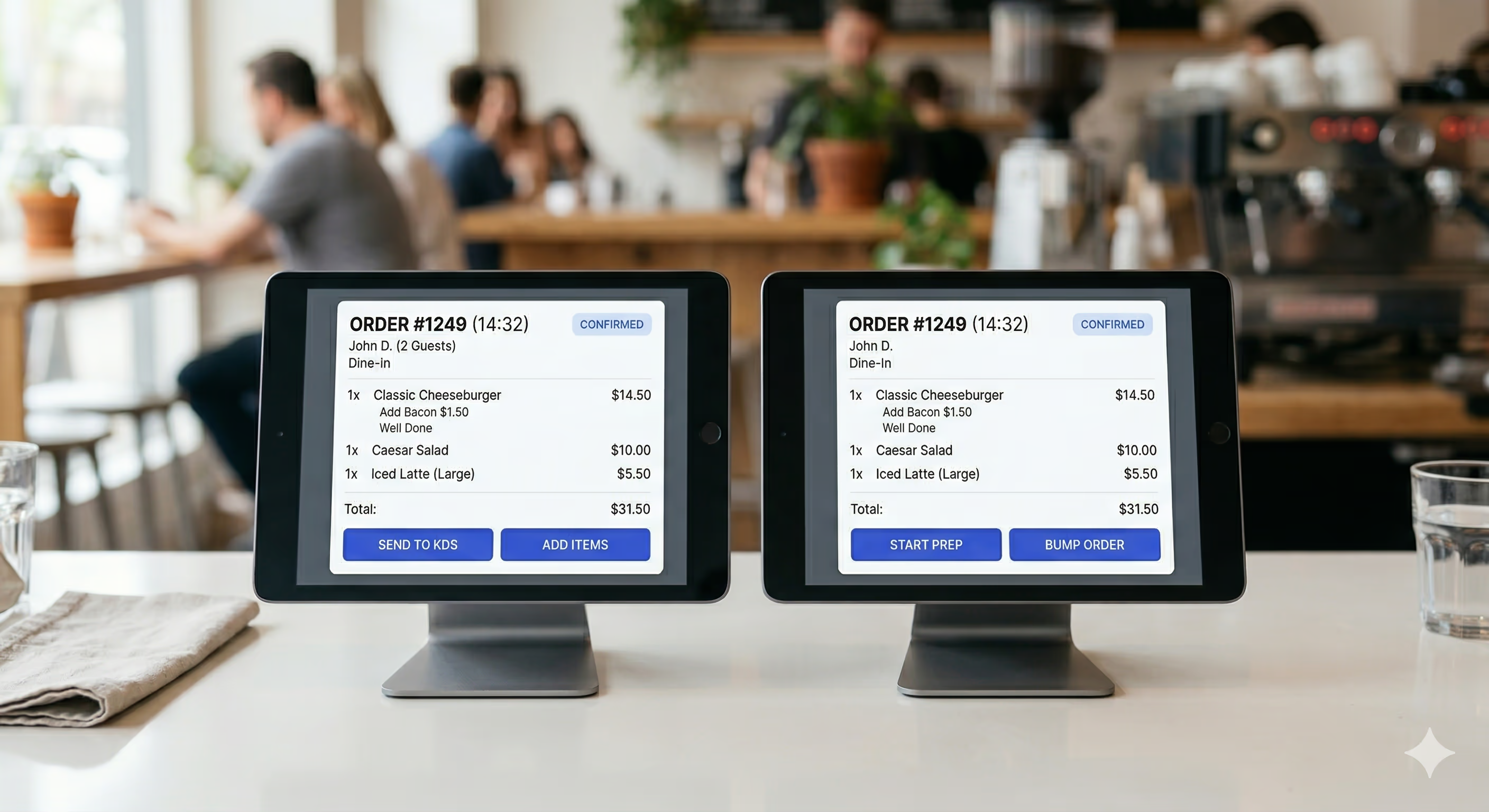
On top of those tokens sit shared components. OrderCard renders an order’s number, customer name, line item summaries, total, and status pill. StatusBadge is a simple pill with a label and color. ModifierGroupSelector handles single- and multi-select modifier choices with price deltas and a “(required)” badge when applicable. These components are intentionally domain-agnostic — they accept primitive parameters and callbacks, not domain models — so they slot into any app’s layout without coupling.
And because this is Flutter, those components render pixel-identically across iOS, macOS, Android, and Linux. The same OrderCard on the barista’s KDS tablet looks exactly like the one on the cashier’s iPad POS. No cross-platform rendering quirks, no “close enough.” One definition, one result, everywhere.
Shared Features: Icing on the Cake
Sharing models, networking, and UI components is already a big win. But the real icing on the cake is sharing entire features — business logic and all.
Shared menu code lives in packages like menu_repository, while each app wires up Blocs that fit its UI. MenuGroupsBloc streams menu groups for category navigation; MenuItemsBloc loads the items for a selected group. The content widgets that display that data include MenuGroupList for vertical layouts and MenuGroupRow for horizontal ones.
The mobile app uses MenuGroupList — a vertical scrollable list of menu group cards, natural for a phone screen. The kiosk app uses MenuGroupRow — the same groups laid out horizontally, better suited for a large touchscreen. Different layouts, same Bloc underneath for a given concern. MenuItemsBloc doesn’t know or care which widget is rendering its state. It combines menu group and item streams with Rx.combineLatest2, then emits the current group and items.
From applications/mobile_app/lib/menu_items/bloc/menu_items_bloc.dart (kiosk uses the same pattern):
await emit.forEach(
  Rx.combineLatest2(
    _menuRepository.getMenuGroups(),
    _menuRepository.getMenuItems(_groupId),
    (groups, items) => (groups, items),
  ),
  onData: (data) {
    final (groups, menuItems) = data;
    final group = groups
        .where((MenuGroup g) => g.id == _groupId)
        .firstOrNull;
    return state.copyWith(
      status: MenuItemsStatus.success,
      group: group,
      menuItems: menuItems,
    );
  },
  onError: (_, _) => state.copyWith(status: MenuItemsStatus.failure),
);
This means when I add a new menu feature — say, filtering by dietary preference — I build it once in the shared repository or Bloc layer. Every app that composes the same MenuRepository and Blocs picks it up automatically. The mobile app gets it. The kiosk gets it. The POS gets it. No coordinating across teams, no “we’ll port that feature next sprint.” It’s just there.
It’s the Same Story
Flutter gave me efficiency by letting me share code across five apps spanning iOS, macOS, Android, and Linux. It handed me back time. And it left me with the same question: what do you do with it?
I keep coming back to that fork in the road. You can pocket the savings — ship with a smaller team, cut costs, move on. Or you can reinvest — build something more ambitious, polish the experience, try the idea you didn’t think you had time for.
The Future Is Multi-Device
At VGV, we’ve formalized this progression into what we call the Multi-Device Maturity Model. It’s a framework for understanding where your business sits on the spectrum — from a single app on a single platform, all the way to a fully connected multi-device experience with shared data and consistent branding across every surface. Very Yummy Coffee is an exercise in pushing toward the far end of that spectrum.
The lines between “this is an app” and “this is a window into your data” are razor thin right now. A customer starts an order on their phone, checks the status on a kiosk, and picks it up when the order-ready board says so. Each screen is just a different view into the same data model — the same orders, the same menu, the same inventory.
This is where Flutter shines. Not just “write once, run on iOS and Android,” but “build a cohesive experience across every screen your business touches.” Toyota is putting Flutter in car dashboards. Universal Destinations & Experiences extended mobile food and drink ordering into a Flutter-powered kiosk solution integrated with restaurant POS systems. Companies across industries are discovering that a surface with a screen is a candidate, which is a different way of thinking about the scope of a “Flutter app.”
As Flutter makes it more practical to build for each of those surfaces, the question isn’t whether your business will need more than a phone app. It’s what you’ll do when building for five screens and four operating systems takes the same effort that one screen and one operating system used to.
That brings the story back to the opening: when technology makes you more efficient, what do you do with that efficiency? Everything above is one way to earn that efficiency—shared models, one multiplexed WebSocket client, shared UI, shared features—so every screen in the shop stays in lockstep.
Here is the suggestion I give teams when we reach this point: treat the gains as opportunity, not only as a cost-saving. Where you have room, reinvest capacity into innovation and craft: flows that are more helpful, handoffs that stay seamless from phone to kiosk to pickup surface, and the small touches that make an experience feel delightful instead of merely functional.