On this page
- The Flutter Video Ecosystem Has a Gap
- The Core Insight: Players Are Not Widgets
- Mute, Don’t Pause
- The Async Gap That Makes Your App Feel Unfinished
- Scroll Performance Is a State Architecture Problem
- Platform Divergence Will Surprise You
- Lifecycle Bugs Are the Hardest to Reproduce
- Quality, Format, and the Infrastructure You’ll Need
- Testing Without a Device
- The Pattern Behind the Patterns
Flutter ships with a VideoPlayer widget. You can drop it in a PageView, hook up a controller, and have something playing in under an hour. It looks like progress. Then you test on a budget Android phone, swipe through twenty videos, and the app crashes without an error message.
The gap between “it plays a video” and “it feels like TikTok” is enormous, and it’s not because Flutter is lacking. It’s because smooth video feed playback is a resource management problem disguised as a UI problem. When we built diVine, we had to learn this the hard way. Every solution we reached changed how we thought about the one before it.
Here’s what we learned, and the architectural shift that made everything click.
The Flutter Video Ecosystem Has a Gap
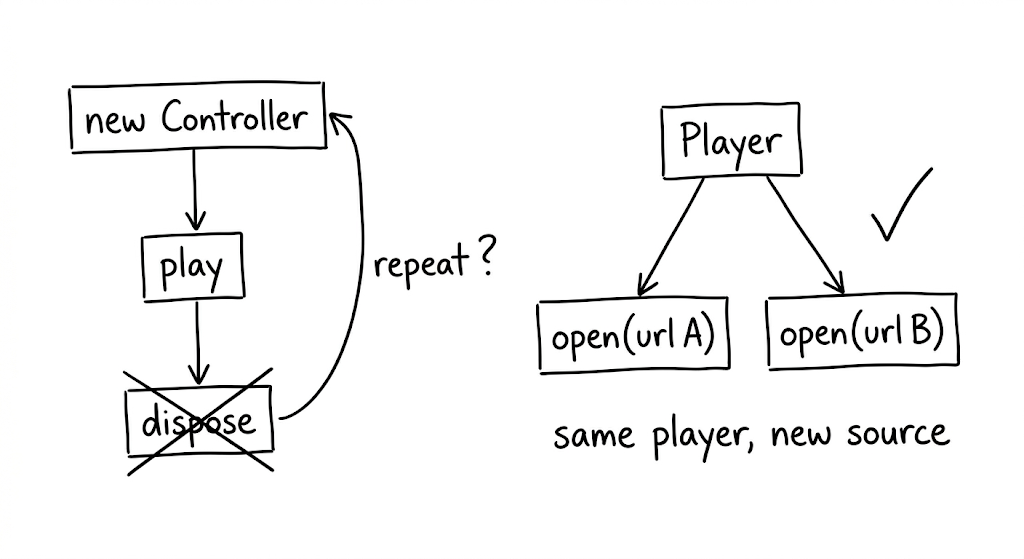
Flutter’s video_player package wraps AVPlayer on iOS and ExoPlayer on Android. It works. But each controller is tied to a single URL. To switch videos, you dispose the controller and create a new one. For a product detail page with one embedded clip, that’s fine. For a feed where users swipe through dozens of videos per session, the constant create-dispose cycle becomes a bottleneck that compounds with every scroll.
The packages built on top of video_player inherit this constraint. chewie adds a richer UI layer (progress bars, fullscreen toggle) but doesn’t solve the reusability problem underneath. better_player is in maintenance mode. awesome_better_player has been discontinued entirely.
We looked for a production-grade reusable player in Flutter and didn’t find one.
media_kit, which wraps libmpv, comes closest. It allows calling player.open() with a new URL on an existing instance. The native player survives the switch; only the media source changes. It also leverages libmpv’s hardware-accelerated decoding pipeline, which reduces CPU load when you’re running multiple streams concurrently.
This single capability, player reuse, turned out to be the foundation for everything else we built. Without it, pooling is impossible. And without pooling, you’re fighting platform limits with every scroll event.
The Core Insight: Players Are Not Widgets
Here’s the mental shift that changed our architecture: stop treating video players as disposable UI components and start treating them as a shared, managed resource.
Every native video player instance holds GPU textures, codec contexts, and network buffers. Android devices typically support 5 to 16 simultaneous hardware decoders, depending on the chipset. Exceed that limit and the app doesn’t throw an error. It just dies.
The naive approach (one player per visible video, created on mount, disposed on unmount) breaks down as soon as the user scrolls at any reasonable speed. The fix is to decouple players from widgets entirely.
We built a player pool: a fixed-size set of reusable players, keyed by URL, with least-recently-used eviction. Three design decisions make it work.
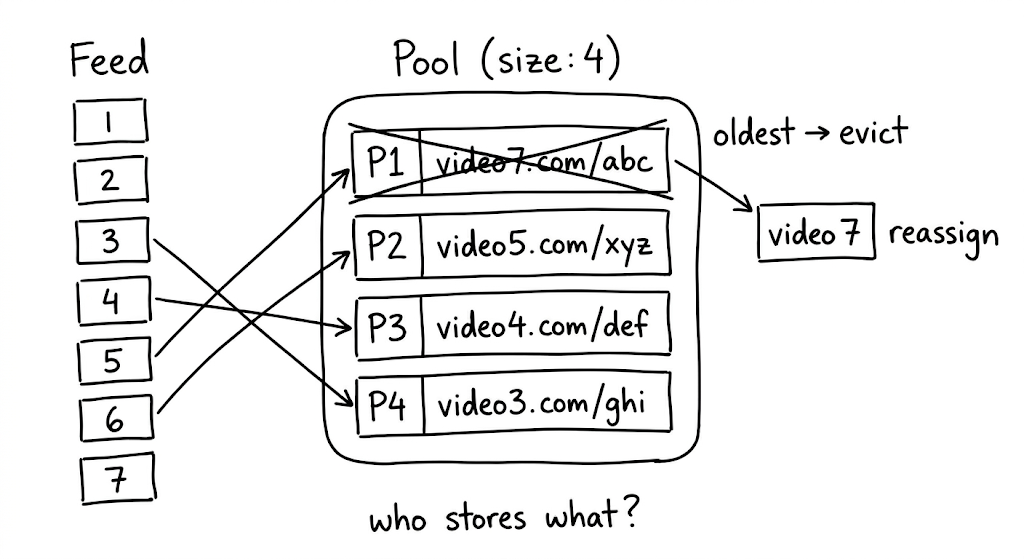
First, key players by URL, not by widget index. When someone scrolls back to a video they already watched, the pool returns the existing player instantly, buffer intact. No rebuffering. This is a subtle UX win that users feel even if they can’t name it.
Second, evict the least recently used. When the pool is full and a new video needs a player, dispose the one the user interacted with longest ago. This naturally keeps “nearby” players alive while freeing resources from content the user has moved past.
Third, fire eviction callbacks synchronously. When the pool reclaims a player, the UI needs to know before Flutter renders the next frame. Synchronous callbacks let the widget swap in a placeholder image before the native texture is destroyed. Without this, you get a single frame of garbage pixels. Small detail, big difference.
Mute, Don’t Pause
This was the single biggest UX win in Divine, and it’s counterintuitive.
When a native video player pauses and then resumes, most implementations need to re-establish the network buffer. That takes 200 to 800 milliseconds. In a feed where users swipe rapidly, the delay compounds into a sluggish experience they feel but can’t articulate. They just know the app feels slow.
The pause itself is the problem. So instead of pausing adjacent videos, keep them playing silently at volume zero. The buffer stays hot because the player never stops. When the user swipes, the transition is simple: mute the old video (it keeps playing, invisible and silent), seek the new video to start, and set its volume to full.
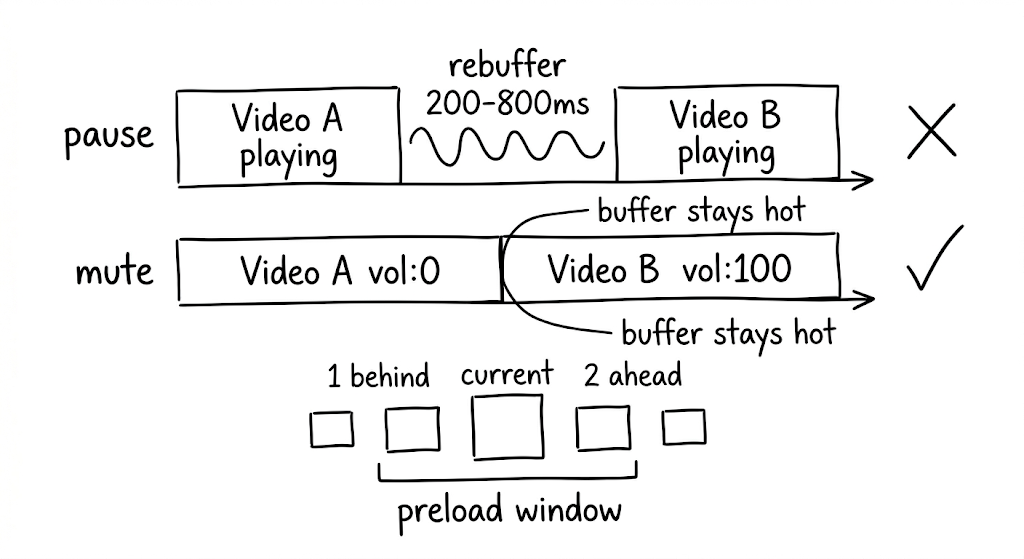
A preload window defines how many videos get this treatment: we use 2 ahead and 1 behind the current index. That means 3 to 4 simultaneous streams at any given time. The bandwidth cost is real, but for short content under 30 seconds it’s acceptable. And once a video has been cached to disk, the muted playback costs zero bandwidth; it’s reading from a local file path.
The Async Gap That Makes Your App Feel Unfinished
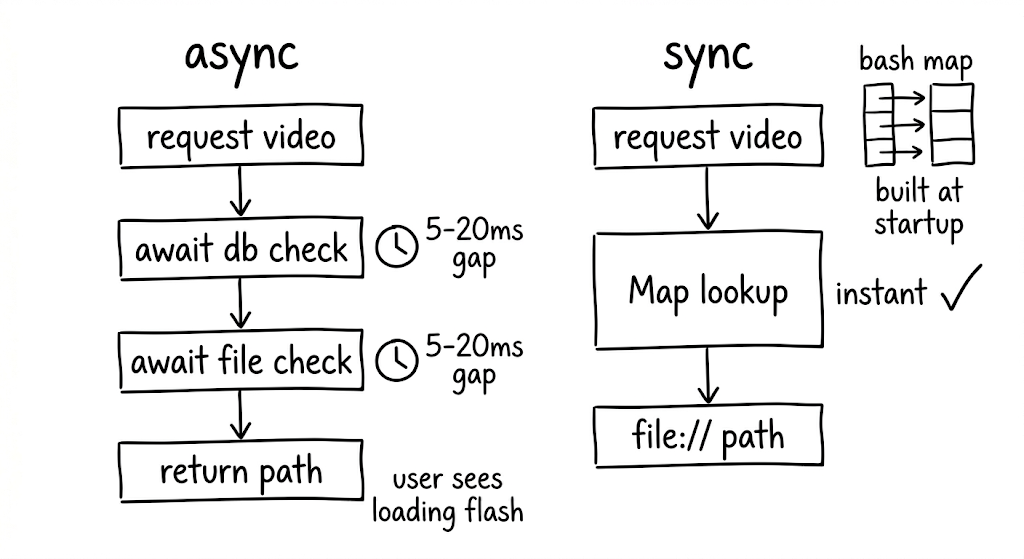
Traditional cache libraries check a database, check the filesystem, and return a path. All async. This sounds fine until you realize it creates a visible “loading” flash between cached videos as the player either starts buffering from the network while the cache check runs or blocks the load entirely.
In a feed where milliseconds determine whether the experience feels polished or broken, that async gap is unacceptable.
We built a synchronous cache manifest instead: an in-memory Map<String, String> of cached URLs to local file paths, populated at app startup. Every subsequent cache lookup is a synchronous map access. The business logic replaces network URLs with file:// paths before the player ever sees them. No async gap. No wasted network requests. No loading flash.
For background pre-caching, two constraints keep things stable. First, limit to one concurrent download at a time. More parallelism competes with the foreground stream for bandwidth, causing the currently-playing video to stutter. Second, deduplicate requests so multiple calls for the same URL piggyback on a single in-flight download.
Scroll Performance Is a State Architecture Problem
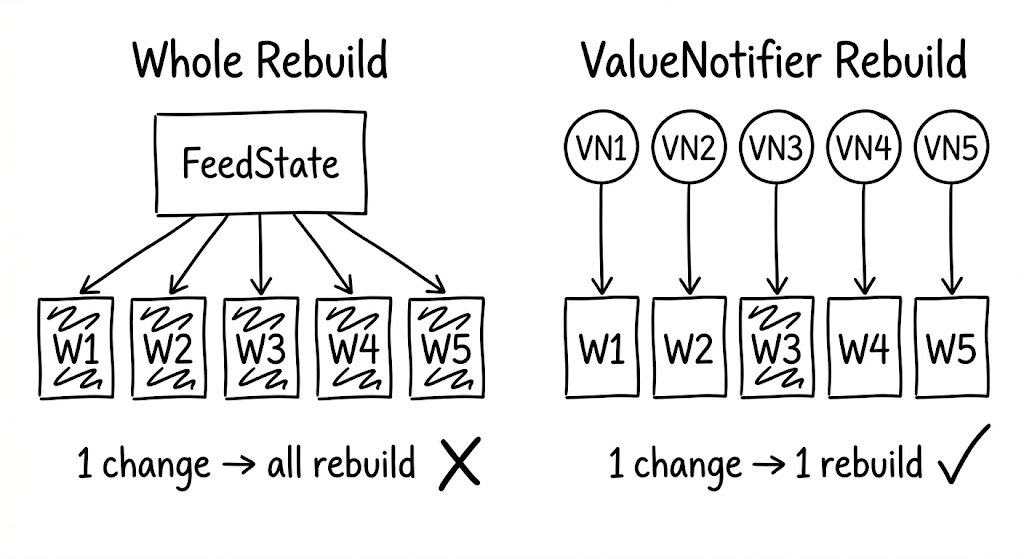
If you model video state as a single object for the whole feed, every state change (video #3 finishes buffering, video #7 starts playing) triggers a rebuild of every video widget. During fast scrolling, this means dropped frames and visible jank. The users who scroll fastest are often your most engaged. Losing frames for them means losing the audience that matters most.
The solution is per-item state isolation. Give each video index its own ValueNotifier, created lazily. Each video widget subscribes only to its own notifier via ValueListenableBuilder. When video #3’s state changes, only widget #3 rebuilds. Everything else stays untouched.
One subtlety worth noting: when the pool evicts a player that was previously assigned to a given index, you need an identity check on the eviction callback. Without it, a stale callback from a previously-released index can trigger incorrect state updates in the wrong widget.
Platform Divergence Will Surprise You
Code that works perfectly on one platform can crash the other. This isn’t theoretical; it happened to us repeatedly.
Android MediaCodec limits are the most common source of silent crashes. Every hardware decoder slot is a scarce resource, and exceeding the device-specific limit produces no error message. Budget Android devices add another layer: many choke on H.264 High Profile content entirely. Your CDN needs to serve an HLS variant encoded with Baseline Profile as a fallback, because that’s the only reliable way to handle the long tail of Android hardware without dropping users.
iOS codec gaps are simpler but still surprising. Native AVPlayer does not support WebM or VP9. If your content pipeline produces VP9, iOS users see a blank frame. Ensure your transcoding pipeline always includes an H.264 or HEVC variant.
These aren’t edge cases. They’re the default experience for a meaningful percentage of your users.
Lifecycle Bugs Are the Hardest to Reproduce
When the user backgrounds the app, video playback should stop. Getting this wrong causes audio leaks: video sound playing while the app is invisible. Getting it almost right causes subtler bugs that only surface in specific sequences (background, switch tabs, return, swipe) and are nearly impossible to reproduce in testing.
Three rules kept our lifecycle clean.
Don’t force-resume on foreground. When the app returns from background, don’t blindly call play(). Signal that the app is foregrounded and let the visibility-based logic decide what should play. This prevents the wrong video from resuming after a tab switch.
Clear stale state on background. When pausing for background, clear any cached visibility tracking. Stale state is the root cause of most “wrong video plays” bugs.
Order matters. Set the foreground flag to false before pausing videos. The reverse order creates a race condition where the visibility logic sees the app as still active and tries to resume playback during the pause sequence.
Quality, Format, and the Infrastructure You’ll Need
Not all users have the same network conditions. Serving a single quality level means either buffering endlessly on slow connections or under-serving fast ones.
In Divine, we measure actual throughput from video load times (file size divided by time to first frame) rather than running synthetic speed tests. A rolling average maps to quality tiers, and the tier drives which resolution the player requests.
The hard part isn’t the client logic. It’s the infrastructure. Your server or CDN must transcode videos into multiple resolutions and serve them on demand. Without that pipeline, adaptive quality is a dead end on the client side.
One format consideration worth calling out: for short content under 30 seconds, MP4 delivers faster first-frame latency than HLS. HLS’s adaptive bitrate shines when you need resilience across varying conditions, and in a feed architecture with pooling and preloading, it provides better overall stability. The choice depends on your content length and architecture.
Testing Without a Device
Video playback code depends on native players with real GPU textures and platform-specific codecs. You can’t run these in unit tests. But the logic around pooling, preloading, eviction, and lifecycle management is complex enough that shipping without tests is reckless.
The answer: mock the native player behind a controllable boundary.
Create test doubles with StreamController instances to simulate buffering completion, playback state changes, and position updates. This lets you thoroughly test scenarios like LRU eviction order, audio leak prevention, and UI safety on eviction, all without touching native code.
The boundary between “things that need a real player” and “things that need a state machine” is exactly where your abstraction layer should live. If you can’t test a behavior without a physical device, you’ve drawn that boundary in the wrong place.
The Pattern Behind the Patterns
Step back from the individual solutions and a larger principle emerges. Every technique we’ve described (player reuse, fixed-size pooling, silent playback, synchronous caching, per-item state isolation, lifecycle management) follows from one insight: treat native resources as a shared, managed pool rather than disposable per-widget allocations.
The player pool is the load-bearing abstraction. Get it right, and the rest of the architecture has room to breathe. Get it wrong, and you’re fighting platform limits with every scroll event.
Building Divine forced us to confront every one of these constraints in production. The patterns that emerged aren’t theoretical. They’re the result of iterating against real devices, real network conditions, and real users swiping through hundreds of videos a day.
If you’re building a video-heavy Flutter app and the experience feels brittle, start here: stop thinking about players as widgets, and start thinking about them as a managed resource. The Flutter ecosystem still has a gap where a truly reusable, well-abstracted player package should be. Until that gap closes, these patterns are how you bridge it.