# Flutter 3.50 and Dart 3.14: Why This Release Is a Big Deal
> Not a full changelog. What we like in Flutter 3.50 and Dart 3.14, and the future of Flutter these changes point to.
- Source: https://verygood.ventures/blog/flutter-3-50-dart-3-14/
- Published: 2026-11-11
- Author: Dominik Simonik
- Tags: Flutter, Dart
---
Flutter 3.50 and Dart 3.14 ship plenty of fixes and new APIs, and the [release notes](https://docs.flutter.dev/release/release-notes/release-notes-3.50.0) already go through each of them in detail.
In this post we want to look at the direction these releases set instead. If we could pick the Flutter we want to be building on in five years, it would look like this: a small core that stays stable, design systems that move at their own pace, native platform APIs that are one call away, and upgrades so boring nobody has to schedule them. Flutter 3.50 and Dart 3.14 take a real step toward each of those.
## Built-in Material and Cupertino are deprecated
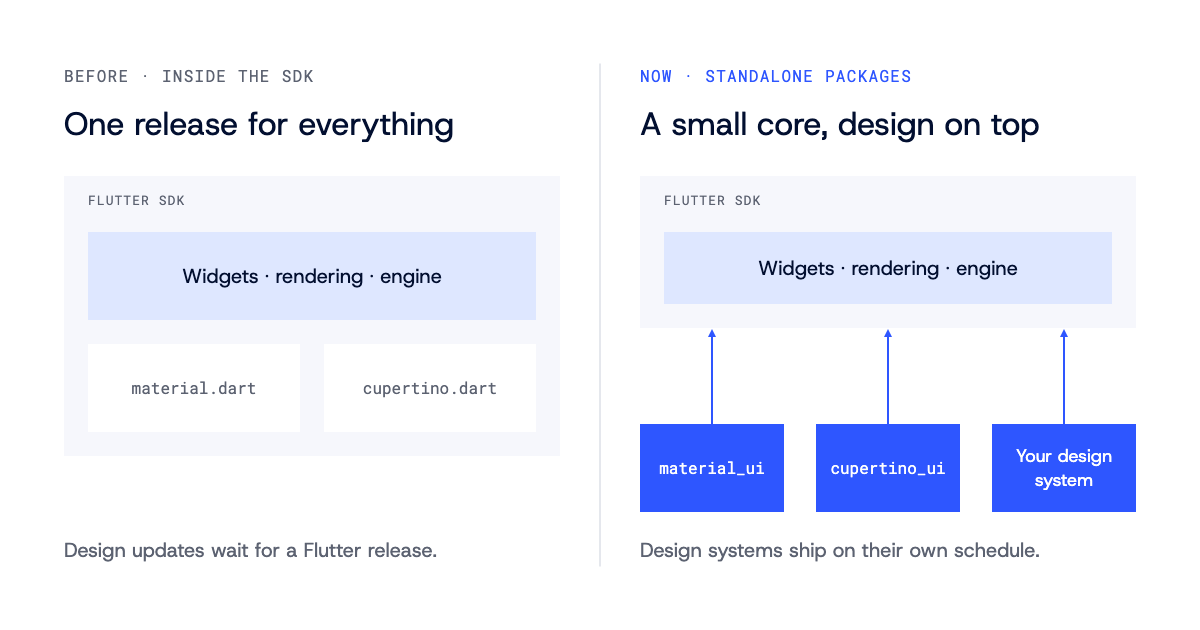
The decoupling of Material and Cupertino continues in 3.50. The built-in libraries in the Flutter SDK are now deprecated in favor of the standalone [`material_ui` and `cupertino_ui`](https://docs.flutter.dev/release/breaking-changes/material-ui-and-cupertino-ui) packages, and new projects created with `flutter create` use `package:material_ui` out of the box.
Existing apps migrate with one command:
```bash
dart fix --apply --code=migrate_design_widgets
```
Deprecated is not removed, but every app and package that imports the built-in libraries will have to move eventually.
**Why we like it.** Before the [Material and Cupertino decoupling](https://flutter.dev/blog/decoupling-material-cupertino), a design update shipped only with a Flutter release. If Apple redesigned iOS, Cupertino had to wait for the next SDK version, and so did you. Now the design systems ship on their own schedule, and you pick the version in `pubspec.yaml` like any other Flutter package.
**Where we think it goes.** This makes the framework's architecture match how good teams already use it. The core is widgets, rendering, and the engine. Material and Cupertino are two design systems built on top, the same way a client's custom Flutter design system is. At VGV we build a lot of [custom design systems](/our-services/design-systems/) as packages with the teams we partner with, and this puts them on equal footing with the official ones. We hope the next step is a healthier ecosystem of design system packages, with Material and Cupertino as the reference examples rather than the only real options.
## Direct native interop is stable
For years, talking to native code in Flutter meant platform channels. You packed data into a message, sent it across a bridge, unpacked it on the other side, and did the same on the way back. It was always async, hand-written on both sides, and easy to break.
In 3.50, [FFIgen](https://pub.dev/packages/ffigen) and [JNIgen](https://pub.dev/packages/jnigen) are stable. FFIgen generates Dart code to call Apple APIs in Objective-C and C. JNIgen does the same for Android APIs in Java and Kotlin. Instead of going through platform channels, Dart calls the native code directly. The calls are type-safe, fast, and instant when you need them.
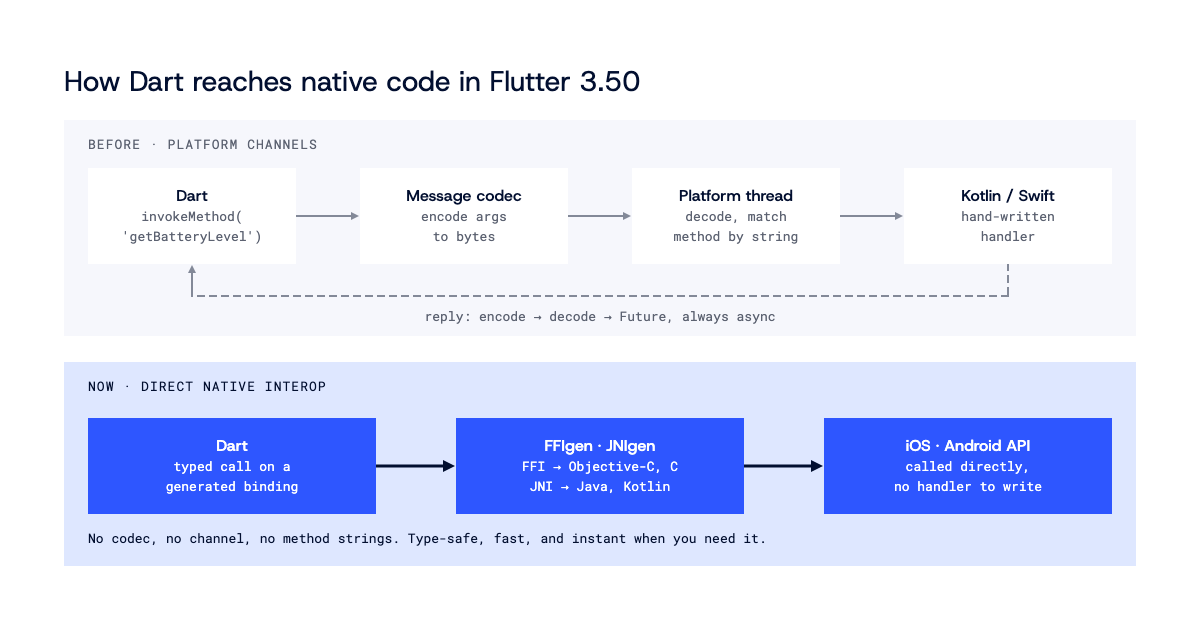
[Pigeon](https://pub.dev/packages/pigeon) now uses FFIgen and JNIgen under the hood, so you still define your API once. `shared_preferences` has already moved over, and migrating is mostly configuration. If you are new to the Pigeon workflow, we covered it in [Pigeon in production](/blog/flutter-pigeon-type-safe-platform-channels/).
**Why we like it.** Of everything in this release, this one changes our day to day the most. When a new iOS or Android API lands, you no longer wait for someone to wrap it in a plugin, because you can generate the bindings and call it from Dart yourself. Less glue code also means fewer places for bugs to hide. Generated bindings are still code you own, though, so they belong in review and in tests like anything else.
**Where we think it goes.** "Flutter can't reach that native API yet" has been a common objection for years, and direct interop answers most of it. We expect plugins to get thinner and more of them to become generated bindings plus a small Dart API on top. Flutter stops being a layer between you and the platform and becomes a way to call the platform with Dart.
## Dart 3.14 makes upgrades boring
Dart 3.14 adds `dart migrate`. One command upgrades your code to the next Dart version, fixes what would break, and can modernize the rest.
```bash
dart migrate --dry-run
```
The analysis server got faster too. Find References, startup, restarts after an `analysis_options.yaml` change, and analyzer plugins are all quicker, which is most noticeable in large monorepos. Background tasks also block formatting and other editor requests less often.
**Why we like it.** We work in a lot of Flutter codebases, some ours and many belonging to clients we partner with. SDK upgrades are the kind of work that everyone agrees is important and nobody wants to schedule. If `dart migrate` works the way the Dart team describes it, the mechanical part of an upgrade turns from an open-ended task into a reviewable diff. If you are not sure how far behind a codebase is, a [Flutter code assessment](/our-services/flutter-code-assessment/) is a good place to start.
**Where we think it goes.** Cheap upgrades change what the language can afford to do. When moving to a new version is one command, Dart can evolve faster without leaving codebases behind. Together with design systems that version on their own, this should make staying on the latest version even easier.
## Free wins: faster on iOS, safer on Android
A few improvements in this release need no code changes and arrive as soon as you upgrade.
On iOS, taps and swipes reach the screen one frame sooner. That is 16 ms less touch lag on 60 Hz iPhones and 8 ms on 120 Hz displays, on every iPhone back to the iPhone 6S. Flutter 3.50 is also the first stable release since Xcode 27, and new test devices work without a white-screen stall. If you are still catching up on the iOS 27 SDK, our post on [WWDC 2026 through a Flutter lens](/blog/wwdc-2026-through-a-flutter-lens/) covers what it means for Flutter teams.
On Android, release builds now ignore routes, entrypoints, and cached engines passed in through external Intents. That closes a hole where other apps could pass startup configuration to yours, while deep links continue to work as before. Release builds also ignore engine flags like `--dart-flags`, even from your own app. Debug mode warns when an extra is ignored, so check the logs if your app relied on one.
**Why we like it.** One frame of touch latency is the kind of detail users feel without being able to name it, and getting it together with a security fix just by upgrading is what we want from a framework this mature.
## Web: Wasm on Safari and Firefox
Flutter web can now run as WebAssembly on Safari 26.2+ and Firefox 147+, not just Chrome and Edge 137+. On heavy widget benchmarks, Safari and Firefox deliver more than twice the frame rate of the JavaScript build. It is opt-in: you enable `webkit` and `gecko` in [`wasmAllowList`](https://docs.flutter.dev/platform-integration/web/wasm) in `flutter_bootstrap.js`, alongside `blink`. `flutter build web --wasm` builds both Wasm and JavaScript and falls back automatically on older browsers.
To prepare, four legacy web libraries are deprecated and scheduled for removal. They are `dart:html`, `dart:js`, `dart:js_util`, and `package:js`. A new flag catches direct and transitive imports of them across your app and its dependencies:
```bash
flutter build web --no-deprecated-js-interop
```
Text rendering is getting lighter too. A preview of native browser text layout, built with Chrome on the Enhanced `TextMetrics` API, cuts the CanvasKit download by about 31%, from roughly 5.46 MB to 3.75 MB, and renders native color emoji.
**Where we think it goes.** As long as Wasm only ran in Chromium browsers, it came with a caveat for every web project. With Safari and Firefox on board and the legacy JS libraries on their way out, we expect Wasm to become the normal way to ship Flutter web.
## What to do now
These are the steps we would start with when upgrading a project to 3.50, and each of them can be tried on a branch first:
1. Turn on [Swift Package Manager](https://docs.flutter.dev/packages-and-plugins/swift-package-manager/for-app-developers). CocoaPods stops accepting updates, and the deadline is December 2026.
2. Run `dart fix --apply --code=migrate_design_widgets` and see what changes.
3. If you maintain a plugin with Android code, move it to AGP's built-in Kotlin support. Applying the Kotlin Gradle Plugin manually, even with an AGP version guard, will lower your pub.dev score and fail on AGP 10.
4. Try `dart migrate --dry-run` on one package.
5. For web apps, run `flutter build web --no-deprecated-js-interop` to find the legacy JS interop calls that block a move to Wasm.
## The Flutter we want to build on
Taken together, these changes point in one direction. The SDK is getting smaller and steadier, design systems are becoming packages you choose and version yourself, native APIs are reachable through generated bindings, and upgrades are turning into a command you run instead of a project you plan. None of these features is flashy on its own, but together they describe the Flutter we want to be maintaining [Flutter apps](/flutter/) on for the next five years, and 3.50 is the clearest step toward it we have seen in a while.
## Frequently Asked Questions
### Do I have to migrate to material_ui and cupertino_ui right away?
No. The built-in Material and Cupertino libraries are deprecated, not removed. Running dart fix --apply --code=migrate_design_widgets migrates an existing app to the new packages, and new projects from flutter create already use package:material_ui.
### Are platform channels going away?
Not today, but they are no longer the only answer. FFIgen and JNIgen are stable, so Dart can call native APIs directly. Pigeon now uses both generators under the hood, so you can keep defining your API once in Pigeon.
### What does dart migrate do?
It upgrades your code to the next Dart version in one command, fixing what would break and optionally modernizing the rest. Start with dart migrate --dry-run to preview the changes.
### What should Flutter teams do before December 2026?
Turn on Swift Package Manager. CocoaPods stops accepting updates, Flutter 3.50 warns when SPM is turned off, and the deadline is December 2026.
### Does Flutter web run as WebAssembly on Safari and Firefox?
Yes, as an opt-in in Flutter 3.50. Safari 26.2+ and Firefox 147+ run Wasm builds when you enable webkit and gecko in wasmAllowList in flutter_bootstrap.js, alongside blink for Chrome and Edge 137+. flutter build web --wasm still produces a JavaScript fallback for older browsers.