# Building Dashy Enterprise with GenUI + ADK
> When the LLM Writes the UI
- Source: https://verygood.ventures/blog/dashy-app-adk/
- Published: 2026-05-05
- Author: Laura Buffington
- Tags: ADK, Agent Development Kit, GenUI, Flutter, Gemini, Google Cloud Next
---
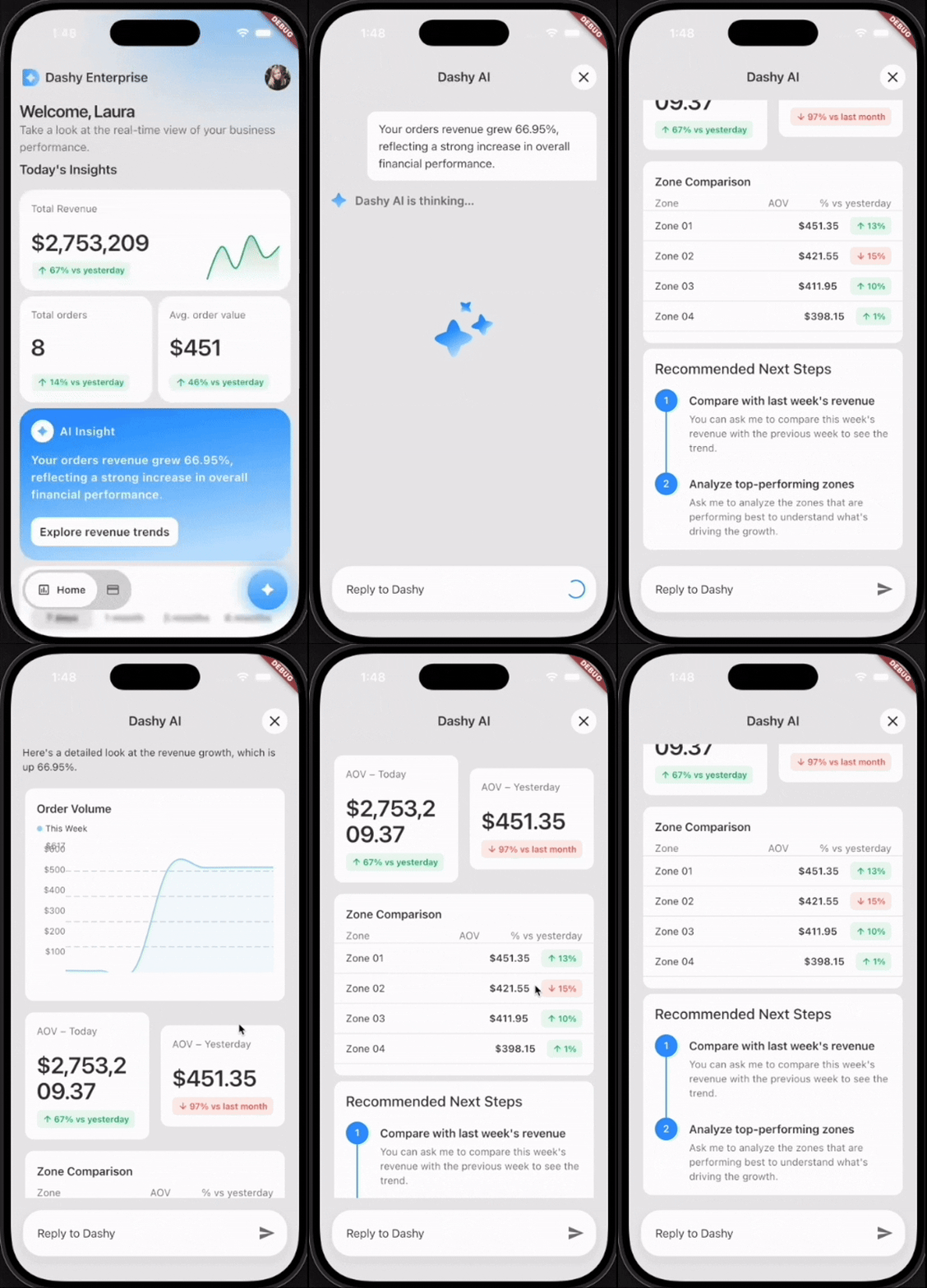
From the above gif, you see a chat bot return a descriptive paragraph along with a rendered graph and other stats from tapping an "AI Insight" card with a statement regarding your company orders. Cool! Based on the user’s request, the AI agent was able to draw and populate these widgets with real data regarding their business. You may already know this is possible with GenUI. A few of us at VGV partnered with Google to build an example app for Google Cloud Next and create a demo of what GenUI looks like in a real business setting. We created a professional dashboard with an AI agent that generates charts, graphs, and other data-driven visuals on demand. The twist: in most prior GenUI examples, something _deterministic_ drove the schema — a backend service, a rules engine, a handwritten response. Here, the driver is a Google Agent Development Kit (ADK) reasoning over the live business data.
Before jumping into the ADK aspect of this project, here are things we already know about using GenUI:
- Component catalog: a reusable widget library for the agent to utilize and populate with information.
- JSON schema: define the guidelines of the use of each catalog item for the agent with no embedded business logic.
- A2UI (Agent-to-UI): JSON message protocol that carries a widget tree from server to client as a pair of messages. `createSurface` (sets up container to render upon) and `updateComponents` (populate that surface). The agent and the UI need this protocol to decide what to show and how to draw it.
### How using ADK differs from plain GenUI
In a GenUI-powered feature a client sends a request, a backend handler runs business logic, and code then deterministically constructs the A2UI JSON. With the ADK, the agent is authoring the schema in real time. In this project, Gemini 2.5 on Vertex AI decides both what to say and which component to render, with an **action-object matrix** in the system prompt acting as its style guide.
The matrix is a literal markdown table embedded in the system prompt. Each row maps an intent (an action paired with an object) to a prioritized chain of catalog components:
| Action | Object | Primary → Secondary → Optional |
| ------- | ----------- | ---------------------------------------------------- |
| view | zone/region | BarChart → RecommendedActions |
| view | expense | ExpensesCategories → ApprovedExpenses |
| compare | employee | ApprovedExpenses → RecommendedActions |
| track | order/AOV | AovAnalysis |
| filter | expense | RadioOptions → ApprovedExpenses → RecommendedActions |
When the agent classifies a question as _view · zone_, it knows to lead with a `BarChart`
and follow it with `RecommendedActions`. No retrieval step, no embeddings — just a lookup
table the LLM reads at inference time. It's actually pretty amazing how much logic the agent takes on its own. As developers, we can spend more time refining our catalog and design systems instead of spending an arduous amount of time dictating render rules.
### Function tools
We defined a number of ADK `FunctionTool`s that wrap Postgres queries. The agent picks the tools, composes results, and emits the corresponding GenUI block in the same turn. Each tool is a plain Python function that reads session state (via `ToolContext`), enforces access rules, and returns a JSON-serializable dict:
```python
async def _get_revenue_summary(tool_context: ToolContext) -> dict:
"""Fetch order revenue summary (total, count, average, change %). Admin only."""
mode = tool_context.state.get("profile_mode")
if mode != ProfileMode.ADMIN.value:
raise PermissionError("Revenue summary is only available in admin mode.")
return await AppDependencies.instance().orders_use_cases.get_orders_revenue_info()
```
`tool_context.state` carries the session's `profile_mode`, `user_id`, `_insight_topic`, etc. so the tool has everything it needs to enforce permissions without the LLM having to pass them in.
The docstring is part of the contract. ADK surfaces it to the model as the tool description, so it also works as prompt context.
Tools are wrapped as `FunctionTool`s and collected in a single list:
```python
from google.adk.tools import FunctionTool
DATA_TOOLS = [
FunctionTool(func=_get_revenue_summary),
FunctionTool(func=_get_order_volume_data),
FunctionTool(func=_get_user_expenses),
FunctionTool(func=_get_team_expenses),
FunctionTool(func=_get_standout_expenses),
FunctionTool(func=_get_user_expenses_aggregate),
FunctionTool(func=_get_recent_team_expense_summary),
FunctionTool(func=_get_employee_profile),
FunctionTool(func=_get_topic_data),
# ...
]
```
This tool list is handed to the ADK `LlmAgent` at construction time, along with the system prompt. Gemini sees each function's name and docstring as available tools and decides which to call.
### Our agent architecture
For the Dashy Enterprise app, we have three main ADK agents — **chat, insights, and suggestions**. We didn’t want the frontend to know about these individual agents. From the backend we exposed a single A2A endpoint called an **orchestrator**. The Flutter client never sees the individual agents. This orchestrator passes information to the `metadata.agent` and delegates to `ChatRunner`, `InsightsRunner` or `SuggestionsRunner`.
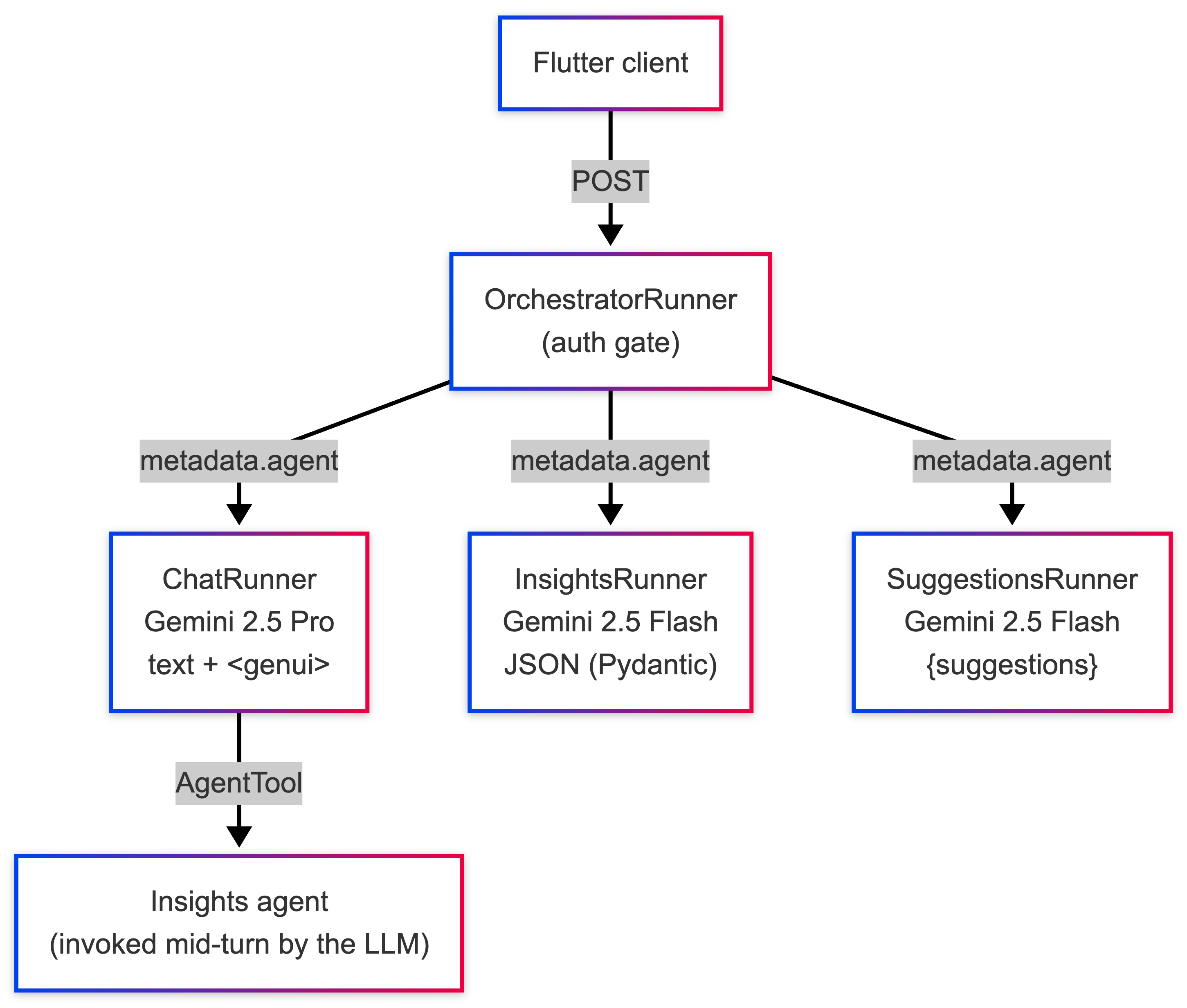
Here is what the `OrchestratorRunner` looks like. Also note that we only need to check for Auth once, instead of three times across the three sub-runners!
```python
class OrchestratorRunner:
"""Unified runner that delegates to chat, insights, or suggestions runners."""
VALID_AGENTS = frozenset({"chat", "insights", "suggestions"})
def __init__(self, models: AgentModels, app_name: str):
self._runners: dict[str, AgentRunner] = {
"chat": ChatRunner(models, app_name),
"insights": InsightsRunner(models, app_name),
"suggestions": SuggestionsRunner(models, app_name),
}
async def execute(self, context: RequestContext, event_queue: EventQueue) -> None:
_get_user_id(context) # centralised auth gate
agent_type = _get_required(context, "agent")
runner = self._runners.get(agent_type)
if runner is None:
raise ValueError(f"Unknown agent type '{agent_type}'.")
await runner.execute(context, event_queue)
```
### How it works: From chat input to backend
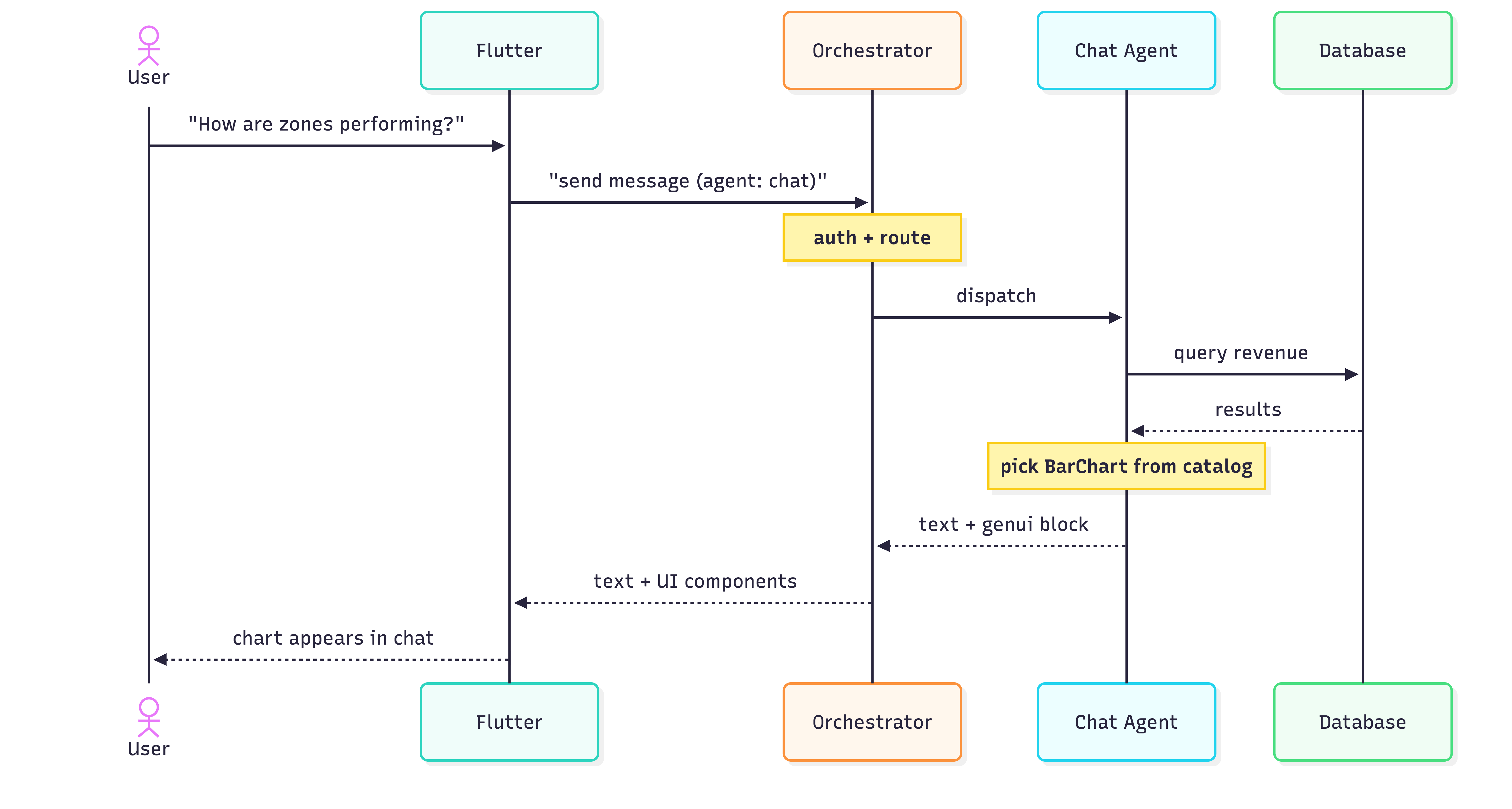
A user asks "How are zones performing today?" In a single call to the model through the chat agent:
1. Calls `_get_revenue_summary(tool_context)` → gets back a dict with `totalAmount`, per-zone breakdown
2. Decides, per the action-object matrix, that _view · zone_ → `BarChart` → `RecommendedExpenses`
3. Emits:
```python
$385,200 total revenue across all zones today. Top performer: Zone 03 - Uptown at $140K.
{"BarChart": {"title": "Revenue by Zone", "data": [
{"day": "Zone 01", "value": 120000},
{"day": "Zone 02", "value": 95000},
{"day": "Zone 03", "value": 140000},
{"day": "Zone 04", "value": 30200}
]}}
```
**What the ADK is doing: the agent is picking, composing, and emitting in one request.**
### How it works: From agent to widget
Once the chat agent emits a block like the "recommended expenses" block above, it doesn't ship straight to Flutter. The backend extracts the JSON by running `parse_genui_blocks`, then wraps each component in two A2UI messages (`createSurface` + `updateComponents`) and attaches them to the JSON-RPC response as `DataPart`s alongside the natural-language `TextPart`.
On the Flutter side, the `ChatAgentClient` sends the response parts in order, dispatching text to the chat bubble and `DataPart`s to the genui package, materializing them into widgets from the catalog.
**The frontend is completely passive in what is being rendered.** The agents in the backend did the hard part of determining how to shape the data.
```python
# Backend: from text to A2UI parts
cleaned_text, component_dicts = parse_genui_blocks(final_response)
parts: list[Part] = []
if cleaned_text:
parts.append(Part(root=TextPart(text=cleaned_text)))
for component in component_dicts:
for a2ui_msg in surface_messages_for_component(component):
parts.append(Part(root=DataPart(data=a2ui_msg)))
```
```dart
// Frontend: from response parts to chat thread
for (final part in result.parts) {
switch (part) {
case RpcTextPart(:final text):
onTextMessage(TextMessage(text.trim()));
case RpcDataPart(:final data):
onA2uiMessage(A2uiMessage.fromJson(data));
}
}
```
Here is a diagram to sum up the roundtrip flow:
Dashy Enterprise is an early experiment in schema-driven UI authored by an ADK agent. The patterns we landed on — a single orchestrator, a component catalog, a prompt that doubles as a router — will certainly evolve. Surely down the line we will determine what the most efficient practice is to manage multiple agents as the technology continues to grow. The ADK ecosystem is still finding its shape. But we have learned that pushing UI authorship into the model reduces a lot of traditional product work, and that's a trade off worth experimenting with even at this stage.