# A2UI and the Smart Home: GenUI That Talks Back
> What changed in A2UI 1.0 for generative UI: typed two-way function calls, shown in Rivera Home, an open source Flutter smart home demo.
- Source: https://verygood.ventures/blog/a2ui-smart-home-genui-that-talks-back/
- Published: 2026-11-13
- Author: Nate Wootten
- Tags: GenUI, Flutter, AI
---
## What's new: A2UI grows up
Google's A2UI protocol just hit a milestone. On November 11, Google announced [A2UI 1.0](https://developers.googleblog.com/a2ui-10-build-delightful-fast-reliable-agentic-experiences/) and [a2ui_flutter 0.3.0](https://pub.dev/packages/a2ui_flutter) brings it to Flutter.
For teams building generative UI, that means a stable, open format with a first-party Flutter path to it.
Google's announcement also featured our A2UI 1.0 smart home demo, Rivera Home. **[Try the Rivera Home demo yourself](https://a2ui-vgv-smart-home.web.app/).**
[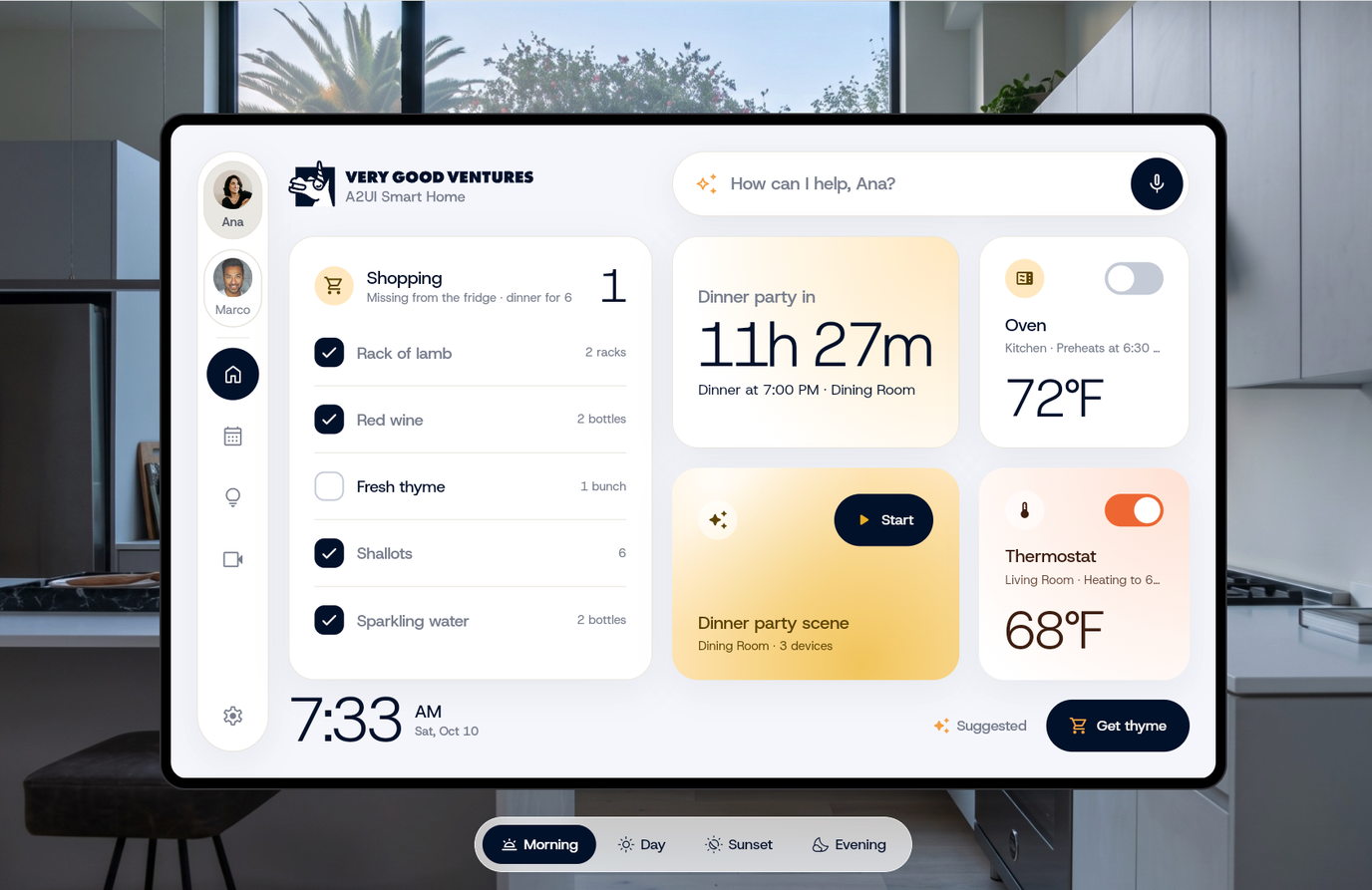](https://a2ui-vgv-smart-home.web.app/)
_Ana's morning on the Rivera Home panel. [Try the live demo](https://a2ui-vgv-smart-home.web.app/) and switch to Marco to watch a different interface take shape._
## Our take: two-way streaming makes GenUI feel alive
Generative UI gets much better when the conversation runs both ways. The agent streams interface updates down as the world changes. The app sends taps, screen state and function calls back up. A2UI 1.0 gives that loop a standard shape.
Most GenUI today is request and response: ask, wait, get a screen. That works in a chat window. Real products are live, though: devices change state, plans move and other people act. Here is what a two-way loop changes for the person using the app.
- **The interface keeps up on its own.** When something happens (a delivery moves, the clock reaches the next item on the schedule), the agent builds a fresh view and streams it down. Nobody taps refresh.
- **The agent edits instead of starting over.** Because the app sends its current data model, the agent updates the screen the person is looking at. They keep their place, and the update arrives faster.
- **Live values skip the model.** Cards bind to data paths, so a temperature or a delivery status updates in place without another model call. It's faster and cheaper, and the model never gets the chance to invent a number.
Our rule of thumb: let the model decide the structure, let code and data carry the values, and let the stream carry the change. It's the same division of labor we wrote about in [GenUI's division-of-labor problem](/blog/genui-division-of-labor-problem/), and Google's post points the same way with decision models that pick components instead of writing text.
[Rivera Home demo walkthrough](/assets/videos/blog/a2ui-smart-home-genui-that-talks-back/rivera-home-walkthrough.mp4)
_Watch the four-minute walkthrough: one change of plans, two people, and an interface that keeps up. [Try the live demo](https://a2ui-vgv-smart-home.web.app/)._
## Inside Rivera Home: one panel, two very different days
Rivera Home is a wall-mounted smart home panel where Gemini and A2UI 1.0 build a separate dashboard for each family member, in the moment. We built it in Flutter, a natural fit for embedded screens, and it's open source. [Try it in your browser](https://a2ui-vgv-smart-home.web.app/).
**The scenario.** The Riveras are hosting a dinner party tonight. Ana is cooking and hosting. Marco is handling pickups and errands. Then the guests call: they're arriving an hour early. That one change ripples through both of their days, and the panel keeps up.
### What we built
- **A dashboard for each person.** The agent reads each person's calendar, tasks and home devices, then picks and arranges cards from a small, approved catalog. Ana sees the dinner party front and center. Marco sees his pickups and the bakery run.
- **Prioritized Feed, not raw data.** The agent gets a ranked view of what is urgent and relevant right now, so it doesn't pour every piece of data onto the screen.
- **Layout rules the model can't break.** The panel is a 12-column, 2-row grid. Each card's size is declared once and used by the prompt, the server-side validator and the layout, so the dashboard always fits with no overflow or gaps.
- **Voice in.** Ana taps the mic and says what happened. Gemini's live transcription turns it into a turn for the agent.
- **A live connection.** The panel keeps a socket open to the back end, which pushes the clock, device changes and freshly built dashboards.
- **Guardrails.** The backend rejects invalid A2UI, unknown components and wrong card sizes, then retries once. The app applies each reply all at once, so the panel never shows a half-built grid.
## Try it yourself
**[Open the Rivera Home demo](https://a2ui-vgv-smart-home.web.app/)** in your browser, then dig into how it works.
- [Rivera Home source code](https://github.com/VGVentures/a2ui_vgv_smart_home) (Apache-2.0)
- [Rivera Home component catalog](https://www.figma.com/design/5lulKujQK2M3unUbeRgqYw/Rivera-Home-%7C-Component-Catalog?node-id=2001-67&t=Wr5QjkukyscJfiQW-1) in Figma
- [a2ui_flutter on pub.dev](https://pub.dev/packages/a2ui_flutter) and its [changelog](https://github.com/a2ui-project/a2ui/blob/main/dart/a2ui_flutter/CHANGELOG.md#unreleased)
### Sources
- [A2UI 1.0: Build delightful, fast, reliable agentic experiences](https://developers.googleblog.com/a2ui-10-build-delightful-fast-reliable-agentic-experiences/), Google for Developers Blog, Nov 11, 2026
- [A2UI v1.0 specification](https://a2ui.org/specification/v1.0-a2ui/)
- [What's new in A2UI v0.9](https://copilotkit.ai/blog/a2ui-whats-new-in-google-generative-ui-spec), CopilotKit
- [GenUI's division-of-labor problem](/blog/genui-division-of-labor-problem/), VGV
## Frequently Asked Questions
### What is A2UI?
A2UI is the open format an agent uses to describe an interface. The agent sends JSON messages, and the app draws them with its own approved components. The model picks and arranges. It never writes UI code or paints pixels.
### What changed in A2UI 1.0?
A2UI 1.0 adds typed function calls in both directions, components and data in one createSurface message, capability exchange, gesture-gated functions, and a transport-agnostic design with AG-UI as the standard binding. Theme was removed from the protocol, so the brand lives in the app's design system, not in model output.
### How do you render A2UI in Flutter?
Use a2ui_flutter from labs.flutter.dev. With a2ui_core and a2ui_agent, it replaces the earlier genui package. It supports A2UI 1.0 and 0.9 from one processor, ships a Material catalog of 18 basic components, supports custom catalogs, and runs on mobile, web, desktop and embedded targets from one codebase.
### Why does two-way streaming matter for generative UI?
Most GenUI today is request and response: ask, wait, get a screen. Real products are live. With a two-way loop, the agent streams interface updates down as the world changes, and the app sends taps, screen state and function calls back up, so the interface keeps up on its own.
### What is Rivera Home?
Rivera Home is a wall-mounted smart home panel where Gemini and A2UI 1.0 build a separate dashboard for each family member, in the moment. VGV built it in Flutter with a Dart Frog back end, and it's open source. Try the demo in your browser.